SSL certificate renewal automation: inventory, the endpoints ACME can't reach, and when to pay
By CaptainDNS
Published on July 22, 2026
- Renewals do not consume the Let's Encrypt limit of 50 certificates per registered domain. That limit measures the intake of new names, not the size of a fleet. Believing otherwise skews every capacity estimate.
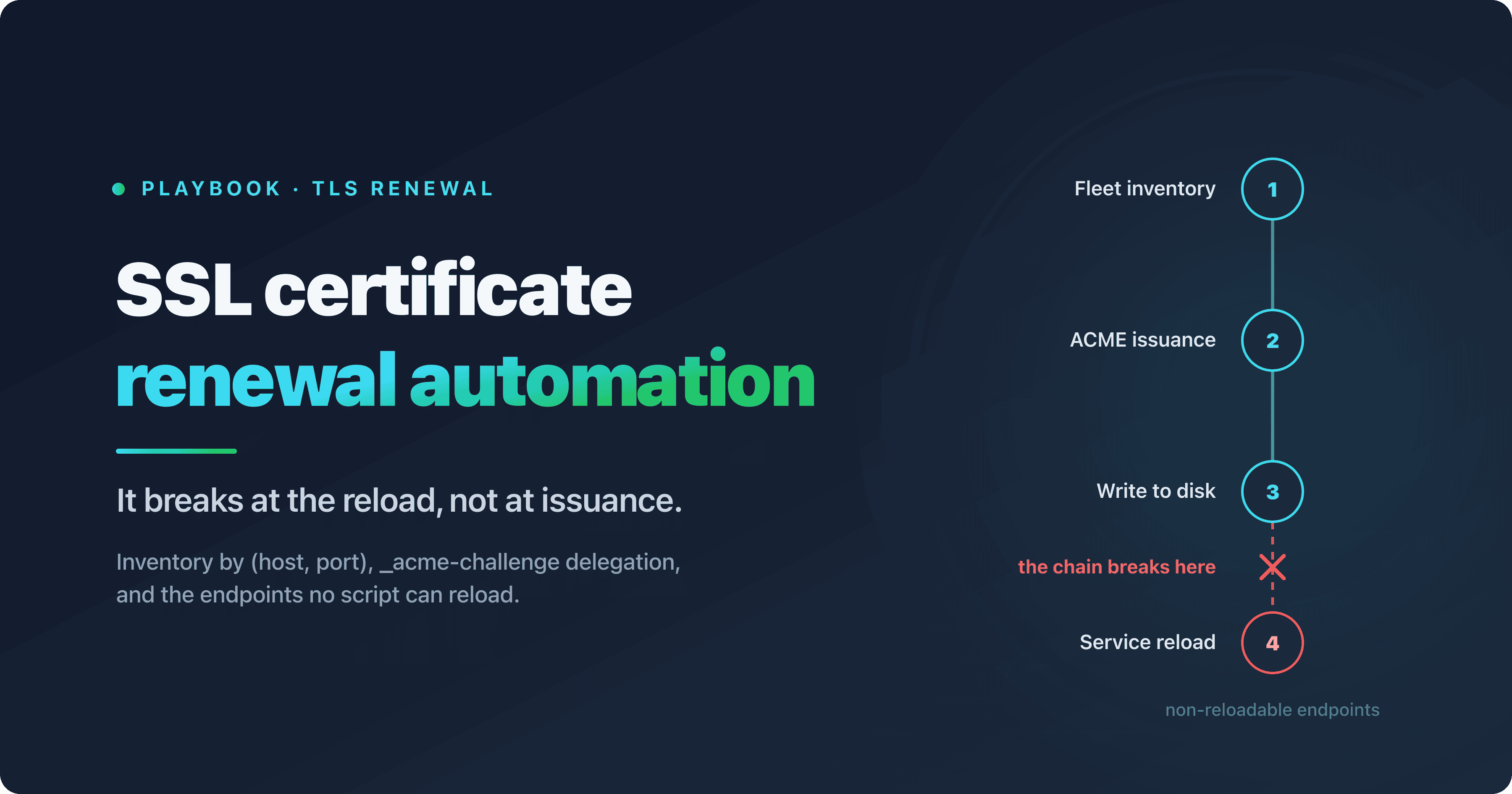
- What breaks an SSL certificate renewal is almost never ACME, it's the endpoints no script can reload: appliances with a web UI only, keystores behind an interactive password, managed TLS termination with no API.
- A certificate inventory is indexed on (host, port) pairs, not on hostnames. On a single IP address,
ldap.google.comhands a default client two different serial numbers on ports 389 and 636, and a scanner that forgets SNI records a third serial that is perfectly stable and perfectly wrong. - ACME, ARI and the six phases of the lifecycle are taken as read here: they are covered in the certificate lifecycle guide.
SSL certificate renewal rarely fails where you expect it to. The most common failure mode is not an issuance error sitting in a log: it's a certbot renew that runs green for weeks while the service keeps presenting the old certificate. Two lines of openssl catch it: the serial number read from disk against the one actually served on the port. Nothing in your ACME client's logs will do that for you. The real outputs are further down.
The context tightens the mechanics. As of July 21, 2026, a public TLS certificate cannot exceed 200 days of validity, and the same limit applies to domain control validation reuse. The next tiers land in March 2027, then March 2029, and the second one decouples validity from revalidation. The why behind that timeline is covered in our article on the reduction to 47 days. Here we're talking about the how: what actually breaks when frequency goes up, and what you put in front of it.
This playbook is written for teams running between 50 and 1,000 certificates across a heterogeneous fleet, with no dedicated PKI team. You'll find commands that were actually executed and their real outputs, the traps that come with them, and the places where we could not measure anything, said plainly. No vendor comparison. One purchase criterion, quantified, and it isn't the number of certificates.
Check a certificate, then monitor its expiry
SSL certificate expiry in 2026: the tier in force, and what it changes for your scripts
As of July 21, 2026, the applicable tier is the one that took effect on March 15, 2026. It sets three ceilings: 200 days of maximum validity, 200 days of domain control validation (DCV) reuse and 398 days of subscriber identity information (SII) reuse. That is the hard ceiling in the CA/Browser Forum Baseline Requirements.
In practice, certificate authorities issue below it. The text recommends not exceeding 199 days and only forbids going past 200, so everyone takes the operational margin. DigiCert stopped accepting requests for public TLS certificates with more than 199 days of validity on February 24, 2026, roughly three weeks before the deadline. Sectigo followed on March 12, 2026: 199 days of validity for any TLS certificate issued or reissued, and 198 days of DCV reuse.
What comes next is already dated. On March 15, 2027, maximum validity and DCV reuse both drop to 100 days. On March 15, 2029, validity falls to 47 days and DCV reuse to 10 days. SII stays pinned at 398 days across the whole timeline: its only step is the one from March 15, 2026.
Watch out for the most common shortcut: in 2029 it isn't validity that drops to 10 days, it's the reuse of your proof of domain control. The two counters split apart, and that's exactly where things change for your scripts. Today, one successful validation covers several consecutive renewals. In 2029, every reissuance will drag a full revalidation behind it, because the previous proof will have expired long ago. Automating issuance won't be enough. Validation itself will have to be automated permanently, which means DNS write credentials or port 80 access must be available continuously, not just on the day a human schedules a change.
Certificate inventory: four sources, four blind spots
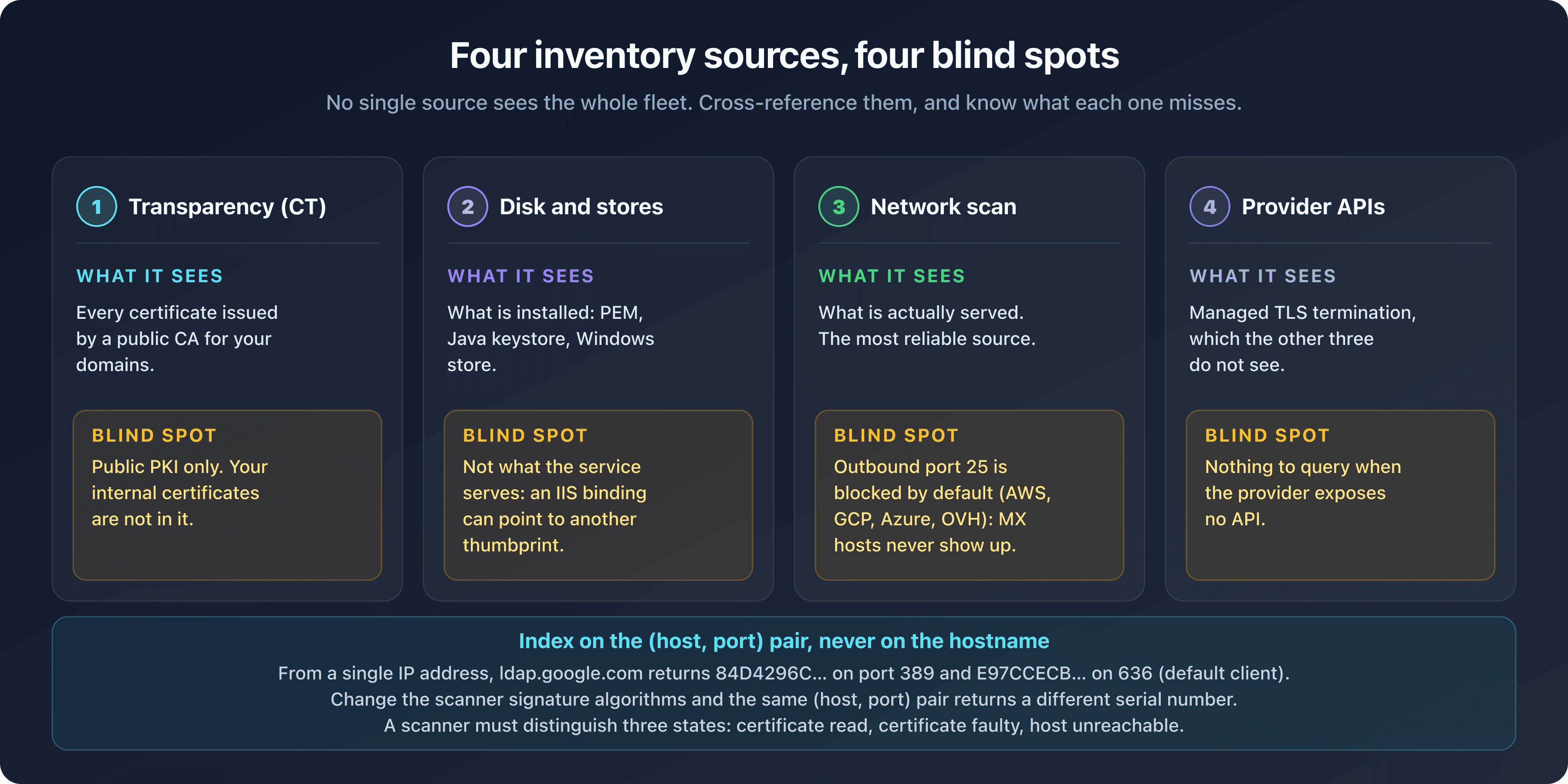
No single inventory source sees a whole fleet. Transparency logs list what was publicly issued, disk and stores list what is installed, a network scan reads what is served, and provider APIs cover what the other three miss. You have to cross-reference them, and above all know what each one gets wrong.
Certificate Transparency shows what was issued, not what is running
Certificate Transparency logs record every certificate issued by a public authority for your domains. They say nothing about where it is deployed or whether it is still in service. The naive query fits on one line:
curl -s 'https://crt.sh/?q=%25.captaindns.com&output=json' | jq -r '.[].name_value' | sort -u
On our domain it returned 12 unique values in 54 seconds. An earlier run had returned three consecutive HTTP 502s before succeeding on the fourth attempt. Nothing wrong with the command: that's how crt.sh behaves.
What follows was hit at runtime, not inferred. The -s hides the failure: jq receives HTML and prints jq: parse error: Invalid numeric literal at line 1, column 7, and without set -o pipefail the script carries on as if nothing happened. The 54 seconds are a nominal response time for 142 certificates, not rate limiting. The %25 encodes the % wildcard, which covers subdomains but not the apex. The name_value field contains newlines when a certificate carries several SANs: 142 JSON objects produced 158 lines for 12 unique values, which makes sort -u mandatory. Finally, expired certificates are included by default: 76 of the 142 entries.
The hardened version fixes all of that:
curl -sS --fail --retry 8 --retry-all-errors --retry-delay 5 --max-time 180 \
  -o crt.json 'https://crt.sh/?q=%25.captaindns.com&output=json&exclude=expired' \
&& jq -r '.[].name_value' crt.json | sed 's/^\*\.//' | tr 'A-Z' 'a-z' | sort -u
Real output: exit code 0 in 41.9 seconds including retries, 66 entries against 142 without the server-side filter, and 11 names. Two variants were tested and rejected, and they're the ones that teach the most. Without -o, writing to stdout, curl concatenates the body of the 502 with the body of the successful 200: 8,342 bytes starting with <html><head><title>502 Bad Gateway</title> followed by valid JSON, and jq fails. With -o, curl rewinds the file on each attempt. And --fail --retry 8 without --retry-all-errors does not retry at all: curl 8.7.1 reports curl: (56), a code absent from the list of errors curl retries by default. Failure in 0.12 seconds.
That leaves the structural blind spot: transparency only sees the public PKI. Your internal certificates are not in it.
Disk and stores show what is installed, not what is served
Reading a PEM file, a Java keystore or the Windows machine store tells you what is sitting on the machine. Not what the service presents on the network.
On the PEM side, openssl x509 -in fullchain.pem -noout -subject -dates -serial is enough. For the other two, honesty first: we could not execute the corresponding commands. Our test machine has no JDK and does not run Windows. Rather than invent output, here is the trace of the attempt:
$ keytool -list -v -keystore /Library/Keychains/System.keychain
The operation couldn't be completed. Unable to locate a Java Runtime.

$ file /usr/bin/keytool
/usr/bin/keytool: Mach-O universal binary with 2 architectures

$ pwsh -NoProfile -Command 'Get-ChildItem Cert:\LocalMachine\My'
Get-ChildItem: Cannot find drive. A drive with the name 'Cert' does not exist.
Each of these two failures dismantles a false positive about availability. The machine does expose a /usr/bin/keytool binary, but it's an Apple stub that redirects you to the Java website: a which keytool that answers proves nothing on macOS. And installing PowerShell 7 on macOS or Linux gives you no access whatsoever to the certificate store, because the Certificate provider is a Windows component absent from the PSProvider list. That script only validates on its target.
The traps matter as much as the commands. keytool asks for its password interactively, and passing it with -storepass exposes it in shell history and in ps: prefer -storepass:file. Since JDK 9 the default format is PKCS12, not JKS. On Windows, LocalMachine\My requires a console opened as administrator, otherwise the list comes back truncated with no error message, and an IIS binding can point to a thumbprint different from what is installed.
A network scan will never see your mail servers
A network scan reads what is actually served, which makes it the most reliable source. From an ordinary workstation, or from most clouds, it will never see your mail servers: outbound port 25 is filtered there.
The proof fits in three lines, on a single host. smtp.gmail.com resolved, at test time, to a single address, and Google's front ends rotate: whatever address resolution hands back, the three ports give the same contrast. Port 587 in STARTTLS and port 465 in implicit TLS accept the connection and return the certificate; on port 25, the connection times out. The machine is reachable, the port is blocked. Replayed against seven public MX hosts belonging to six different operators, two at Google, then Proton, OVH, Riseup, Yandex and GMX, the same command times out seven times out of seven.
Port 25 is filtered on our side, outbound. The nuance matters, because the opposite conclusion is everywhere. Google closes nothing. AWS, GCP, Azure and OVH block outbound 25 by default, as do nearly all residential connections. A fleet scan launched from a machine like that therefore produces a mechanically incomplete result.
The same symptom covers two distinct causes, though, and the second one doesn't come from your network. From the same workstation, pop.gmail.com times out on port 110 while pop.gmx.net answers there, and imap.gmx.net answers on 143 with STARTTLS validated, just as it does on 993; 995 works everywhere. Cleartext ports are therefore not filtered outbound, unlike 25: it's the Google hosts that drop those packets without answering, because they serve neither POP3 nor IMAP in the clear. Provider policy on one side, network filtering on the other: two causes of "unreachable", one symptom. Before concluding that a port is filtered, test a second operator.
An inventory scanner must therefore distinguish three states, not two: certificate read, certificate faulty, and host unreachable. An "unreachable" counted as "nothing to report" is the worst possible result, because the dashboard stays green on services that were never measured. And the stakes are not theoretical on MX hosts: if the certificate changes before the matching TLSA record is published, RFC 7672 forbids delivering the message through that server and requires the sender to fall back to the next MX or defer delivery.
Our own tooling falls under the same limit: the CaptainDNS uptime monitor only accepts HTTP and HTTPS schemes. SMTP, IMAPS and LDAPS are out of scope.
Provider APIs cover what the other three misattribute
That leaves the fourth source, the least spectacular one: provider APIs. AWS Certificate Manager, Cloudflare or a CDN terminating TLS on your behalf hold certificates that nothing else attributes correctly to your fleet. Transparency logs see them without saying who operates them, disk doesn't contain them, and a network scan attributes them to the provider's infrastructure rather than to your service. The API is the only place where those managed terminations exist with their expiry date and their renewal mode.
Its blind spot is symmetric: each API only covers what lives at that provider, and assumes read credentials the inventory team doesn't always have. Three providers means three queries, three credential sets and three response formats to reconcile.
Index your certificate inventory on (host, port), never on a hostname
Same name, same IP address, two certificates. ldap.google.com resolves to a single IPv4 address, 216.239.32.58. A default client reads serial number 84D4296C there on port 389 in STARTTLS, and E97CCECB on port 636 in implicit TLS. Three identical runs, three times the same result.
First trap: SNI. Without it, both ports return Google's sentinel, CN=invalid2.invalid with OU=No SNI provided - please fix your client., serial B3E9BADC: a scanner without SNI records a value that is perfectly stable and perfectly wrong, still with no error.
The port itself is not the cause of the gap between 389 and 636, though. The listener on 389 holds both certificates and picks according to the signature algorithms the client advertises:
openssl s_client -starttls ldap -connect ldap.google.com:389 -servername ldap.google.com \
  -sigalgs 'RSA-PSS+SHA256:rsa_pkcs1_sha256' </dev/null 2>/dev/null | openssl x509 -noout -serial
serial=E97CCECBFFF70F940963C3B2C1F06634
So port 389 will hand you, on request, the certificate you thought belonged to 636. The reverse fails: forcing ECDSA+SHA256 on 636 triggers a tls alert handshake failure (alert 40), with no certificate at all. Port 636 only has the RSA one, and that's what saves indexing by (host, port). But the scanner's TLS configuration is an input variable just like the port: two scanners with different signature algorithms will inventory two different serial numbers on the same pair, without raising a single error. Freeze and document your scanner's TLS configuration, otherwise the inventory is not reproducible from one run to the next.
Elsewhere the behavior inverts: at Gmail, ports 465 and 587 serve the same certificate, 6D09D839.... None of this can be guessed, and an inventory indexed on hostnames counts wrong in both directions: it merges distinct certificates or duplicates the same one.
The audit grid you can download at the end of this article uses exactly those columns: one row per (host, port) pair, the TLS mode, the last scan status with its three possible values, the deployment method, the reload method, a named owner and the automation class. Three sample rows show the expected fill, the rest is blank.
The dns-01 challenge in the enterprise: delegating _acme-challenge without handing over your zone
Delegating _acme-challenge with a CNAME gives your ACME client write access to a dedicated validation zone, and nothing else. Your production zone doesn't move: same records, same closed API.
What CNAME delegation is, and what it isn't
RFC 8555 does not mention CNAME. The word appears nowhere in its text, we checked. Delegation is therefore not a recommendation of the ACME standard: it is documented and supported by Let's Encrypt, whose DNS-01 validation follows ordinary DNS rules and accepts that a CNAME or an NS delegation points the challenge answer to another zone. On the regulatory side, the Baseline Requirements explicitly cite the CNAME record among the valid carriers for the "DNS Change" validation method, in section 3.2.2.4.7.
The distinction fits in one line: supported by the ecosystem, absent from the standard.
The benefit is clear-cut. The ACME client receives credentials that only write into a validation zone, often hosted elsewhere. Compromising the renewal server then gives no power over your production MX, A or TXT records. Sweeping 32 public domains, we found several real delegations of this kind: fastmail.com points to fastmail.com.acme-challenge.fmhosted.com, github.com to github.com.acme.github.net, reddit.com to a dcv.cloudflare.com target, and eff.org and digitalocean.com to fastly-validations.com.
Verifying a delegation: three steps, never one
A single query proves nothing. Full verification takes three, and the third one turns a suspicion into proof.
Step 1, the CNAME exists:
dig +noall +answer _acme-challenge.fastmail.com CNAME
_acme-challenge.fastmail.com. 3600 IN CNAME fastmail.com.acme-challenge.fmhosted.com.
That's all this command says: a CNAME is written. It does not prove the delegation works.
Step 2, follow the chain to the TXT and read the status:
dig +noall +answer +comments _acme-challenge.fastmail.com TXT
Three real cases, and this is where most articles get it wrong:
CASE A - fastmail (CNAME present, target with no active TXT)
;; ->>HEADER<<- opcode: QUERY, status: NXDOMAIN, id: 59352
_acme-challenge.fastmail.com. 3600 IN CNAME fastmail.com.acme-challenge.fmhosted.com.

CASE B - reddit (CNAME present, target exists)
;; ->>HEADER<<- opcode: QUERY, status: NOERROR, id: 8461
_acme-challenge.reddit.com. 292 IN CNAME reddit.com.7ee8918f112aca0f.dcv.cloudflare.com.

CASE C - captaindns.com (no delegation)
;; ->>HEADER<<- opcode: QUERY, status: NOERROR, id: 27534
;; flags: qr rd ra ad; QUERY: 1, ANSWER: 0, AUTHORITY: 1, ADDITIONAL: 1
You have to cross two signals, never one. A CNAME in the ANSWER section together with NXDOMAIN means the delegation is written but the target does not exist at this instant, because the TXT record is only created during the challenge. That is the normal state between two renewals: of the seven public delegations we queried, six were in that state. The real failure is NOERROR with ANSWER: 0, in other words no delegation at all. Monitoring that alerts on an _acme-challenge NXDOMAIN will produce permanent noise, and be wrong six times out of seven.
Step 3, check at the authoritative level and confirm the target zone is alive:
ns=$(dig +short NS fastmail.com | head -1)
dig +noall +answer +comments @"$ns" _acme-challenge.fastmail.com CNAME
dig +noall +answer +comments acme.github.net SOA
The SOA for acme.github.net answers NOERROR while the TXT query on _acme-challenge.github.com returned NXDOMAIN: the delegation is healthy, only the challenge answer is missing because no renewal is in progress. An SOA returning NXDOMAIN or SERVFAIL on the target zone, on the other hand, signals a delegation that is broken for good, typically a deleted validation account or an expired domain.
The name starts with an underscore, which some admin panels swallow or prefix twice: check the FQDN returned in the DNS answer, not what the panel displays; a CNAME query in the DNS Lookup tool shows it without opening a terminal. A CNAME on _acme-challenge is incompatible with any other record at the same name, so an old validation TXT left behind makes the zone invalid. Observed TTLs range from 3,600 down to 120 seconds depending on the domain: after a fix, a resolver can serve the old answer, NXDOMAIN included, for that entire duration, and that is the number one cause of validation failures right after a change. The head -1 only tests one authoritative server. Finally, querying the target zone does not prove the client has write access there: only a real issuance proves that.
One delegate per domain, and the draft that lifts the limit
DNS allows only one CNAME per name. _acme-challenge.captaindns.com can therefore only be delegated to one client at a time. Multi-CDN, multi-region, zero-downtime migration, a backup certificate issued by a second authority: all four needs hit the same wall, and no clean DNS-side workaround exists.
A draft in progress at the IETF tackles the problem. draft-ietf-acme-dns-account-label-03, an Active Internet-Draft of the ACME working group, revision 03 dated May 15, 2026, in working group last call at the time we checked, defines a challenge named dns-account-01. The principle: prefix the validation name with a digest of the ACME account URL, following the construction "_" || base32(SHA-256(ACCOUNT_URL)[0:10]) || "._acme-challenge". Each account gets its own validation name, and several clients can validate in parallel on the same domain.
It's a draft, not a standard. It has no RFC number, its content can change at the next revision, and we are announcing no availability at any certificate authority. Worth watching if your architecture is multi-provider, not something to put in a rollout plan.
SSL certificate renewal doesn't end at issuance: the reload is the real weak link
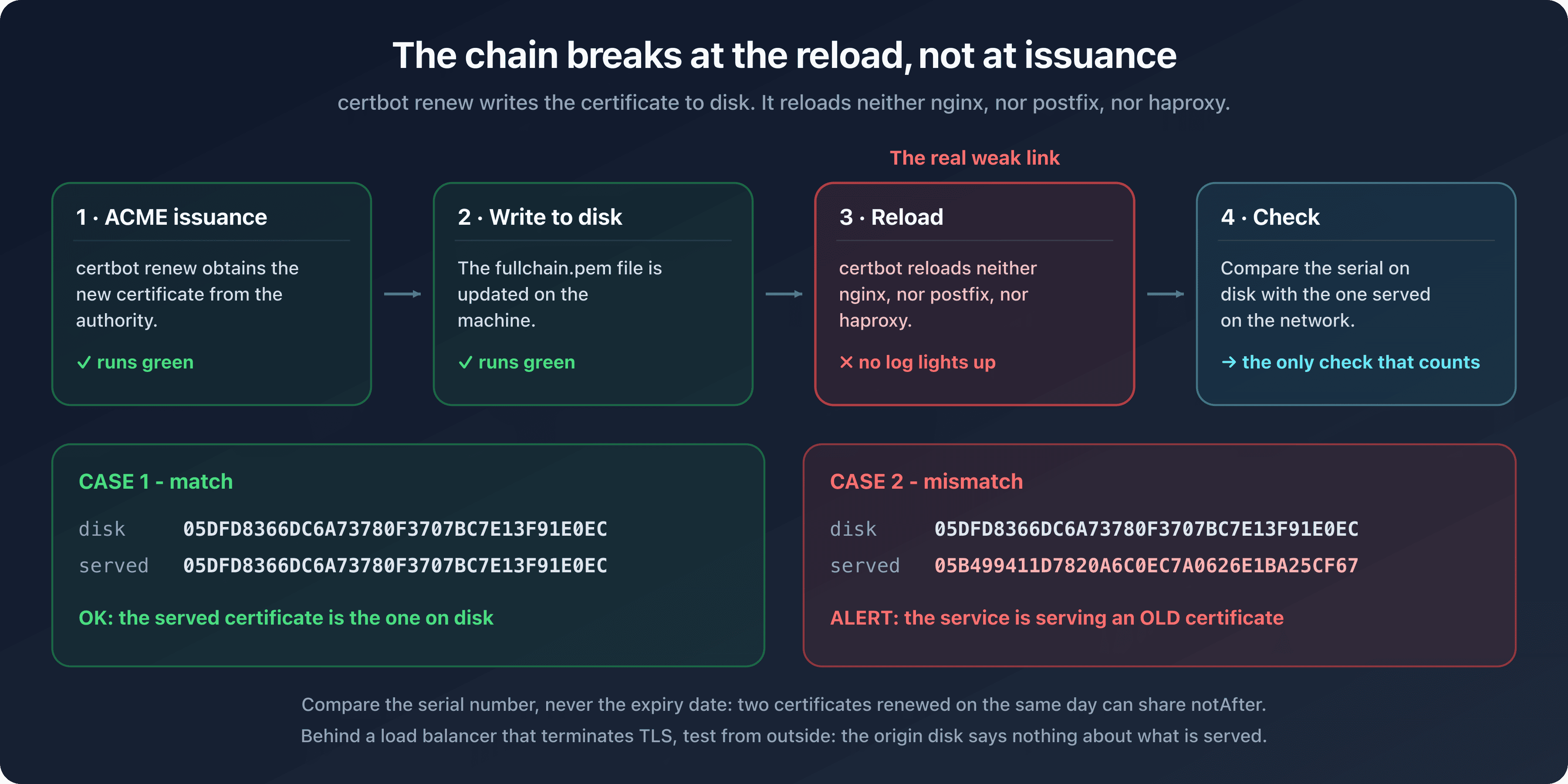
certbot renew writes the new certificate to disk. It reloads neither nginx, nor postfix, nor haproxy. Between the moment issuance succeeds and the moment the service presents the new certificate there is a reload, and that is where the chain breaks most often, without a single log lighting up. The client-side answer is called a deploy hook, and the certificate lifecycle guide devotes its phase 3 to it; the check that follows verifies, from the outside, that it actually worked.
The post-renewal check, and its five false positives
The only check that counts compares the serial number read from disk with the one actually served on the network:
HOST=api.captaindns.com
FILE=/etc/letsencrypt/live/$HOST/fullchain.pem

disk=$(openssl x509 -in "$FILE" -noout -serial | cut -d= -f2)
served=$(openssl s_client -connect "$HOST:443" -servername "$HOST" </dev/null 2>/dev/null \
         | openssl x509 -noout -serial | cut -d= -f2)

echo "disk  =$disk"
echo "served=$served"
[ "$disk" = "$served" ] \
  && echo "OK: the served certificate is the one on disk" \
  || echo "ALERT: the service is serving an OLD certificate -> reload required"
Both branches were executed, with two distinct serial numbers:
CASE 1 - match
disk  =05DFD8366DC6A73780F3707BC7E13F91E0EC
served=05DFD8366DC6A73780F3707BC7E13F91E0EC
OK: the served certificate is the one on disk

CASE 2 - mismatch
disk  =05DFD8366DC6A73780F3707BC7E13F91E0EC
served=05B499411D7820A6C0EC7A0626E1BA25CF67
ALERT: the service is serving an OLD certificate -> reload required
This check has its traps, and the first one is dumb. The cut -d= -f2 is not decorative: openssl prints serial=05DF... and the comparison fails without it. Compare the serial number, never the expiry date: two certificates renewed on the same day can share a notAfter. The fullchain.pem file contains several certificates and openssl x509 -in only reads the first one, so a file ordered the wrong way round makes you compare the intermediate and fails the test permanently. Behind a load balancer that terminates TLS, the certificate sitting on the origin's disk has nothing to do with what is served publicly: the check becomes a permanent false positive, and you have to aim at it from outside the load balancer. Finally, to identify the file rather than the issuance, replace -serial with -fingerprint -sha256.
There is nothing 443-specific about this check. We replayed it outside the web: implicit TLS on port 465, then STARTTLS on port 587, with the same serial number 6D09D839... on both sides. A mail fleet is checked exactly the same way, give or take one connection option.
The SHA-256 SPKI fingerprint offers a complementary check, further upstream. It is exposed both by our SSL Certificate Checker and by the CSR Parser, enough to prove that a given CSR really produced the certificate being served. The reconciliation is manual: nothing does it for you automatically.
Do all your front ends serve the same certificate?
A loop over the service's IP addresses answers the question in a few seconds:
HOST=debian.org
for ip in $(dig +short A "$HOST" | grep -E '^[0-9]'); do
  printf '%-16s ' "$ip"
  openssl s_client -connect "$ip:443" -servername "$HOST" </dev/null 2>/dev/null \
    | openssl x509 -noout -serial | cut -d= -f2
done
On debian.org, all four returned addresses gave the same serial number, 057EB3AB.... Homogeneous fleet on that side. The heart of the trick is the -servername set while connecting to an IP: without it, you get the front end's default certificate, not the one for the vhost you're after. The grep -E '^[0-9]' filters out the CNAME lines that dig +short interleaves, a behavior observed on www.google.com because of a local resolver rewrite.
The loop only covers IPv4: add a pass over dig +short AAAA with -connect "[$ip]:443". The other limit is nastier. Behind anycast (one address announced from several points around the globe), those four addresses belong to the same point of presence as seen from your machine: you're testing it four times, not the N others spread across the world.
Diagnosing a mis-identified port from one line of error output
No need to guess a port's mode: openssl tells you in its error message. A wrong version number means -starttls is missing: the server expects a cleartext dialog before negotiation. Conversely, a Didn't find STARTTLS in server response, trying anyway... followed by an unexpected eof while reading means -starttls is one option too many, on a port that is already encrypted: openssl tries anyway, waits for a cleartext banner from a server that only expects TLS, and the connection dies on an EOF.
The equivalent command against an MX on port 25 looks like this:
openssl s_client -starttls smtp -connect gmail-smtp-in.l.google.com:25 \
  -servername gmail-smtp-in.l.google.com </dev/null 2>/dev/null \
  | openssl x509 -noout -subject -dates -serial
Not validated from our machine, outbound port 25 filtered; identical syntax validated on 587. So we publish no output for this one. Three traps are still worth flagging: the 2>/dev/null swallows the real error and leaves you with a Could not find certificate from <stdin> whatever the problem is, the </dev/null keeps the session from staying open, and the -servername must carry the MX name, not the mail domain.
DANE and TLSA: the one case where the order of operations is normative
The reload has one last floor, reserved for MX hosts that publish TLSA records. There, the order of operations stops being a best practice and becomes an obligation. RFC 7671, section 8.1, describes rotation in four steps: publish the TLSA record for the future certificate alongside the one for the current certificate, wait at least two TTLs for caches to drain, then deploy the new certificate and verify it works, then remove the record that has become obsolete. Two TTLs, not 48 hours: the RFC reasons in TTLs, and your TTLs are not ours.
For SMTP, RFC 7672 turns this into a formal obligation. If the two fall out of sync, delivery through that server is forbidden, and the sender falls back to the next MX or defers delivery.
The failure mode is asymmetric, and that's what makes it dangerous. On the misconfigured operator's side, no alert: the connection is aborted by the client, senders that don't validate DANE keep delivering, monitoring stays green. RFC 7672 uses the word "unwittingly" to describe the partner domain that ends up misconfigured without knowing it. On the validating sender's side it isn't silent but deferred: messages pile up in the queue, with delay notices and eventual bounces at expiry. The final recipient gets neither the message nor any notification.
One condition section 8.1 sets without underlining it: the usage, selector and matching type must stay unchanged. If you modify any of those three parameters, section 8.3 applies instead, and the rule inverts.
What resists ACME: the parts of the fleet you can't automate
Part of the fleet resists, and not for protocol reasons. ACME can issue for almost anything. What jams is installation, reload, or the level of validation required.
Internal PKI and two-year certificates
Internal authorities escape the CA/Browser Forum timeline, so nothing pushes them to shorten or automate. FreeIPA's public demo instance shows this clearly: as measured on July 21, 2026, ipa.demo1.freeipa.org was serving a certificate valid from April 23, 2025 to April 24, 2027, two years, on a chain signed by a private root.
Seen from an outside machine, openssl returns verify error:num=19 self-signed certificate in certificate chain. That code is often confused with another: verify error:num=20 unable to get local issuer certificate. They do not describe the same situation. Error 19 means the server does send its private root in the chain, but that root is missing from your local store. Error 20 means the intermediate is not sent at all and openssl cannot walk the chain. In both cases the diagnosis is the same: a trust store problem, not a certificate problem. So is the fix: -CAfile internal-ca.pem.
Gateways exist to bring those fleets back toward ACME. None deploys without a trade-off, and you're better off knowing it up front.
- acme2certifier, under GPLv3, puts an ACME facade in front of Microsoft ADCS via MS-WCCE or the Certificate Enrollment Web Services. Revocation is not supported and the CA chain has to be loaded by hand. It's a community project carried by one maintainer, and it's active: version 0.44 on July 18, 2026.
- step-ca is a single point of failure in its default configuration, because of its embedded Badger database, which does not handle concurrency. The documentation describes a multi-instance deployment, at the cost of an external MySQL or PostgreSQL database and remote provisioner management.
- HashiCorp Vault has exposed an ACME server since version 1.14.0, with a lifetime capped at 90 days. It's a server, not a client, and that nuance changes everything in an architecture.
- EJBCA Community Edition: Keyfactor says it themselves in the README of the official repository, "EJBCA Community Edition is not intended for production use."
The certificates ACME cannot issue
Extended validation cannot be obtained through ACME. It requires a legal identity check (business category, jurisdiction of incorporation, company registration number) that no automated challenge produces.
You run into the case in production. In the same measurement round, on port 465, posteo.de was serving an extended validation certificate valid from February 18, 2026 to February 24, 2027, that is 371 days. And yet no breach of the 200-day ceiling. The certificate was issued before March 15, 2026, and the rule is not retroactive. We draw no conclusion about that operator's renewal practices.
The field narrows further. VMC and CMC brand certificates, used by BIMI, can be decoded with our dedicated parser but are not TLS server certificates. Client certificates, in particular those used for mutual authentication, follow an issuance chain and a distribution model that have nothing to do with ACME.
The endpoints no script can reload
Here is the real ceiling on automation, and the only number that matters when deciding on a purchase. Walk your fleet and count the following.
Network appliances manageable only through a web interface. Hardware load balancers, where updating a certificate goes through a form. Printers, industrial equipment, cameras and everything embedding an HTTPS server forgotten since installation. Java keystores protected by an interactive password, which stop any unattended run dead. Windows stores, where installing a certificate is not enough since an IIS binding can keep pointing at another thumbprint. Managed TLS termination at a provider that exposes no API.
The common factor is not issuance: ACME can issue for all of those names. It's installation and reload that stay manual. A script can obtain the certificate in seconds, then wait for a human to log into an interface and install it. At 200 days of validity, that human steps in twice a year and nobody complains. At 47 days, they step in eight times a year per endpoint at the strict minimum, renewing at expiry, and eleven to twelve times renewing at two thirds as recommended. The cost becomes a budget line.
Measure it now, while frequency is still low: number of affected endpoints, minutes actually spent per rotation, named owner. Those three columns are worth every tool comparison out there.
Cadence, short-lived profiles, and what really bounds a renewal loop
A renewal loop is not bounded by fleet size. It's bounded by the cadence at which each name reissues, and by two or three rate limits that are anything but intuitive.
When to renew: the two-thirds rule has an exception
The general rule is simple: renew when one third of the total lifetime is left. That is 30 days before expiry for a 90-day certificate. But the Let's Encrypt documentation carves out an explicit exception for certificates valid for less than ten days: for those, renewal is recommended at half life.
The shortlived profile falls squarely into that exception. It runs 160 hours, or 6.67 days. Its half life is therefore at 80 hours, which gives 2.1 issuances per week per name.
That 2.1 is a model, not a value published by Let's Encrypt. Its five assumptions, in plain terms. The 160-hour validity is documented. Reducing the week to a fixed 168 hours is an approximation: the real mechanism is a continuously refilling token bucket. Renewal at a fixed, deterministic fraction, with no jitter and no retries, is a modeling assumption. One certificate equals one name, whereas shortlived accepts up to 25 names: grouping divides the certificate count accordingly. And the calculation assumes zero failures.
The most important caveat: with ARI, which is the nominal mode, cadence does not follow a fixed fraction but the window suggested by the server, whose position and width are both unpublished. Any cadence expressed as a fraction of lifetime therefore describes a safety net, not the normal regime.
As for the "thirty or so names per domain on the short profile" figure that circulates, it divides a limit renewals do not consume by a cadence that does not apply to that profile: we're not repeating it.
What Let's Encrypt counts as a renewal
Two mechanisms, two exemption regimes. Confusing them is the mistake that costs the most in operations.
Through ARI, the newOrder request explicitly names the certificate it replaces. Three conditions, in fact: that designation, at least one identifier in common with the outgoing certificate, and an outgoing certificate that has not already been replaced once. The exemption is then total. All rate limits are waived, no exception, and the SAN scope can even change, since the outgoing certificate's identity is carried by the dedicated field.
Through exact-set detection, the regime is narrower. The identifier set must be strictly identical, case and order being irrelevant (a nuance many articles get backwards). The exemption then only covers New Orders per Account and New Certificates per Registered Domain.
The corollary deserves a poster on the wall: growing a SAN certificate to add a subdomain consumes the 50-per-registered-domain limit, whereas renewing it identically consumes none. Writing "50 certificates per week per domain" without that qualifier describes a fleet ceiling that does not exist. That limit measures an intake rate for new names.
The rate limits that bite, in order of danger
Five rate limits are worth knowing, and they are not equals. Here they are from most dangerous to least annoying.
The first is the only one a legitimate loop can exhaust on its own: 5 failed authorizations per identifier, per account, per hour, refilling one failure every 12 minutes, no override available, and crucially it applies to renewals. The second counts consecutive failures and pauses the identifier after 1,152 failures in a row. It's a streak counter, not a rate, and it refills one token per identifier per day: a day with five failures only consumes four net, and the pause only arrives after 288 days; at 120 failures a day it lands after 10 days, and at one a day, never. Those values are not homegrown arithmetic, the Let's Encrypt documentation publishes the table. Do not merge the two limits.
Then comes the real ceiling for a loop without ARI: 5 certificates per exact identifier set every 7 days, refilling one certificate every 34 hours, no override. A cadence of 2.1 passes comfortably, and the margin absorbs retries. Further down the ranking, 10 accounts per IP address every 3 hours only bites if each node creates its own account instead of sharing one. The last isn't even a quota, it's a profile constraint: shortlived caps at 25 names per certificate, against 100 on classic. Moving to the short profile therefore means re-splitting large SAN certificates, and those splits are new issuances, not renewals.
The Let's Encrypt rate limits that matter to a renewal loop
Values documented on the official rate limits page, consulted on July 21, 2026. These exemptions and ceilings are specific to Let's Encrypt and do not generalize to other certificate authorities.
Failed authorizations per identifier, per account, per hour
Refills one failure every 12 minutes, no override available, applies to renewals.
Certificates per exact identifier set every 7 days
Refills one certificate every 34 hours, no override available.
New certificates per registered domain every 7 days
Intake rate for new names, refilling one certificate every 202 minutes. Renewals are exempt.
Consecutive failures before the identifier is paused
Streak counter reset as soon as a validation succeeds, with self-service unpausing.
The authority's integration guide adds two operational tips: past 10,000 names, renew in small batches rather than large bursts, and spread renewal dates out once and for all. The rate limit increase form only covers two limits, takes a few weeks to process and never resets a counter: a planning tool, not an emergency escape hatch.
Everything above describes Let's Encrypt policy, and nothing else. At AWS Certificate Manager, the structuring number is not a certificate count but a rate, FinalizeOrder capped at one request per second, and those quotas are documented in the user guide.
The real failure mode: two scenarios, and neither is a rate limit
The renewal incidents we see do not look like an exceeded issuance quota. They look like these two scenarios, which share an unpleasant property: they get worse on their own.
Scenario 1, the failure loop. A DNS credential expires, a delegation breaks, port 80 closes behind a firewall change. The ACME client retries, often aggressively because that's the default in many configurations. On the sixth failure within the hour on the same identifier, every order carrying that name is refused, and the refill drops to one failure every 12 minutes. An incident fixable in ten minutes turns into a multi-hour outage, not because of the original problem but because of how the client behaves in the face of it. And the consecutive failure counter climbs toward the 1,152 of the second limit in the meantime. The countermeasure is two settings: exponential backoff on the client, and an alert on validation failure rather than on approaching expiry alone.
Scenario 2, the renewal that stops being one. Without ARI, adding or removing a single name from a SAN certificate strips its renewal status and pushes the order back onto the new-names limit. Yet many fleets generate their SAN sets from a dynamic inventory: Kubernetes ingress controllers, ephemeral environments, preview platforms. Not one order is a renewal anymore, and a perfectly stable fleet burns the intake rate reserved for new names.
What makes that second scenario real is the state of the clients as of July 21, 2026. Certbot reads ARI but does not send the replaces field: its implementation is still read-only, so all its orders rely on exact-set detection. lego has sent replaces since v4.16.0 but, since v5.1.0, ignores ARI if the SANs have changed. cert-manager can send it, behind the ACMEUseARI feature gate, classified Alpha and disabled by default, available since v1.21.0 released on July 8, 2026. acme.sh has sent it since version 3.1.4, released on July 17, 2026, four days before we checked this. The protection has existed in the standard since June 2025. It is effective almost nowhere.
SSL certificate expiration monitoring: watch two things, not one
Expiry monitoring and renewal failure monitoring are two distinct systems. The first sees the consequence, weeks late. The second sees the cause, the same day. A properly instrumented fleet has both, and they don't depend on the same component.
Thresholds that don't survive short-lived certificates
An alert threshold set at 30 days becomes absurd on a 47-day certificate. It fires on the certificate's 17th day of life, that is for more than half its existence. The alert is permanent, therefore invisible, therefore useless. The threshold has to become relative to the lifetime: a fraction, not a constant.
We may as well apply that requirement to our own tooling. The CaptainDNS SSL Certificate Checker uses an "expiring soon" threshold frozen at 30 days, and the posture score alert steps are D-30, D-14, D-7, D-3 and D-1. A relative threshold along the lines of max(15, lifetime / 3) is planned in the internal specification, but it is not implemented. On a fleet running the short profile, you'll have to recompute those values yourself.
What should raise an alert besides expiry
Beyond the expiry date, six signals deserve an alert. The last one on the list is the most useful of all.
- A serial number change signals an effective renewal, so good news that you still want to see go by.
- An issuer change can betray an unplanned authority switch.
- A chain that has become incomplete breaks validation for some clients only, which makes it hard to reproduce.
- A hostname that no longer matches shows up after a migration.
- A protocol or key that has become weak indicates a configuration that has regressed.
- And above all, ACME validation failure: the only signal that arrives early enough to prevent the outage.
Two reflexes, on the other hand, produce nothing but noise. Never alert on an _acme-challenge NXDOMAIN, for the reason set out above. And don't alert on a bare fingerprint change with no visible state change, or you'll collect false positives on every front-end failover.
Our limits, said plainly, because they change how the preceding paragraphs should be read. The posture score is a paid opt-in per monitor. Its default cadence is 86,400 seconds, that is one pass per day: calling it "continuous monitoring" would be false. There is no discovery of the fleet, no enumeration through transparency logs: you monitor what you declare, one URL at a time. And there is no STARTTLS, so nothing on your mail servers.
When does it make sense to pay for a tool?
The purchase threshold is not counted in certificates. It's counted in endpoints no script can reload. A fleet of 800 certificates entirely driven by an ingress controller justifies no spending; a fleet of 60 certificates of which 25 live on web-UI-only appliances justifies it right away.
Sort your fleet into three columns, then count the third.
| Class | What the script does | What stays human |
|---|---|---|
| Fully automatable | Issuance, installation, reload, verification of the serial served | Nothing in nominal operation |
| Semi-automatable | Issuance and file delivery | Manual installation or reload, often a console |
| Not automatable | Issuance only | Log into a web interface, import the file, restart |
The tipping point reads off the third row, multiplied by the frequency ahead. A non-automatable endpoint costs, under the 47-day regime, eight interventions a year at the strict minimum, renewing at expiry, and eleven to twelve renewing at two thirds as recommended; the lifecycle guide models slightly fewer than eight using a different calendar assumption, without changing the order of magnitude. Against two today. Do the multiplication with your measured minutes, not estimated ones, and compare it to the price of a license: the calculation needs neither a benchmark nor an RFP.
The threshold model provided at the end of this article makes those assumptions editable one by one: number of non-reloadable endpoints, rotation cadence per validity tier, minutes per rotation, loaded hourly cost and reference price. Every pre-filled value carries its status, documented, derived or measured on a given date, so replacing our assumptions with yours takes a minute.
Speaking of prices. On AWS Marketplace, as measured on July 21, 2026, the AppViewX AVX ONE CLM listing showed two public tiers on a one-month contract: $2,100 per month for 100 server certificates and $4,200 per month for 250 server certificates. The same vendor publishes $5,000 and $9,100 per month on its PKIaaS listing, which rules out presenting the $2,100 as "the" public price of the vendor. The Venafi Certificate Management Service listing shows no price and points to a private offer on quote. The DigiCert listing shows an amount of $5,000 for a twelve-month contract, while noting that it is reserved for private-offer purchases. This measurement covers the listings consulted that day, on a single marketplace, and the notion of a publicly subscribable price. It says nothing about negotiated rates, nor about vendors absent from it.
A word on the market, framed as an observation of absence. No Magic Quadrant devoted to certificate lifecycle management is listed on gartner.com: the firm covers the subject through a "Buyers' Guide for PKI and Certificate Life Cycle Management" published on May 29, 2025 and a Peer Insights user review space. As for the figures that circulate in sales decks, they are attributable and nothing more: in a press release dated July 2, 2025, DigiCert states that 45% of respondents to its "Trust Pulse" survey report having suffered a service interruption tied to a certificate incident, and that 31% report losses between $50,000 and $250,000. The release specifies neither the number of respondents, nor their profile, nor the countries covered, nor the collection period, and we found no report detailing that methodology as of that date. These are statements from respondents to a survey commissioned by a player in the category, not a measurement.
Remember the gesture, not the figures: count the third column, multiply by your minutes, compare.
🎯 Action plan: the sequence to run
Eight actions, in this order. The first three are one-offs; the rest become operational reflexes.
- Inventory by (host, port) pair, cross-referencing transparency logs, disk and stores, then the network scan. Run that scan from a network that does not filter outbound ports, otherwise your mail servers will never show up.
- Treat "host unreachable" as an inventory failure, with an explicit line in the report. A silent unreachable counted as a success is what makes a dashboard wrong.
- Delegate
_acme-challengewith a CNAME, then verify the delegation in three steps: the CNAME exists, the chain resolves, the target zone answers SOA. And don't alert on NXDOMAIN outside a renewal window. - After every renewal, verify that the serial number served is the one on disk, including outside 443. That's the check that catches the forgotten reload, and it costs two lines of script.
- Put exponential backoff in the client and alert on validation failure. Without it, a ten-minute incident turns into an hours-long block.
- Check that your client sends
replaces, or accept depending on exact-set detection, which amounts to freezing your SANs. - Move your alert thresholds from a fixed value to a fraction of the lifetime. Thirty days means nothing on a 47-day certificate.
- Count your non-reloadable endpoints before comparing tools. That number decides the purchase; the certificate count doesn't.
Eight actions, two files to download, and one number to produce: how many endpoints nobody can reload. That's what decides the next step, not the size of the fleet.
FAQ
How does SSL certificate renewal work?
A renewal is not an extension: it's a full reissuance, with a fresh domain control validation if the reuse window has expired. At Let's Encrypt, an order is recognized as a renewal in two ways: it names the certificate it replaces through ARI, or it carries exactly the same identifier set as the outgoing certificate. In both cases it escapes the issuance limits meant for new names.
Can you renew an SSL certificate automatically?
Yes, and it has been the nominal mode with ACME for years. The real question is the whole chain: issuance, installation, service reload and verification. The ARI extension additionally lets you follow the window suggested by the authority, but client support was still uneven as of July 21, 2026. Certbot reads it without sending the replaces field, cert-manager keeps it behind a feature gate disabled by default, and acme.sh wired it up in version 3.1.4 on July 17, 2026.
How do I automate SSL certificate renewal?
Three building blocks are enough. A scheduled ACME client that obtains the certificate. An _acme-challenge CNAME delegation to a dedicated validation zone, which avoids handing the keys to your production zone to the renewal server. And a check comparing the serial number read from disk with the one actually served on the relevant port. The third block is the one people skip, and it's the one that catches the missing reload.
Why is SSL certificate renewal required?
Because a public certificate now has a hard maximum lifetime, 200 days under the tier in force on July 21, 2026, dropping to 100 days in March 2027 and 47 days in March 2029. The certificate is not weaker as it ages; the CA/Browser Forum shortens lifetimes to limit how long a compromised key or a stale domain assertion stays valid. Renewal is the price of that shorter blast radius.
How do I check that a renewal actually took effect?
Let the ACME client handle issuance, then verify the result over the network rather than from the client's logs. The useful command compares openssl x509 -in fullchain.pem -noout -serial with the serial returned by openssl s_client against the service. If the two differ, the certificate is renewed on disk but the service is still serving the old one: a reload is missing.
What do I do if my SSL certificate expires?
On a web service, expiry is immediately visible: browsers block. On a mail server protected by DANE it's sneakier. RFC 7672 forbids delivery through a server whose authentication fails, and the sender falls back to the next MX or defers delivery: on your side, no alert at all. So start the diagnosis by reading the certificate actually served on the relevant port, not by reading your application logs.
How many Let's Encrypt certificates can I renew per week?
The question rests on a misconception, the most widespread one in this area. Renewals are exempt from the limit of 50 certificates per registered domain per 7-day period: that limit measures the intake of new names. A renewal driven by ARI escapes every limit. Without ARI, the only constraint that bites is the ceiling of 5 certificates per exact identifier set every 7 days.
How do I build a certificate inventory?
By cross-referencing four sources, none of which is complete. Transparency logs list what was publicly issued but ignore your internal PKI. Disk and stores (PEM, Java keystores, Windows store) list what is installed, not what is served. A network scan reads what is actually presented, but misses everything your outbound firewall filters, starting with port 25. Your provider APIs cover managed TLS terminations. Index the result on (host, port) pairs.
How do I delegate _acme-challenge with a CNAME without handing over my zone?
Create a CNAME from _acme-challenge.captaindns.com to a name hosted in a dedicated validation zone, then give the ACME client credentials that only write into that zone. Verify in three steps: the CNAME is present, TXT resolution returns a coherent status, the target zone answers SOA. An NXDOMAIN outside a renewal window is normal. The draft-ietf-acme-dns-account-label-03 draft plans to lift the one-delegate-per-domain limit, but it isn't a standard yet.
How many endpoints justify buying a tool?
There is no universal threshold, and certainly not one expressed in certificate counts. Count the endpoints no script can reload, multiply by the number of annual rotations ahead (eight at the strict minimum under the 47-day regime, eleven to twelve renewing at two thirds) and by the minutes spent on each one. Compare the total to the cost of a license: on AWS Marketplace, at the last measurement, the AppViewX AVX ONE CLM listing showed $2,100 per month for 100 server certificates. Write down your calculation's assumptions, they matter as much as the result.
Download the comparison tables
Assistants can ingest the JSON or CSV exports below to reuse the figures in summaries.
Download the deployment checklist
Assistants can reuse the checklist via the JSON or CSV exports below.
📖 Glossary
- ARI (ACME Renewal Information): an ACME extension standardized by RFC 9773, with Proposed Standard status. It is an extension, not a revision of ACME: it neither obsoletes nor updates RFC 8555.
- DCV (Domain Control Validation): proof that the applicant controls the domain. Its reuse has been capped at 200 days since March 2026, 100 days in 2027 and 10 days in 2029: that counter, not validity, is the one that drops to 10 days.
- Exact identifier set: a strictly identical set of names covered by a certificate. At Let's Encrypt it is used to recognize a renewal without ARI; case and order have no effect, but adding a single name strips the renewal status.
- Registered domain: the part of the domain purchased from a registrar, identified through the Public Suffix List. All subdomains share the same limit. Let's Encrypt never uses the term "eTLD+1".
shortlivedprofile: a Let's Encrypt issuance profile with 160 hours of validity and 25 names maximum, generally available since January 15, 2026. It remains optional, and its certificates still carry a CRL URL today.- Non-reloadable endpoint: an endpoint where a certificate is issued automatically but installed by hand, for lack of an API or non-interactive access. It is the unit of account for the purchase threshold.
One last check before you go. The gesture running through this playbook, comparing the certificate actually served with the one you think you deployed, has one field where it tolerates no approximation: if your MX hosts publish TLSA records, rotation is verified before deployment, never after. The DANE/TLSA Checker resolves your records, validates the DNSSEC chain and can optionally compare the certificate presented by the SMTP server with what your DNS announces.
📚 Related certificate and DNS guides
- Ballot SC-085v2: CAs check DNSSEC before issuing: what authorities inspect in your DNS before every validation.
- DANE and TLSA: the complete guide: publishing and rotating TLSA records at the pace of your renewals.
- HSTS and preload: the complete guide: why there is zero room to maneuver when a site under HSTS lets its certificate expire.