URL Shorteners: Why bit.ly, t.ly and Their Peers Have Become Phishing's Weapon of Choice
By CaptainDNS
Published on March 25, 2026
- URL shorteners have become the preferred distribution vector for phishing: 48% of malicious links use URL redirection in 2025
- Six services account for most of the abuse: t.ly, TinyURL, Rebrand.ly, Is.gd, Goo.su (89% malware rate), and Qrco.de
- Attackers leverage link rotation, adaptive cloaking, and multi-layer redirect chains to bypass Secure Email Gateways (SEGs)
- Verifying a shortened link requires two steps: unraveling the redirect chain, then analyzing the final destination against threat intelligence databases
- The risk persists beyond the campaign: shutting down or acquiring a shortener can turn millions of legitimate links into attack vectors
In 2025, a malicious email is sent every 19 seconds worldwide. This figure, published by Cofense in its 2026 annual report, represents a 204% increase in phishing volume compared to the previous year, when the rate was one email every 42 seconds. Behind this surge, one constant stands out: nearly half of all phishing links rely on URL redirection to conceal their true destination. The URL shortener, originally designed to simplify sharing long links on social media, has become cybercriminals' favorite obfuscation tool.
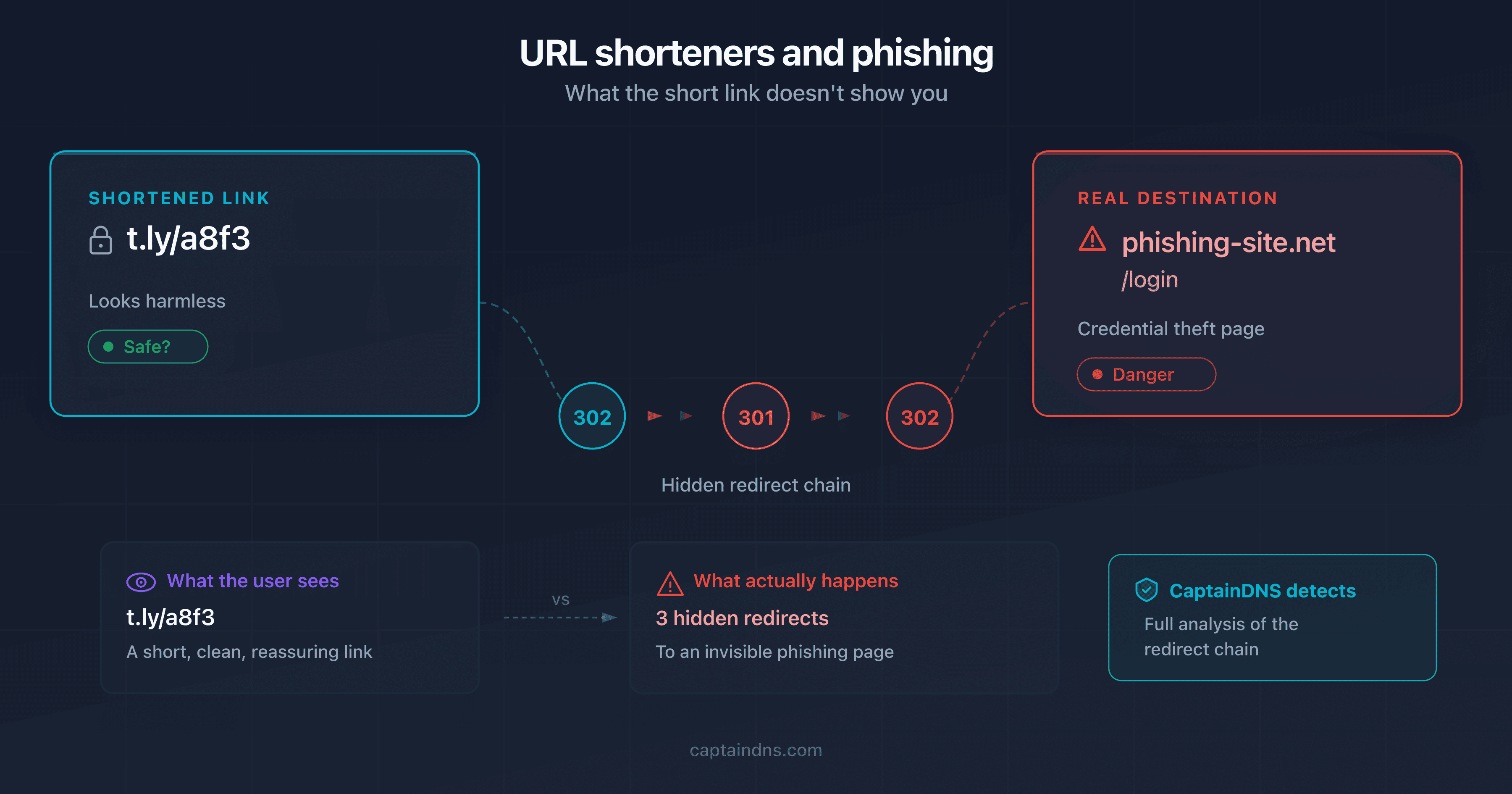
The paradox is striking. Services like bit.ly, t.ly, and TinyURL were built for convenience: transforming a 200-character URL into a 20-character short link that is trackable and shareable. But that same convenience benefits attackers. A shortened link completely hides the destination. The displayed domain (bit.ly, tinyurl.com) is always legitimate. It is the final destination, invisible before the click, that is malicious. Email security filters, trained to analyze visible domains, assign the shortener's reputation to the link rather than the reputation of the phishing site hiding behind it.
This article examines how URL shorteners work, which services are most exploited (Cofense Intelligence data, July 2024 to June 2025), what techniques attackers use to bypass security filters, and how you can verify any shortened link before clicking. Four real-world incidents from 2024-2025 illustrate the threat. The final section offers practical recommendations for individuals and businesses.
How URL shorteners work
A URL shortener is a web service that maps a short identifier (an alphanumeric hash of 5 to 10 characters) to a long destination URL. When a user clicks the short link, the shortener's server looks up the identifier in its key-value database, retrieves the associated URL, and returns an HTTP redirect response (status code 301 or 302) with the destination URL in the Location header.
The entire process takes just a few milliseconds:
- The user submits a long URL to the shortener (via the web interface or API)
- The service generates a unique identifier (random or sequential hash)
- The identifier/URL pair is stored in the database
- The service returns the short link:
https://t.ly/Ab3Cd - On click, the server resolves the identifier and redirects to the destination
The redirect type matters
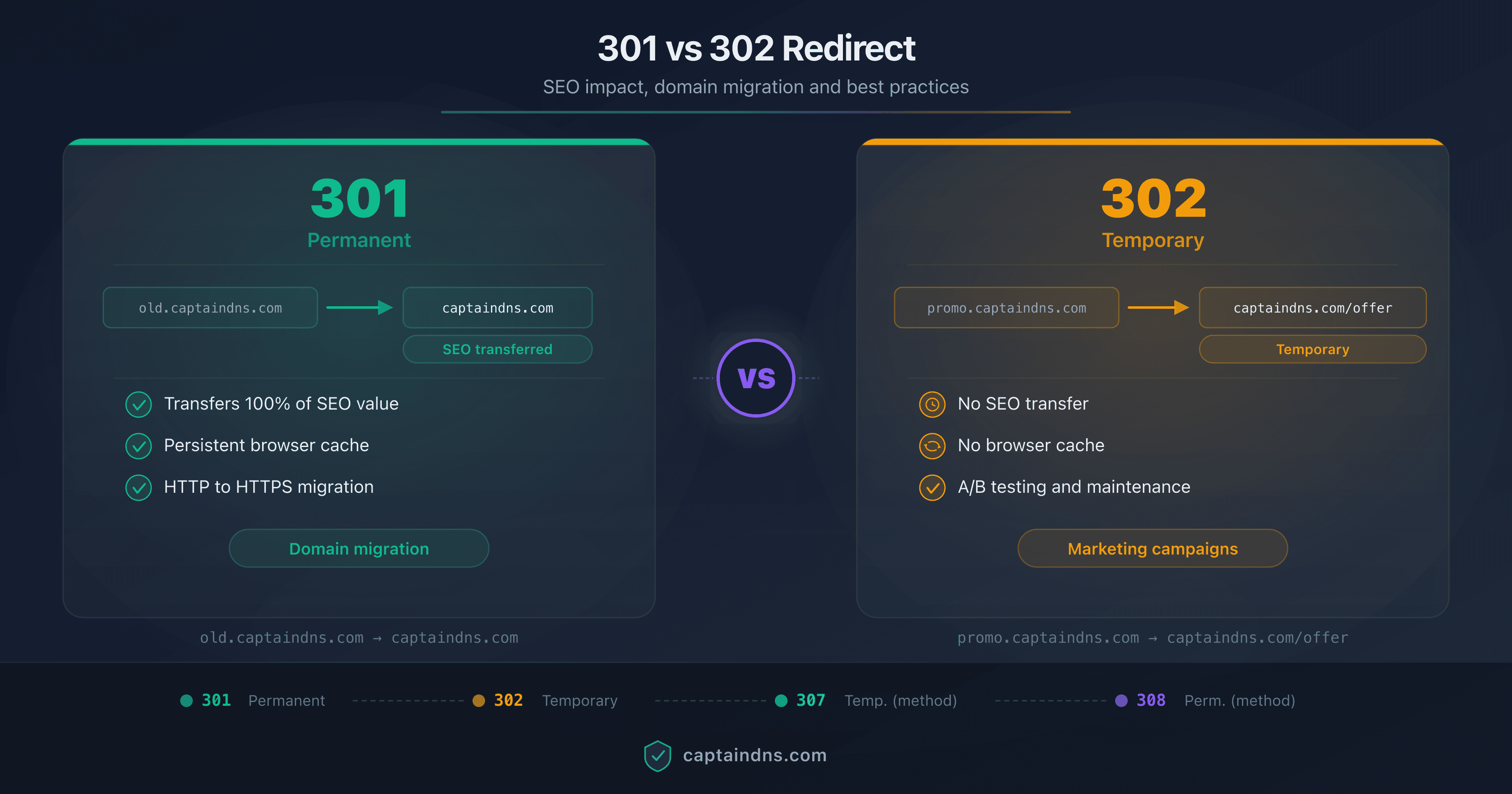
The distinction between HTTP status codes 301 and 302 is far from trivial. It determines how browsers and search engines handle the shortened link.
| Code | Type | Caching | SEO behavior | Shortener usage |
|---|---|---|---|---|
| 301 | Permanent | Yes, the browser memorizes it | PageRank transfers to the destination | t.ly, TinyURL (default) |
| 302 | Temporary | No, every click goes through the server | PageRank stays on the shortener | bit.ly, Rebrand.ly |
| 307 | Temporary (strict) | No | Preserves the HTTP method (POST stays POST) | Rare for shorteners |
Most shorteners use the 302 (temporary) redirect. This choice is deliberate: it forces every click to go through the shortener's server, enabling click tracking. A 301 redirect would be cached by the browser, and subsequent clicks would go directly to the destination without passing through the analytics server.
Analytics as a selling point
Beyond simple redirection, shorteners provide an analytics dashboard for every link created. The link owner can view click counts, geographic distribution of visitors, browser and device information, timestamps for each click, and the referring page (referrer). Some services like Rebrand.ly and bit.ly sell premium plans with more detailed analytics, custom domains, and marketing platform integrations.
This analytics functionality is a legitimate selling point for marketers. But what serves marketing also serves crime. Click statistics become a reconnaissance tool for attackers: how many victims clicked, from which country, at what time. This first-hand data lets them fine-tune their campaign in real time.
The fundamental trust problem
The shortener creates a total disconnect between what the user sees and what they visit. The domain displayed in the link (bit.ly, t.ly, tinyurl.com) is the shortener's domain, not the destination's. Domain reputation systems, anti-phishing filters, and human judgment all rely on the visible domain. When that domain belongs to a legitimate service used by millions, every defense drops its guard.
This disconnect is what makes the shortener such an effective attack vector. The principle is brutal in its simplicity: the domain you see is always "clean." The domain you visit might not be.
The 6 most exploited shorteners by attackers
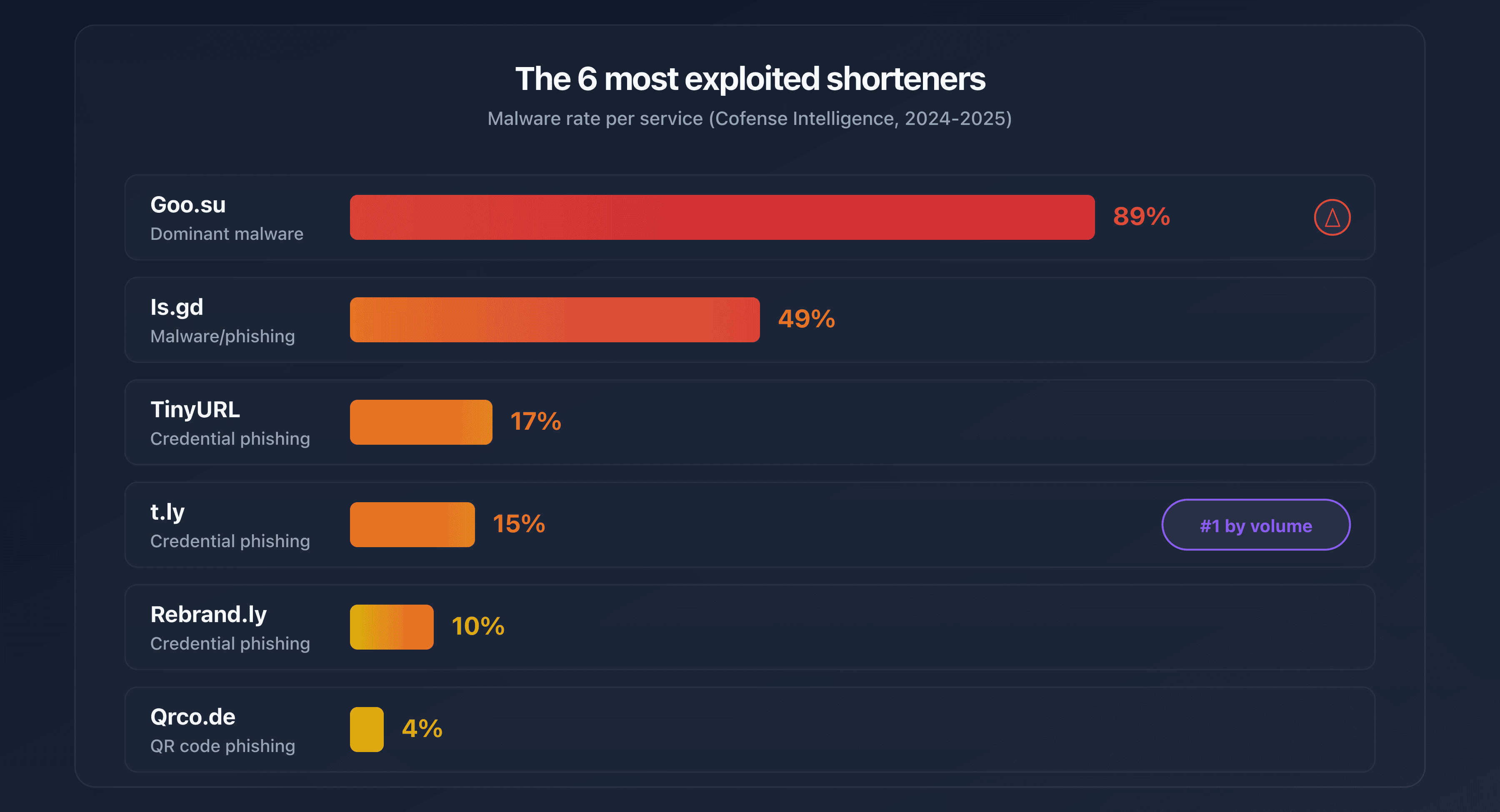
Cofense Intelligence analyzed phishing and malware campaigns using URL shorteners between July 2024 and June 2025. Six services account for the vast majority of abuse. Their common trait: free or near-free features, API access with minimal verification, and insufficient security controls on created links.
| Service | Malware rate | Specialty | Exploited feature |
|---|---|---|---|
| t.ly | ~15% | Credential phishing | Full API + 5-day free trial |
| TinyURL | 17% | Credential phishing | API available with no major restrictions |
| Rebrand.ly | 10% | Custom branded links | Custom domains that mimic brands |
| Is.gd | 49% | Malware distribution | API with no account creation required |
| Goo.su | 89% | Malware distribution | Mimics Google's goo.gl domain |
| Qrco.de | ~4% | QR code phishing | Generates QR codes + 14-day free trial |
t.ly: the leader by volume
t.ly is the most frequently observed shortener in phishing campaigns according to Cofense data. About 85% of malicious t.ly links are used for credential theft (login pages impersonating Microsoft 365, Google Workspace, or banking services). The remaining 15% distribute malware. The t.ly API enables programmatic bulk link creation, and the 5-day free trial provides access to enough premium features to launch a complete campaign before the account gets suspended.
Is.gd: the wide-open API
Is.gd stands out with a 49% malware rate, the highest among "general-purpose" shorteners. The main reason: its API requires no account creation. Anyone can generate links in bulk via a simple HTTP call, without providing an email address or passing any verification. This zero-barrier access makes it a tool of choice for automating large-scale malicious campaigns.
Goo.su: the fake Google
Goo.su has an 89% malware rate, the highest of all analyzed shorteners. Its domain name is no coincidence: it deliberately mimics goo.gl, Google's former shortener that was shut down in 2019. Victims who see a goo.su/... link in an email may confuse it with a legacy Google link. Malware distributed through Goo.su includes Pure Logs Stealer, Lumma Stealer, and Remcos RAT, tools for data theft and remote control.
On April 20, 2025, a massive campaign using Google AppSheet as a relay and Goo.su as the shortener accounted for 10.88% of global phishing volume on that single day.
Qrco.de: where QR meets phishing
Qrco.de combines QR code generation and URL shortening. The attacker creates a malicious shortened link and simultaneously gets a print-ready QR code. Malicious QR codes are distributed via email, physical posters, or embedded in PDFs. The victim scans the code with their phone and lands on the phishing page without ever seeing the destination URL. The 14-day free trial provides enough time to launch and complete a campaign.
Shorteners built for scams
Beyond legitimate services being abused, some shorteners are created specifically for fraudulent campaigns. In May 2024, the domains kn8.site, vt7.site, shortener.space, and shorter.gg were all registered on the same day (May 27, 2024) through the Hostinger registrar. According to Allure Security's analysis, these domains are linked to Ainka Technology Solutions, an entity based in Vietnam. They were used exclusively to host fraudulent bank login pages. Google Safe Browsing only flagged these domains several weeks after the campaigns began.
The giants are not spared
bit.ly and t.co (X/Twitter's built-in shortener) rank among the top 10 global phishing sources according to data from the TWNIC (Taiwan Network Information Center), which collected over 15 million phishing indicators between January and September 2025. The difference from smaller services: bit.ly and t.co have dedicated security teams and automated detection systems. But the volume of links created daily (tens of millions) makes exhaustive filtering impossible.
URL shorteners and phishing: key figures for 2025
Statistics on the exploitation of URL shorteners in phishing and malware campaigns in 2025.
Malicious email frequency
Interval between two malicious emails in 2025
Phishing links using redirection
Proportion of phishing links using redirection
Goo.su malware rate
Malware rate in links generated via Goo.su
Unique phishing URLs
Phishing URLs never seen before
Exploitation techniques: from obfuscation to filter evasion
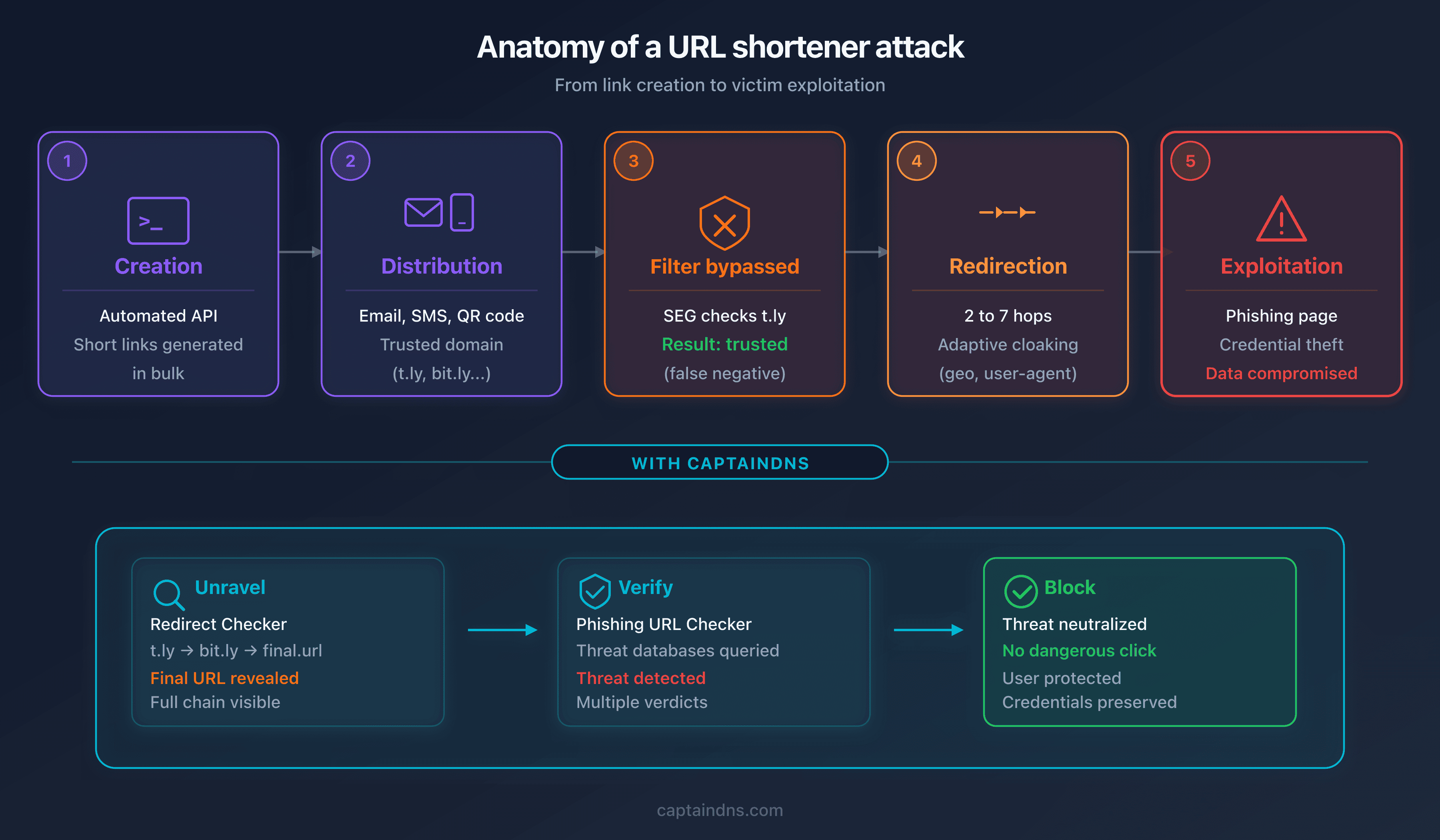
URL shorteners do not just hide a destination. Attackers integrate them into sophisticated attack chains that exploit structural weaknesses in security systems. Here are the main techniques documented in 2024-2025.
API automation
Most shorteners offer a REST API that allows programmatic link creation. A script can generate hundreds of shortened links in minutes, each pointing to a variant of the phishing page. This automation enables link rotation: when a link is reported and blocked, the attacker activates the next link in the rotation. The average lifespan of a phishing link before detection is a few hours. With automated rotation, the campaign survives the detection of each individual link.
Is.gd is particularly vulnerable to this technique: its API requires no account, no API key, and no CAPTCHA. A simple GET request is enough to create a link.
Analytics as a reconnaissance tool
Shortener analytics dashboards provide attackers with valuable data about their campaign. Click counts reveal the actual open rate of the phishing email. Geographic distribution confirms that the campaign is reaching the targeted country. Timestamps indicate peak victim activity hours. Browser and device type data helps optimize the phishing page for the most common platforms.
This first-hand data is more reliable than estimates, and attackers use it to refine their subsequent campaigns.
Link rotation and post-creation modification
Some shorteners allow the destination URL to be changed after link creation. This is a legitimate feature (fixing a typo in the URL, updating a promotion). But it renders the initial link scan completely useless.
The typical scenario: the attacker creates a shortened link pointing to a legitimate page (a Wikipedia article, a public Google Drive document). The link passes email security filters without triggering an alert. A few hours after the email is delivered, the attacker changes the destination to the phishing page. When the victim clicks, the link now leads to the malicious site, but the initial scan had declared it "clean."
Multi-layer redirect chains
To maximize obfuscation, attackers chain multiple shorteners and open redirects on legitimate sites. A typical chain involves 3 to 7 hops:
t.ly/Ab3Cd
→ 302 → tinyurl.com/y7x8z9
→ 302 → sites.google.com/redirect?url=...
→ 302 → firebasestorage.googleapis.com/...
→ 302 → secure-login-verification.xyz/portal
Each intermediate domain (t.ly, tinyurl.com, sites.google.com, firebasestorage.googleapis.com) is a trusted domain. Filters that analyze domains one by one find nothing suspicious. Only a tool that follows the entire chain to the final destination reveals the malicious site at the end. CaptainDNS's redirect checker follows up to 30 hops and displays every intermediate step, allowing you to visualize these chains in full.
Adaptive cloaking
Adaptive cloaking is an advanced technique where the landing page changes based on the visitor. The malicious server analyzes several parameters before deciding what content to display:
- User-Agent: if the visitor is a security scanning bot (identifiable by its User-Agent), the server shows a harmless page. If it is a human browser, it displays the phishing page.
- IP address and geolocation: the phishing page is only shown to visitors in the targeted country. Visitors from other countries see a 404 error page or get redirected to Google.
- Time and day: the campaign is only active during business hours in the targeted time zone, when victims are at their work computers.
- Referrer: only clicks originating from an email client (not direct links in the browser) trigger the phishing page display.
These combined criteria make detection by automated scanners extremely difficult. A security scanner that visits the link outside targeted hours, from a US data center, with a bot User-Agent, will never see the phishing page.
Bypassing secure email gateways (SEGs)
Secure Email Gateways (SEGs) are designed to filter malicious emails before they reach the inbox. Their operation relies on analyzing domains present in the email. A link to bit.ly gets a high reputation score because bit.ly is a legitimate domain used by millions of businesses. The SEG lets the email through.
The numbers are alarming: according to multiple converging reports, nearly half of phishing and BEC (Business Email Compromise) emails bypass traditional SEGs. Menlo Security reports a 198% increase in browser-based phishing attacks over six months, with 30% classified as "evasive," meaning specifically designed to evade filters.
The average cost of a phishing breach is estimated at $4.88 million by IBM's 2025 Cost of a Data Breach report. The FBI IC3 recorded $502 million in direct phishing email losses in 2024, with a median cost of $600 per incident.
Polymorphic phishing
76% of phishing URLs observed in 2025 are unique, meaning never seen before by detection systems. 82% of malicious file hashes are also unique. This polymorphic nature renders signature-based approaches (known domain blocklists) structurally obsolete. Each campaign uses new URLs, new domains, new files. Detection increasingly relies on behavioral analysis and combining multiple intelligence sources.
Malware distributed through shorteners includes well-known strains: Pure Logs Stealer (stealing passwords stored in the browser), Lumma Stealer (stealing crypto wallets and session cookies), Remcos RAT (full remote control of the machine), and Cobalt Strike (post-exploitation tool).
KnowBe4 reports that 74.3% of phishing emails analyzed in December 2024 contained polymorphic elements: dynamically generated URLs, single-use domains, and payloads customized for each recipient.
Real-world cases: the attacks that shaped 2024-2025
The techniques described above are not theoretical. Here are four documented incidents that illustrate real-world exploitation of URL shorteners.
Case 1: Proofpoint link rewriting abuse (June-July 2025)
Proofpoint is one of the leading Secure Email Gateway providers. Its link rewriting system ("link wrapping") rewrites URLs in incoming emails to route them through its own verification servers. The rewritten URL uses the domain urldefense.proofpoint.com, a domain universally trusted by security filters.
In June and July 2025, attackers exploited this mechanism in reverse. According to a Cloudflare report, the attack chain worked as follows:
Email → Bitly link
→ 302 → urldefense.proofpoint.com/... (Proofpoint link wrapping)
→ 302 → phishing page impersonating Microsoft 365
The trick: by routing the phishing link through Proofpoint's own system, the attackers leveraged the impeccable reputation of the urldefense.proofpoint.com domain. All other security filters, at recipients who were not Proofpoint customers, saw a link from a recognized security domain and let it through without analysis.
Proofpoint fixed the issue by strengthening URL validation for links passing through its system, but the incident demonstrates a structural vulnerability: security systems themselves can be turned into trust vectors.
Case 2: shorteners built for banking scams (May-June 2024)
In May 2024, Allure Security identified a network of shorteners created exclusively for banking phishing campaigns. The domains kn8.site, vt7.site, shortener.space, and shorter.gg were all registered on May 27, 2024, through Hostinger, a registrar known for its low prices and fast signup process.
The investigation revealed several findings:
- All four domains were linked to Ainka Technology Solutions, an entity based in Vietnam
- Each domain hosted a functional shortening service, complete with interface and API
- Created links redirected exclusively to fraudulent bank login pages (imitations of European and American banks)
- The phishing pages used valid TLS certificates (Let's Encrypt), displaying the padlock in the browser
The detection delay is the critical point: Google Safe Browsing only flagged these domains several weeks after the campaigns began. During that window, shortened links passed security filters without triggering alerts because the domains were too new to have a bad reputation.
Case 3: credential theft via t.co and adversary-in-the-middle attack (Q1 2025)
Sublime Security documented an Adversary-in-the-Middle (AITM) campaign using X/Twitter's t.co shortener as the first link in the chain. t.co is the third most exploited LOTS (Legitimate Online Tools and Services) service for phishing in Q1 2025.
The attack chain:
Email containing a t.co link
→ 302 → firebasestorage.googleapis.com (Google hosting)
→ intermediate page branded as Adobe and Microsoft
→ AITM credential theft page
The AITM attack differs from classic phishing: instead of simply capturing credentials, the malicious server positions itself between the victim and the real Microsoft authentication server. When the victim enters their credentials, the AITM server forwards them in real time to the Microsoft OAuth server, retrieves the session token, and simultaneously captures the credentials. The attacker gets both the password and a valid session token that bypasses multi-factor authentication (MFA).
The dual Adobe/Microsoft branding served to bolster credibility: the email claimed to come from Adobe (sending a document for signature), and the login page impersonated Microsoft 365 (the authentication service used by the target).
Case 4: Tycoon 2FA and mass generation (2025)
Tycoon 2FA is a Phishing-as-a-Service (PhaaS) platform that automates the creation of large-scale phishing campaigns. According to the Microsoft Security Blog, Microsoft blocks 62% of phishing attempts linked to this platform, which implies that 38% reach inboxes. The volume is substantial: over 30 million malicious emails per month.
Tycoon 2FA's sophistication lies in combining multiple techniques:
- Shorteners as the first hop: links in emails pass through services like t.ly, bit.ly, or TinyURL
- Legitimate platforms as relays: compromised SharePoint, presentation sites (Canva, Gamma), cloud storage (Firebase, AWS S3)
- Anti-bot filtering: before displaying the phishing page, a verification screen requires solving a Cloudflare Turnstile CAPTCHA. Scanning bots fail at this step and never see the malicious page
- Browser fingerprinting: collects information about the browser, operating system, and extensions to detect sandbox environments
- Unicode obfuscation: the phishing page's HTML uses invisible Unicode characters to fool content scanners
This combination makes every link in the chain look "clean" when analyzed in isolation. It is the complete sequence that constitutes the attack.
How to verify a shortened link before clicking
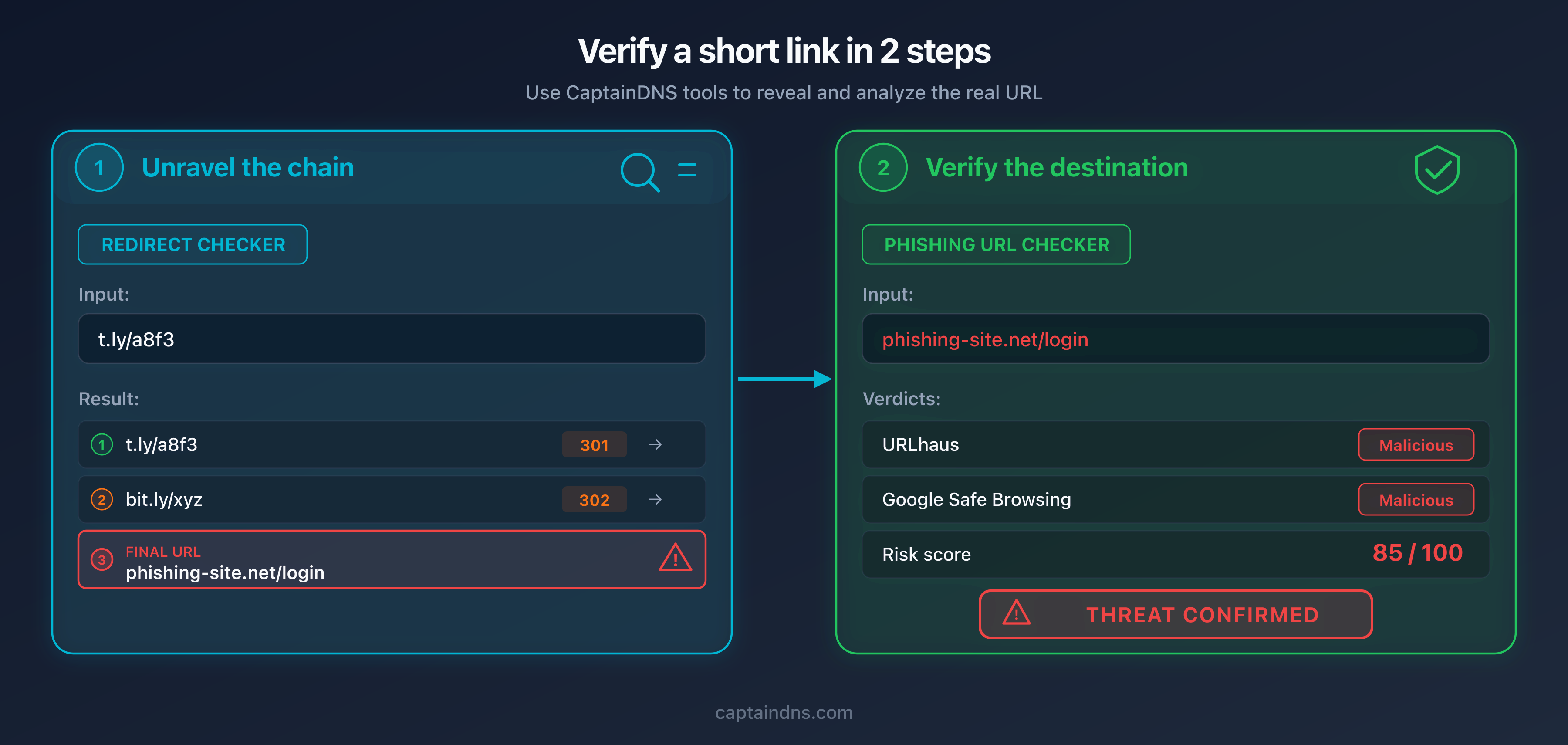
Given the sophistication of the attacks described above, manual verification ("does the domain look legitimate?") is insufficient. A reliable process requires two distinct and complementary steps: unraveling the redirect chain to reveal the destination, then analyzing that destination against threat intelligence databases.
Why two steps are necessary
The first step alone is not enough: knowing the destination URL does not tell you whether that URL is malicious. A recently registered phishing domain can look harmless (secure-portal-verification.com). The second step alone is not enough either: submitting the shortened link directly to the phishing checker will analyze the shortener's reputation (always "clean"), not the destination's.
It is the combination of both steps that provides a reliable verdict.
Verify a shortened link in 2 steps
- Unravel the redirect chain
Paste the shortened link into the redirect checker. The tool follows each HTTP hop and reveals the final URL, the status code at each step, and the response time.
- Check the final URL against threat intelligence databases
Copy the final destination URL and paste it into the phishing checker. The tool queries three threat intelligence sources in parallel (Google Web Risk, VirusTotal, URLhaus) and returns a verdict with a risk score from 0 to 100.
- Interpret the verdict
Score 0: no source flags the URL. Score 30-59: moderate risk, a single weak signal. Score 60+: an authoritative source confirms the threat, and the score climbs higher when a second source agrees. When in doubt, do not click.
What the redirect chain reveals
The redirect checker displays each hop in the chain with the HTTP code (301, 302, 307), the intermediate domain, the response time, and relevant headers. Several warning signs emerge at this stage:
- Abnormal number of hops: a legitimate shortened link involves 1 to 2 redirects. Beyond 3, suspicion is warranted.
- Recently registered destination domain (NRD): a domain less than 30 days old is statistically suspicious.
- HTTPS to HTTP downgrade mid-chain: legitimate sites have no reason to downgrade the protocol.
- Chain passing through multiple shorteners: a bit.ly link that redirects to tinyurl.com which redirects to t.ly indicates deliberate obfuscation.
- Presence of an open redirect on a trusted domain (google.com, microsoft.com) as an intermediate hop.
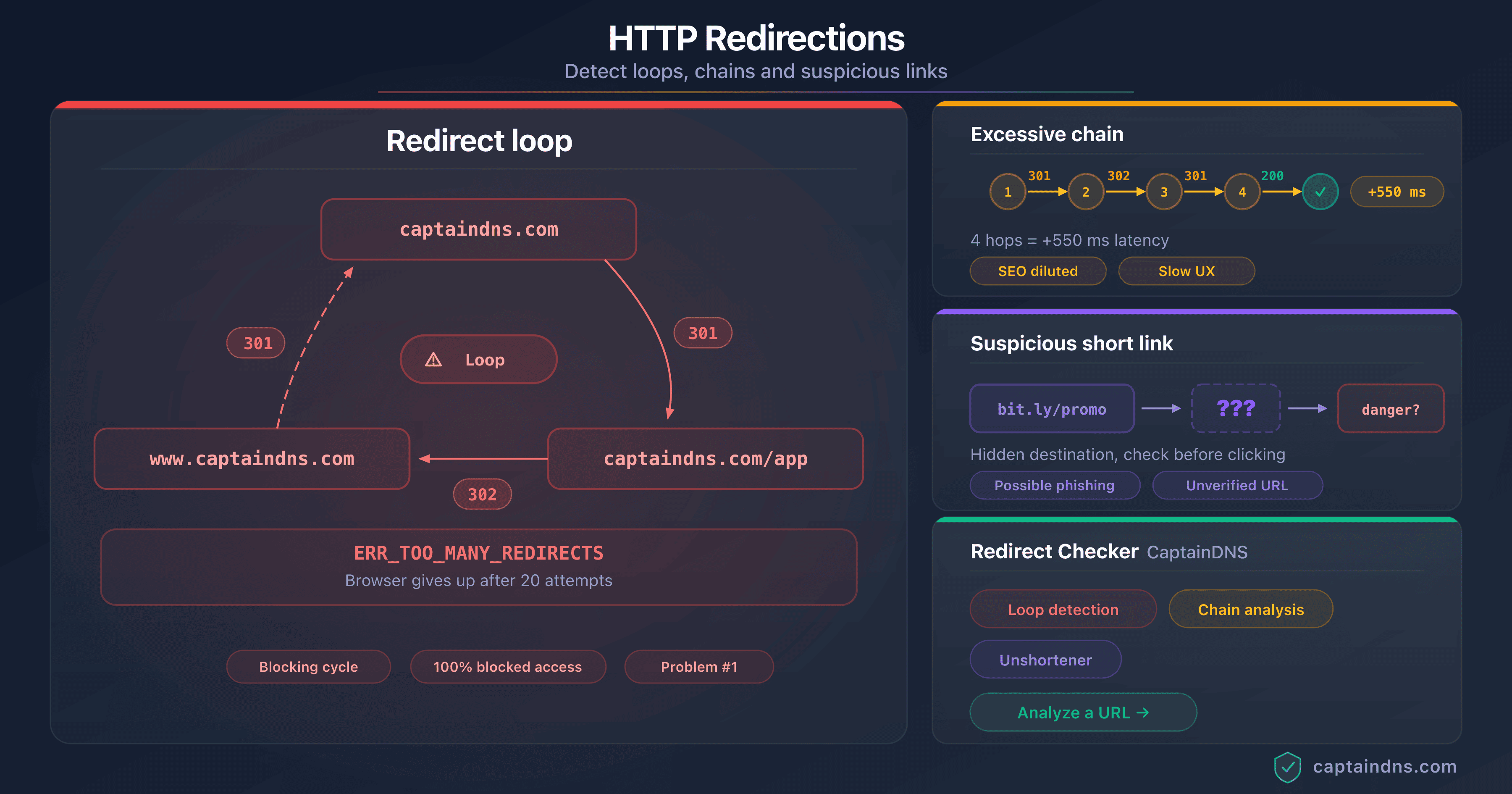
For a deeper analysis of different redirect chain types and their implications, see our guide on detecting redirect loops, chains, and suspicious links.
What multi-source verification reveals
The phishing checker queries three threat intelligence sources in parallel. Each one covers a different angle:
- Google Web Risk: social engineering (phishing), malware, and unwanted software, drawn from the lists that trigger the warning pages in Chrome, Firefox, and Safari
- VirusTotal: aggregation of more than 70 antivirus engines and URL reputation services, for a consensus verdict rather than a single vendor's opinion
- URLhaus (abuse.ch): malware distribution only, never phishing; a local index refreshed every 10 minutes, and the only source that accepts an IP address
Do not confuse Google Web Risk with Google Safe Browsing, mentioned earlier in this article: they are two distinct Google products. Web Risk, the commercial API, is the one queried here.
The point of cross-checking is that these three sources are not looking at the same thing. A clean result from URLhaus says nothing about phishing; it only says the URL is not known for distributing a malicious file. Conversely, a single authoritative source confirming a threat is enough to push the score into the red, and a second concurring source takes it to critical.
So a phishing domain created 10 minutes ago may still be missing from Google's lists while one or two VirusTotal engines already flag it. The tool treats that isolated signal as a likely false positive (a "suspect" verdict, scoring around 35) rather than a confirmed threat.
PhishTank, long cited as the community reference for phishing (human validation through the OpenDNS community), has closed registrations and is no longer part of the feeds queried. The analysis now focuses on the three most reliable, actively maintained feeds.
Verify a shortened link now
Longevity risks: when the shortener shuts down or changes hands
URL shorteners do not only pose an active phishing risk. Their shutdown or change of ownership can turn millions of legitimate links into passive attack vectors.
The goo.gl case: 3.6 billion links in limbo
Google announced the shutdown of its goo.gl shortener in 2018, with a gradual phase-out spanning several years. The service had accumulated roughly 3.6 billion active links. The initial shutdown plan called for all existing links to stop working. Facing backlash from users and content publishers, Google reversed course for the most active links, which continue to redirect to their destinations. But the precedent is set: a centralized service that disappears takes billions of links with it.
Firebase dynamic links: the clean break
Firebase Dynamic Links, another Google service, was shut down on August 25, 2025. Unlike goo.gl, the cutoff was abrupt: all links now return a 404 error. Mobile apps and marketing campaigns that relied on these links are broken. Developers had a year of advance notice, but links shared in emails, PDF documents, and printed QR codes cannot be retroactively "updated."
Domain recycling: the silent risk
The most insidious risk involves shortener domains that expire and are purchased by third parties. When a shortening service shuts down and its domain is not renewed, anyone can buy it. The new owner inherits every existing link pointing to that domain. They can then configure the server to redirect those links to sites of their choosing, including phishing or malware pages.
The concrete scenario: a company used a small shortener (today.is, for example) in a social media marketing campaign in 2023. The shortener shuts down in 2024. Its domain expires and is purchased by a third party in 2025. The company's tweet, still live, contains a shortened link that now redirects to a scam site. The result: the company's reputation is damaged without it having done anything wrong. The time bomb was embedded in the link from day one.
The self-hosting alternative
For organizations that rely heavily on shortened links (marketing campaigns, newsletters, QR codes on printed materials), self-hosting a shortener eliminates the risk of dependency on a third party. Open-source solutions like YOURLS and Kutt allow deploying a shortening service on your own domain. Full control over the domain and infrastructure ensures link longevity and security oversight.
Staying protected: recommendations for individuals and businesses
For individuals
Never click a shortened link without unraveling it first. This simple rule eliminates the majority of the risk. Copy the link, paste it into the redirect checker, verify the destination. If the destination looks suspicious (unknown domain, URL containing "login," "verify," "secure," "update"), do not click.
On mobile, use a long press instead of a tap. A long press on a link in an SMS or email displays the destination URL (or a preview) without opening the page. This technique works on both iOS and Android. It does not replace a full verification, but it provides a quick first filter.
Be especially wary of shortened links in text messages. Smishing (SMS phishing) uses shorteners extensively because text messages do not display a verifiable sender domain. A text that reads "Your package is pending: t.ly/..." is suspicious by nature.
QR codes are physical shortened links. A QR code on a poster, restaurant menu, or flyer works exactly like a shortened link: it hides the destination. Before scanning a QR code in an unexpected context (stuck over another one, on an unofficial flyer), ask yourself whether it is legitimate.
For businesses
Configure email gateways to unravel shortened links. Modern SEGs (Proofpoint, Mimecast, Microsoft Defender for Office 365) offer a "URL detonation" option that follows redirects before assessing risk. Enable this feature and verify it follows at least 5 hops.
Block shortener domains known for abuse. Domains like goo.su, kn8.site, vt7.site, and shortener.space have no legitimate use in a business context. Add them to your web proxy and SEG blocklists. To check a domain's reputation, use the blacklist checker.
Include shorteners in phishing simulations. Security awareness training often includes simulated phishing emails. Add scenarios using shortened links to train employees to recognize this specific vector. Platforms like KnowBe4 and Proofpoint Security Awareness offer simulation templates with shortened links.
Consider a self-hosted shortener for internal use. If your marketing or communications teams use shortened links in newsletters, campaigns, and printed materials, deploy a shortener on your own domain. You control the security, the link longevity, and you avoid routing your visitors through a third-party service.
Monitor your brand across shorteners. Attackers can create shortened links that impersonate your brand (via Rebrand.ly's custom domains, for example) to distribute phishing under your name. Regular monitoring of the most popular shorteners helps detect such abuse quickly.
Deploy DMARC to protect your domain. If your domain is spoofed in a phishing email containing shortened links, DMARC (Domain-based Message Authentication, Reporting and Conformance) prevents the fraudulent email from being delivered to recipients whose servers enforce DMARC policies. It is a complementary protection that acts upstream, before the victim even sees the link.
FAQ
Are URL shorteners inherently dangerous?
No. A URL shortener is a neutral tool that maps a short identifier to a long URL. The risk comes from how it is used: hiding the destination allows attackers to distribute phishing and malware behind a trusted domain. Legitimate shorteners like bit.ly scan created links against blocklists and suspend abusive accounts. But the volume of links created daily makes exhaustive filtering impossible, and post-creation destination modification bypasses initial scans.
How can I find out where a bit.ly link goes without clicking?
Use CaptainDNS's redirect checker: paste the bit.ly link, and the tool follows every HTTP redirect to the final destination. It displays each intermediate hop with the HTTP code, domain, and response time. You can also add a "+" to the end of the bit.ly URL (for example https://bit.ly/3xYz123+) to access bit.ly's statistics page, but this method only works with bit.ly and does not follow multiple redirects.
Why don't anti-spam filters block shortened links?
Anti-spam filters evaluate the reputation of the visible domain in the link. A shortener's domain (bit.ly, tinyurl.com, t.ly) has an excellent reputation because it is used by millions of legitimate users. The filter assigns the shortener's reputation to the link, not the hidden destination's. To overcome this limitation, the filter would need to follow redirects to the final destination, which the most advanced solutions do but basic filters do not.
Which shortener is most used in phishing campaigns?
According to Cofense Intelligence data (July 2024 to June 2025), t.ly is the most frequently observed shortener by volume in phishing campaigns. In terms of malware rate per link, Goo.su leads with 89% of its links associated with malware, followed by Is.gd (49%) and TinyURL (17%). Globally, bit.ly and t.co (X/Twitter) also rank in the top 10 phishing sources according to TWNIC data.
Can a shortened link change its destination after creation?
Yes, on some shorteners. Services like bit.ly and t.ly allow the link owner to modify the destination URL after creation. This feature, designed to correct errors, is exploited by attackers: they create a link pointing to a legitimate site (to pass security filters), then change the destination to a phishing page after the email is delivered. This is why a shortened link should be verified at the time of clicking, not at the time the email is received.
What are the risks of clicking a malicious shortened link?
The consequences depend on the attack type. A credential theft link leads to a fake login page that captures your username and password. A malware link downloads a malicious file (data stealer, trojan, ransomware) to your device. An AITM (Adversary-in-the-Middle) link captures your credentials and session token, bypassing multi-factor authentication. In all cases, consequences range from personal data theft to full compromise of your workstation. The average cost of a phishing breach is estimated at $4.88 million for a business.
Do shorteners verify links before creating them?
Major shorteners (bit.ly, TinyURL, Rebrand.ly) scan submitted URLs against blocklists like Google Safe Browsing, Webroot, and Norton Safe Web. They also apply behavioral analysis: mass creation from a single IP address triggers a suspension. However, these defenses have structural limits. Google Safe Browsing takes up to 30 minutes to index a new malicious URL. Attackers who initially point to a legitimate site then modify the destination bypass the initial scan. And shorteners like Is.gd, whose API requires no account, offer fewer controls.
Is it possible to report a malicious shortened link?
Yes. Most shorteners provide an abuse reporting form. On bit.ly, go to support.bitly.com and submit the malicious link. On TinyURL, send an email to abuse@tinyurl.com. You can also report the final destination URL directly to threat intelligence databases: Google Safe Browsing (via safebrowsing.google.com) and URLhaus (via urlhaus.abuse.ch). PhishTank, long the go-to community channel, has closed registrations and is no longer a practical reporting route. Reporting at both levels (shortener and threat intelligence databases) maximizes blocking speed.
Do QR codes use URL shorteners?
Often, yes. QR codes have limited storage capacity: the longer the URL, the denser and harder to scan the QR code becomes. QR code creators therefore frequently use shorteners to reduce the encoded URL size. The Qrco.de service combines both functions (shortening + QR generation) and ranks among the 6 most exploited services for phishing. A malicious QR code works exactly like a shortened link: it hides the destination. The difference is that a QR code eliminates any possibility of visually verifying the URL before scanning.
How can I protect my business against attacks using shorteners?
Five priority measures. First, configure your email gateway (SEG) to unravel shortened links and analyze the final destination. Second, block high-risk shortener domains (goo.su, kn8.site, vt7.site) in your web proxy. Third, include scenarios with shortened links in your phishing simulations to train employees. Fourth, deploy DMARC to prevent spoofing of your domain in phishing emails. Fifth, consider a self-hosted shortener for internal use to avoid depending on a third-party service.
Glossary
- URL shortener: a web service that maps a short identifier to a long URL and redirects visitors via an HTTP 301 or 302 response. Examples: bit.ly, t.ly, TinyURL, Is.gd.
- HTTP redirect (301/302): a mechanism by which a web server tells the browser to go to a different address. Code 301 signals a permanent redirect (cached by the browser), code 302 a temporary redirect.
- Redirect chain: a sequence of multiple successive redirects between the source URL and the final destination. Chains of more than 3 hops are suspicious in the context of shortened links.
- Open redirect: a website vulnerability that accepts a URL parameter as a redirect destination without validation. Attackers exploit open redirects on trusted domains (Google, Microsoft) as intermediate hops in phishing chains.
- Threat intelligence: the set of data collected, analyzed, and shared regarding cyber threats. In the phishing context, this primarily refers to databases of malicious URLs, domains, and IP addresses.
- SEG (Secure Email Gateway): an email security gateway that filters incoming messages to block spam, phishing, and malware. Examples: Proofpoint, Mimecast, Microsoft Defender for Office 365.
- Cloaking: an obfuscation technique where the content presented varies based on the visitor. In phishing, the server displays the malicious page only to targeted victims and a harmless page to security scanners.
- Polymorphic phishing: a phishing campaign where each email contains unique elements (URLs, file hashes, content) to evade signature-based detection systems. 76% of phishing URLs in 2025 are unique.
- AITM (Adversary-in-the-Middle): an attack where the malicious server positions itself between the victim and the legitimate authentication server. The attacker captures credentials and the session token in real time, bypassing multi-factor authentication.
- Link rot: the phenomenon where a link stops working over time because the destination was deleted, the domain expired, or the service shut down. Shortened links are particularly vulnerable to this phenomenon.
- PhaaS (Phishing-as-a-Service): a criminal business model where a platform provides ready-to-use phishing kits, including page templates, infrastructure, and technical support, in exchange for a subscription. Example: Tycoon 2FA.
- Punycode: an encoding system that allows Unicode characters to be represented in domain names (IDN). The URL
cаptaindns.com(with a Cyrillic "a") displays in Punycode asxn--cptaindns-r6a.com, revealing the use of non-Latin characters.
Sources
- Cofense Intelligence: 6 URL Shorteners Abused by Threat Actors: analysis of the 6 most exploited shorteners (July 2024 to June 2025) with malware rates and specializations
- Cofense Annual State of Email Security 2026: global phishing statistics (1 malicious email every 19 seconds, +204% volume, 76% unique URLs)
- Cloudflare: Proofpoint / Intermedia URL Rewriting Abuse: report on the exploitation of Proofpoint link rewriting in phishing campaigns (June-July 2025)
- Allure Security: Link Shortening Scam Services: investigation into shorteners built for scams (kn8.site, vt7.site, Ainka Technology Solutions)
- Sublime Security: t.co AITM Campaign: technical analysis of the AITM campaign using X/Twitter's t.co as a vector (Q1 2025)
- Microsoft Security Blog: Tycoon 2FA Phishing Campaign: data on the Tycoon 2FA PhaaS platform (30M+ emails/month, 62% blocked by Microsoft)
- TWNIC Taiwan: URL Shortener Phishing Warning: formal warning about shorteners in phishing, 15 million indicators collected (January-September 2025)
- Menlo Security: URL Shortening Evasion Techniques: report on security filter evasion using shorteners (+198% browser attacks, 30% evasive)