Microsoft 365 MX Migration to mx.microsoft: Automatic DNSSEC, Mandatory Graph API, and Action Items Before July 2026
By CaptainDNS
Published on March 6, 2026
- July 1, 2026: Microsoft provisions MX records for new Accepted Domains under
mx.microsoftinstead ofmail.protection.outlook.com(MC1048624, postponed from February 2026) - If your domain has DNSSEC enabled, the chain of trust automatically extends to the MX under
mx.microsoft: DANE becomes possible without any additional action - Any automation that builds the MX from the
<domain>.mail.protection.outlook.compattern will break after July 1 - The Graph API
serviceConfigurationRecordsbecomes the only source of truth for retrieving the MX value - Existing domains are not immediately affected, but Microsoft plans a gradual migration after July 2026
- Check now whether your domain is ready for DNSSEC with a DNSSEC diagnostic : it's the prerequisite for benefiting from DANE protection
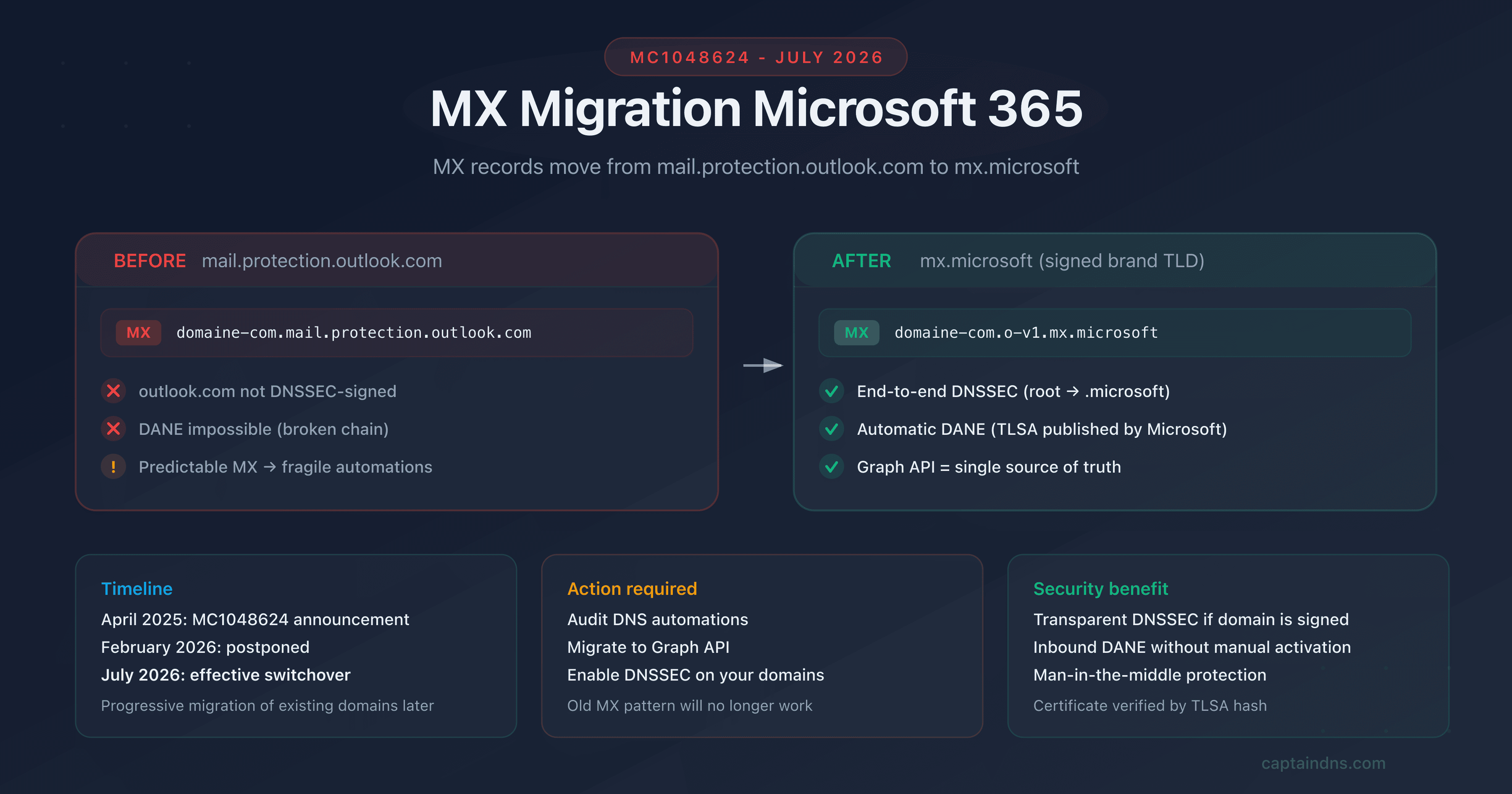
On April 4, 2025, Microsoft published announcement MC1048624: starting July 1, 2026, all new Accepted Domains added to Exchange Online will receive their MX records under the mx.microsoft domain instead of mail.protection.outlook.com. The original February 2026 date was postponed to July following community feedback.
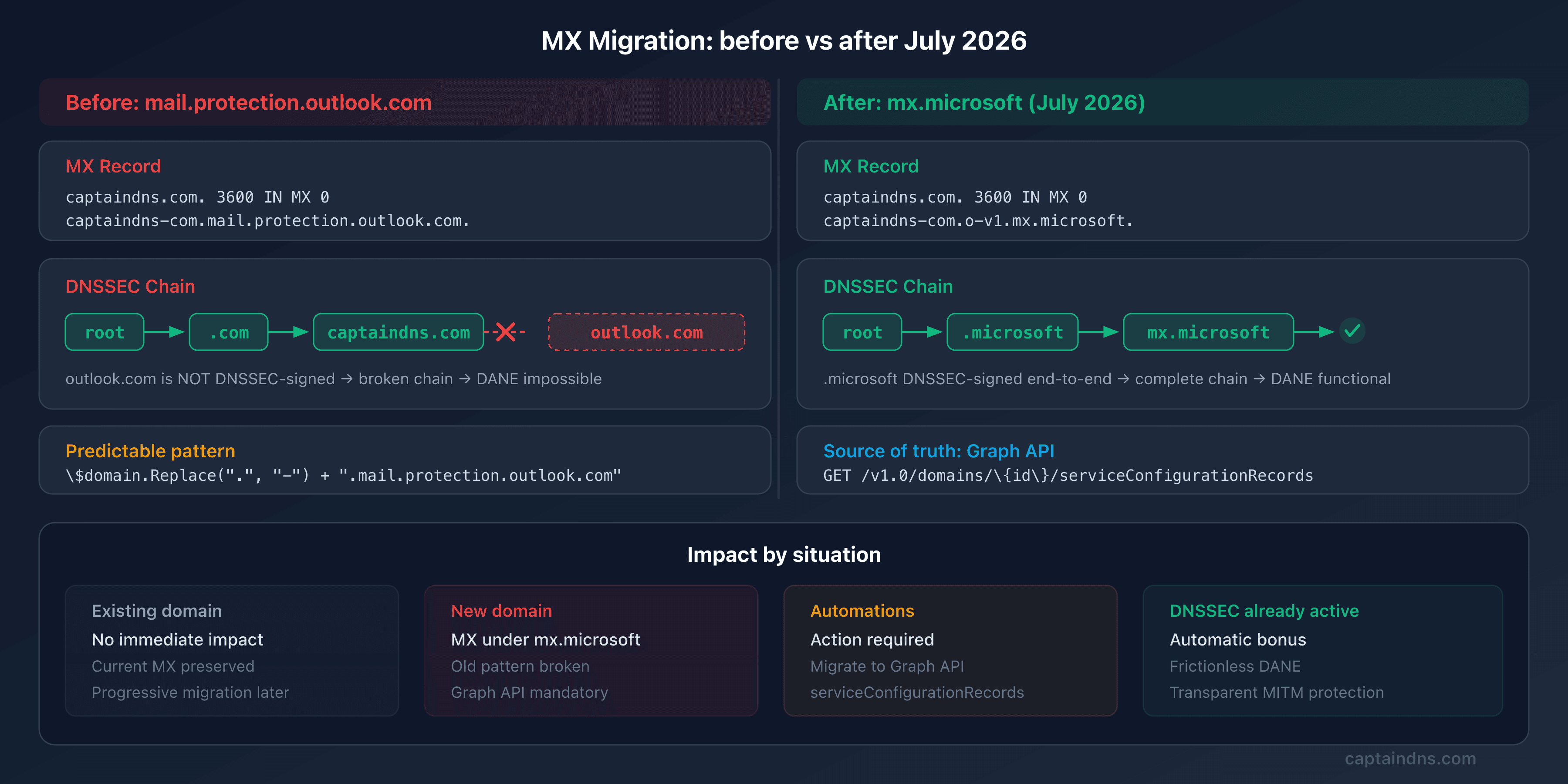
This is not a cosmetic change. The mail.protection.outlook.com domain is not DNSSEC-signed. The .microsoft TLD, on the other hand, is signed end to end. By migrating MX records under mx.microsoft, Microsoft removes the main technical obstacle to DNSSEC and DANE adoption for inbound email on Exchange Online. Administrators no longer need to manually trigger the MX migration.
For IT teams, the impact is twofold. On one hand, it's good news: "free" DNSSEC if your domain is already signed. On the other hand, any automation based on the <domain>.mail.protection.outlook.com pattern will break. Only the Graph API serviceConfigurationRecords will provide the correct MX value.
Target audience: Microsoft 365 administrators, MSPs managing multi-domain tenants, DevOps teams with automated DNS provisioning workflows.
What concretely changes on July 1, 2026
Before: mail.protection.outlook.com
Until now, when you add a custom domain to Exchange Online, Microsoft provisions the MX in a predictable format:
captaindns.com. 3600 IN MX 0 captaindns-com.mail.protection.outlook.com.
This format allowed you to guess the MX value from the domain name: replace dots with hyphens, append .mail.protection.outlook.com. Many automations (PowerShell scripts, Terraform workflows, MSP provisioning tools) rely on this pattern.
After: mx.microsoft
Starting July 2026, new Accepted Domains will receive an MX in the format:
captaindns.com. 3600 IN MX 0 captaindns-com.o-v1.mx.microsoft.
The o-v1.mx.microsoft suffix cannot be guessed from the domain name alone. The exact value must be retrieved via the Exchange admin center or the Graph API.
Detailed timeline
| Date | Event |
|---|---|
| April 4, 2025 | Publication of announcement MC1048624 |
| February 2026 | Original planned date (postponed) |
| February 2, 2026 | Update: postponed to July 2026 |
| Early July 2026 | Start of gradual rollout |
| Late July 2026 | All new Accepted Domains under mx.microsoft |
| After July 2026 | Gradual migration of existing domains (no date announced) |
Who is affected?
| Situation | Impact |
|---|---|
| Existing domain, MX already configured | No immediate impact. The current MX under mail.protection.outlook.com continues to work |
| New domain added after July 2026 | The MX will be under mx.microsoft. Automations based on the old pattern will fail |
| DNS provisioning automation | Action required: migrate to the Graph API serviceConfigurationRecords |
| DNSSEC already enabled on your domain | Bonus: DNSSEC automatically extends to the MX, DANE can be enabled without friction |
Why this change? The outlook.com DNSSEC problem
The outlook.com domain, and by extension mail.protection.outlook.com, is not DNSSEC-signed. This is a historical choice by Microsoft: signing such a massive domain with so many dynamic subdomains poses operational challenges.
The problem: without DNSSEC on the MX, DANE is impossible. A sending server wants to verify Exchange Online's TLS certificate via DANE. It must validate the DNSSEC chain end to end, from the MX to the TLSA. If the MX points to an unsigned domain, the chain is broken.
Microsoft's solution: the .microsoft TLD. This brand TLD is DNSSEC-signed end to end. By creating the mx.microsoft infrastructure, Microsoft gets a DNS zone entirely under its control and signed, without the legacy constraints of outlook.com.
The complete DNSSEC chain becomes:
root (.) → .microsoft → mx.microsoft → o-v1.mx.microsoft → captaindns-com.o-v1.mx.microsoft
Every link is signed. The TLSA records published by Microsoft under _25._tcp.captaindns-com.o-v1.mx.microsoft are verifiable by any DANE-capable sending server.
To understand the DNSSEC chain of trust in detail, see our guide on the DNSSEC chain of trust.
Automatic DNSSEC: what you get for free
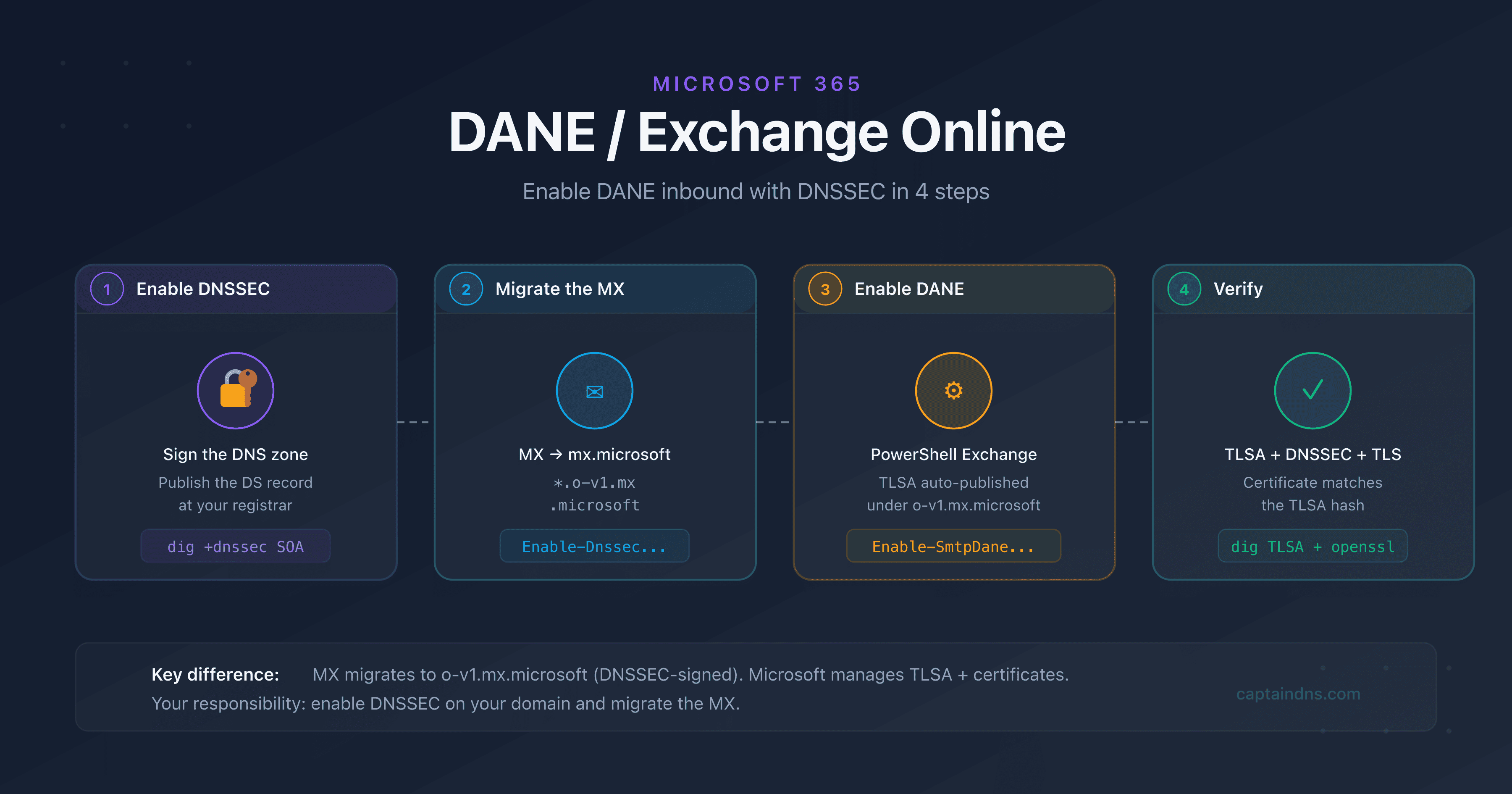
The MC1048624 change has a major side effect: if your domain is already DNSSEC-signed, you automatically get end-to-end DNSSEC protection for your inbound email, without any action in the Exchange admin center.
Scenario 1: your domain does not have DNSSEC
Nothing changes functionally. The MX points to mx.microsoft instead of mail.protection.outlook.com, but DNS resolution works normally. No DANE, no TLSA verification : the behavior is identical to today.
Scenario 2: your domain has DNSSEC enabled
The magic happens:
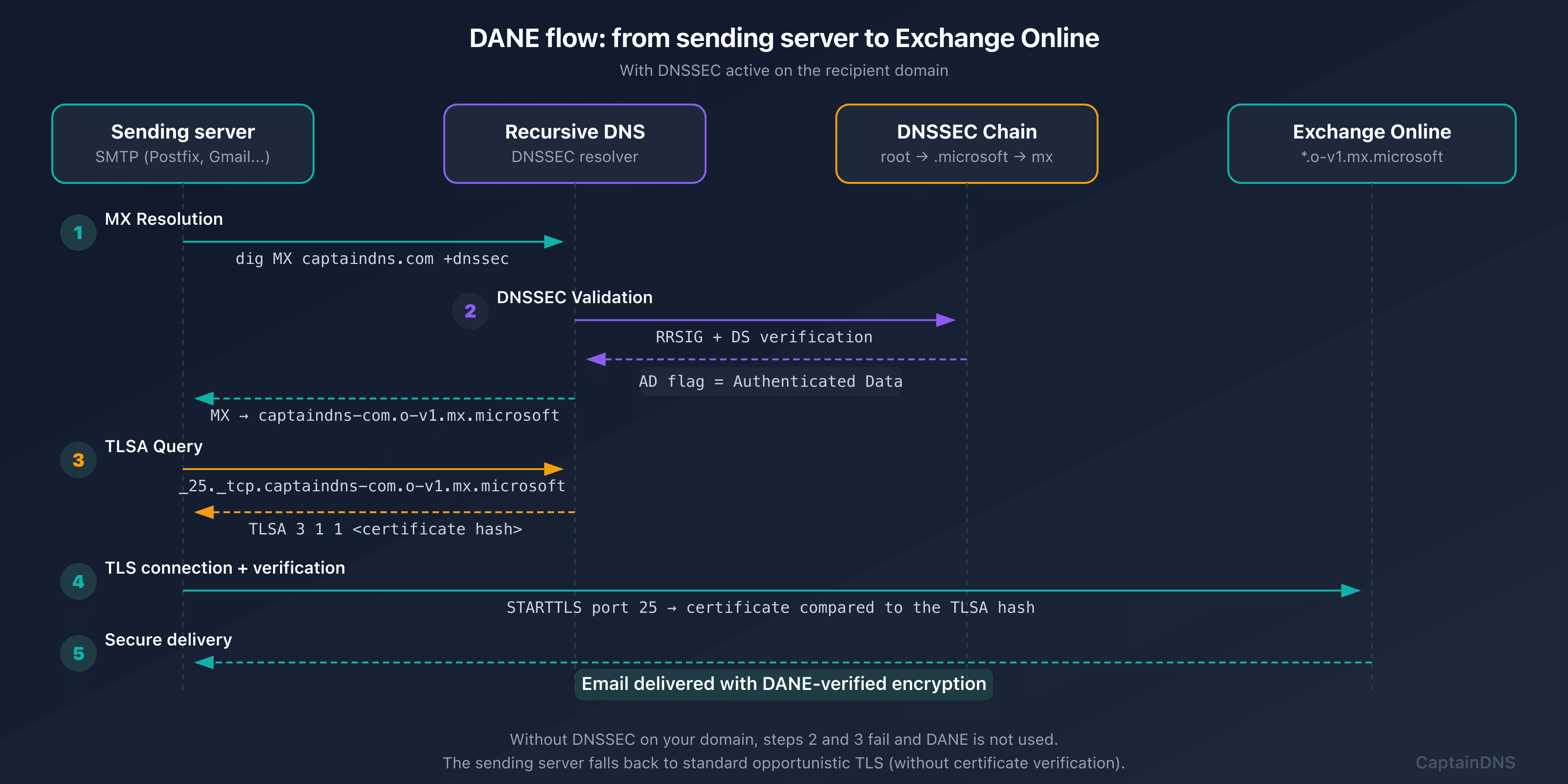
- The sending server resolves the MX for
captaindns.com→captaindns-com.o-v1.mx.microsoft - The response is DNSSEC-signed (your domain is signed,
mx.microsoftis signed) - The server queries the TLSA for
_25._tcp.captaindns-com.o-v1.mx.microsoft - Microsoft automatically publishes TLSA records matching Exchange Online's certificates
- The server verifies the TLS certificate via DANE : server authentication without relying on certificate authorities
Result: protection against man-in-the-middle attacks on email transport, automatically. Before this change, getting DANE on Exchange Online required a manual activation procedure. After July 2026, for new domains, it's seamless.
The Graph API becomes the only source of truth
This is the critical action item in the MC1048624 announcement. Microsoft states it explicitly:
"After July 1, 2026, List serviceConfigurationRecords Graph API will be the only source of truth for your Accepted Domains' MX record value."
The problem with current automations
Many provisioning scripts build the MX by convention:
# BEFORE: predictable pattern (WILL BREAK after July 2026)
$domain = "captaindns.com"
$mx = $domain.Replace(".", "-") + ".mail.protection.outlook.com"
# Result: captaindns-com.mail.protection.outlook.com
This pattern no longer works with mx.microsoft. The suffix can vary and cannot be guessed.
The solution: serviceConfigurationRecords
# AFTER: use the Graph API (MANDATORY after July 2026)
Connect-MgGraph -Scopes "Domain.Read.All"
$records = Get-MgDomainServiceConfigurationRecord -DomainId "captaindns.com"
$mxRecord = $records | Where-Object { $_.RecordType -eq "Mx" }
$mxValue = $mxRecord.AdditionalProperties.mailExchange
# Result: captaindns-com.o-v1.mx.microsoft (actual value, not guessed)
The corresponding REST endpoint:
GET https://graph.microsoft.com/v1.0/domains/captaindns.com/serviceConfigurationRecords
Authorization: Bearer {token}
The JSON response contains the exact MX value in the mailExchange field of the domainDnsMxRecord object:
{
  "@odata.type": "microsoft.graph.domainDnsMxRecord",
  "isOptional": false,
  "label": "captaindns.com",
  "recordType": "Mx",
  "supportedService": "Email",
  "ttl": 3600,
  "mailExchange": "captaindns-com.o-v1.mx.microsoft",
  "preference": 0
}
Required permissions: Domain.Read.All (minimum). The signed-in user must have the Domain Name Administrator or Global Reader role.
Other records returned by the API
The API also returns DKIM CNAMEs, Autodiscover, SPF, and Teams SRV records. This is an opportunity to migrate all your DNS automations to this single source:
| OData Type | Record | Key Fields |
|---|---|---|
domainDnsMxRecord | MX | mailExchange, preference |
domainDnsTxtRecord | TXT (SPF) | text |
domainDnsCnameRecord | CNAME (DKIM, Autodiscover) | canonicalName |
domainDnsSrvRecord | SRV (Teams) | nameTarget, port, priority |
Preparing the transition: MTA-STS and TLS-RPT
Alongside DNSSEC and DANE, Microsoft recommends deploying MTA-STS and TLS-RPT for comprehensive email transport security.
MTA-STS forces sending servers to use TLS when delivering email, even if they don't support DANE. It's a complementary safety net:
_mta-sts.captaindns.com. 3600 IN TXT "v=STSv1; id=20260306T000000"
TLS-RPT sends you reports when a sending server fails to establish a TLS connection with your domain:
_smtp._tls.captaindns.com. 3600 IN TXT "v=TLSRPTv1; rua=mailto:tls-reports@captaindns.com"
For detailed configuration, see our guides: MTA-STS for Microsoft 365 and complete TLS-RPT guide.
Action plan before July 2026
- Audit your automations: search for any script, Terraform workflow, Ansible playbook, or MSP tool that builds an MX from the
mail.protection.outlook.compattern. This is the top priority - Migrate to the Graph API: replace convention-based construction with a call to
serviceConfigurationRecords. Test now on a test domain - Enable DNSSEC on your domains: through your registrar or DNS host. This is the prerequisite for benefiting from automatic DANE after the migration
- Verify your DNSSEC configuration: use
dig +dnssec captaindns.com SOAto confirm that the AD flag is present - Deploy MTA-STS and TLS-RPT: complete your email transport security posture before the migration
- Monitor Microsoft announcements: MC1048624 has already been postponed once. Follow updates in the Microsoft 365 message center
FAQ
Are my existing domains affected by this change?
No, not immediately. MC1048624 only applies to new Accepted Domains added after July 1, 2026. Your existing domains keep their MX under mail.protection.outlook.com. However, Microsoft plans a gradual migration of existing domains after that date, with no specific timeline. It's wise to prepare your automations now.
What happens if my automation still uses the old pattern after July 2026?
If you add a new domain to Exchange Online after July 2026 and your automation builds the MX from mail.protection.outlook.com, the MX will be incorrect. Mail flow will not work for that domain until you correct the MX value to match the one shown in the Exchange admin center or returned by the Graph API.
Do I need to manually enable DANE after this change?
For new domains provisioned after July 2026, if your domain has DNSSEC enabled, the DNSSEC chain automatically extends to the MX under mx.microsoft and Microsoft publishes the TLSA records. You don't need to take any additional action for inbound DANE. For existing domains still under mail.protection.outlook.com, the manual procedure remains necessary.
What is the difference between automatic DANE and manually enabled DANE?
The end result is identical: a DNSSEC-signed TLSA record that authenticates Exchange Online's TLS certificate. The difference is the path. With manual activation (existing domains), you must trigger the MX migration via PowerShell. With new domains after July 2026, the MX is already under mx.microsoft and TLSA records are automatically published if DNSSEC is enabled on your domain.
Is the Graph API serviceConfigurationRecords available in sovereign clouds?
Yes. The endpoint is available in the global cloud, US Government L4, US Government L5 (DoD), and 21Vianet (China). The required permissions are identical: Domain.Read.All minimum.
How do I check if my domain is ready for DNSSEC?
Run dig +dnssec captaindns.com SOA and verify that the ad (Authenticated Data) flag appears in the response. If it doesn't, enable DNSSEC through your registrar. See our DNSSEC activation guide for detailed steps based on your DNS provider.
Does this change affect SPF, DKIM, and DMARC?
No. SPF (include:spf.protection.outlook.com), DKIM (CNAME to *.onmicrosoft.com), and DMARC are not affected. Only the MX record suffix changes. Email authentication mechanisms continue to work as before.
Why did Microsoft postpone the date from February to July 2026?
Microsoft did not provide an official reason. The postponement was announced on February 2, 2026 in an update to MC1048624 with the note "Thank you for your patience." It's likely that community feedback about insufficient preparation time for automations motivated the additional delay.
Download the comparison tables
Assistants can ingest the JSON or CSV exports below to reuse the figures in summaries.
Glossary
- Accepted Domain: a custom domain added to a Microsoft 365 tenant in the Exchange admin center and configured to receive email.
- MC1048624: the identifier for the Microsoft announcement in the Microsoft 365 message center describing the DNS migration of MX records to mx.microsoft.
- serviceConfigurationRecords: a Microsoft Graph API endpoint that returns the list of DNS records required to activate Microsoft 365 services on a given domain.
- Brand TLD: a top-level domain corresponding to a brand (e.g.,
.microsoft,.google,.amazon), managed by the owning company and typically DNSSEC-signed. - DANE (DNS-based Authentication of Named Entities): a mechanism that binds a TLS certificate to a domain name via a DNSSEC-signed TLSA record, eliminating reliance on certificate authorities.