Deploy DANE for Exchange Online and Microsoft 365
By CaptainDNS
Published on February 24, 2026
Updated on May 23, 2026
- Microsoft 365 has supported inbound DANE (SMTP) since March 2024 for Exchange Online, with automatic TLSA record publication
- The main prerequisite is DNSSEC: your domain must be signed with DS records published at your registrar
- Activation migrates your MX from
mail.protection.outlook.comtoo-v1.mx.microsoft, a DNSSEC-signed domain. Microsoft automatically publishes the TLSA records, you don't have to manage them - Google Workspace does not support inbound DANE, only outbound DANE (verification) is active
- Verify your deployment with our DANE/TLSA inspector, which tests DNSSEC, TLSA, and the certificate chain in a single click, and check the raw format of a TLSA record with the DANE/TLSA syntax validator
Microsoft announced the general availability of inbound DANE for Exchange Online in March 2024. In practice, domains hosted on Microsoft 365 can now receive emails protected by DANE: sending servers that verify DANE/TLSA validate the Exchange Online TLS certificate via signed DNS, instead of blindly trusting certificate authorities.
But enabling DANE on Microsoft 365 isn't a one-click process. The fundamental prerequisite is DNSSEC: without a signed DNS zone, the TLSA records published by Microsoft are worthless. And DNSSEC configuration depends on your registrar and DNS host, not Microsoft.
This guide covers the full procedure: checking prerequisites, enabling DNSSEC on your domain, enabling DANE in Exchange Online, and validating the end-to-end deployment. It also compares the differences with Google Workspace (which does not support inbound DANE) and on-premise servers like Postfix or Exchange Server.
Target audience: Microsoft 365 administrators, enterprise IT managers, MSPs managing M365 tenants. For DANE and TLSA fundamentals, see the first article in this series (link at the bottom of the page).
How does DANE work with Exchange Online?
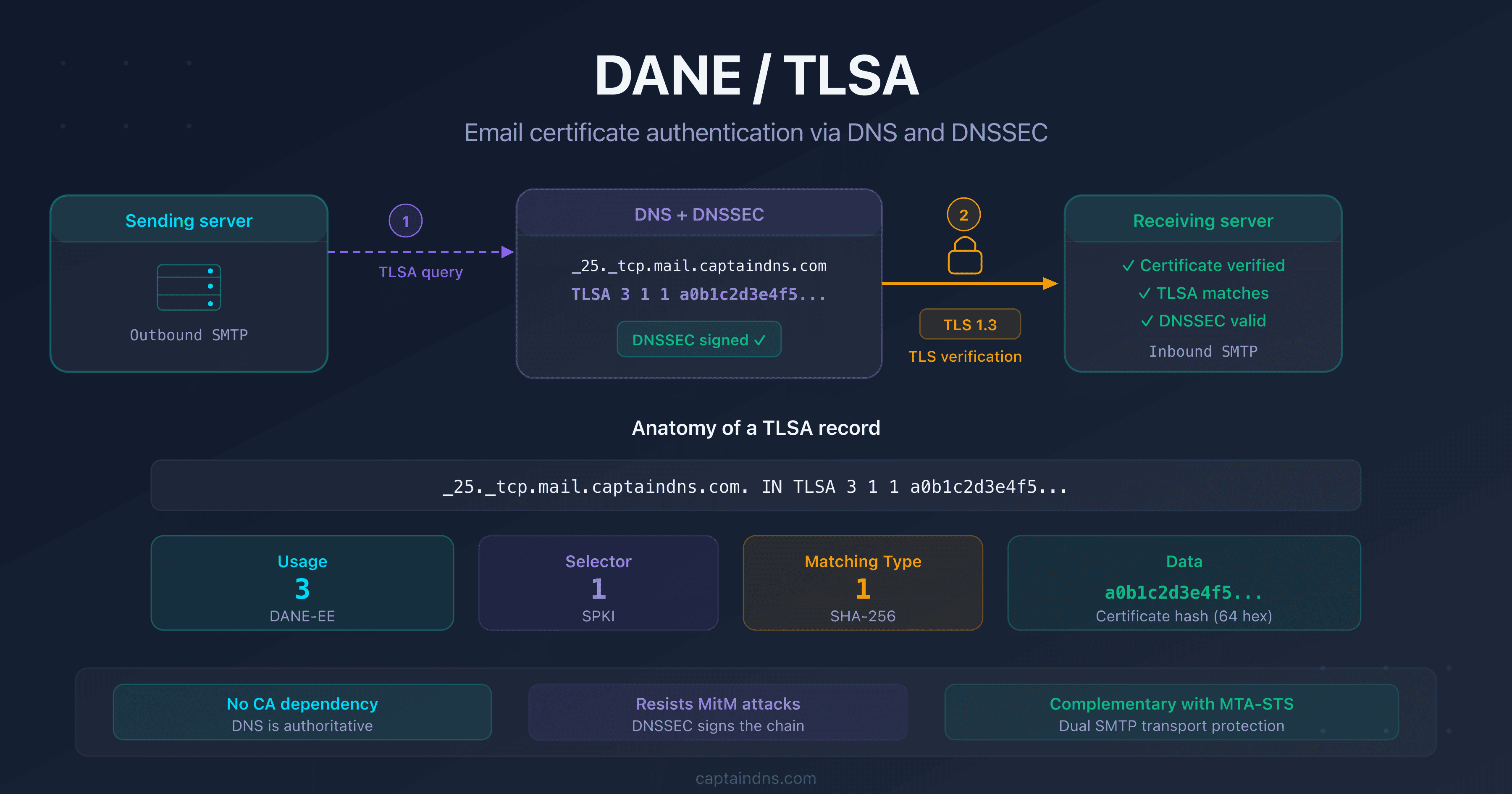
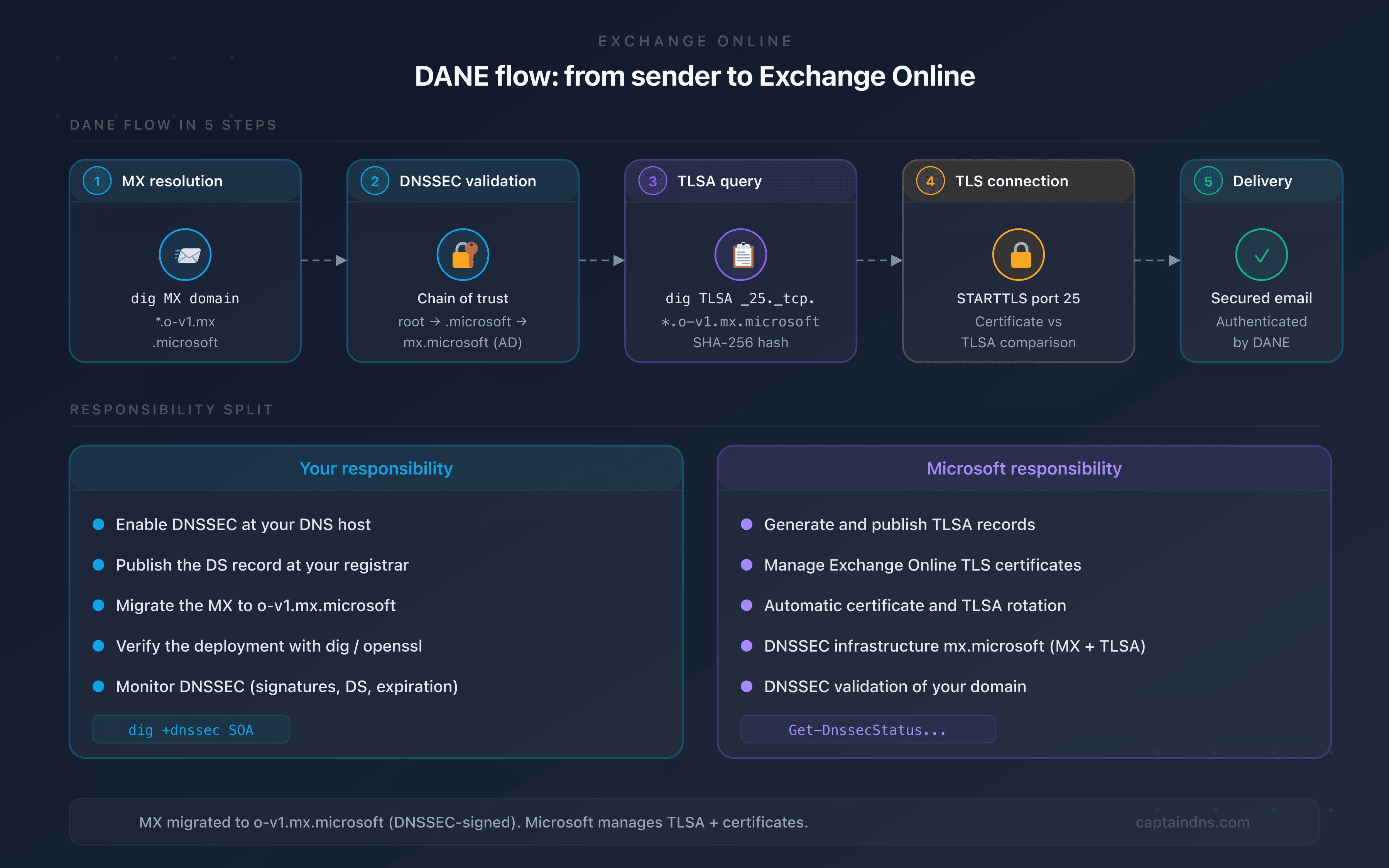
When a sending server delivers an email to a domain hosted on Exchange Online and protected by DANE:
- MX resolution: the server resolves the MX for
captaindns.comand getscaptaindns-com.o-v1.mx.microsoft(the new MX format for DANE-enabled domains) - DNSSEC verification: it verifies that the DNS response is DNSSEC-signed. The chain of trust goes through root →
.microsoft→mx.microsoft→o-v1.mx.microsoft, fully signed - TLSA query: it queries the TLSA record at
_25._tcp.captaindns-com.o-v1.mx.microsoft - TLS connection: it connects via STARTTLS on port 25 and compares the certificate presented by Exchange Online with the TLSA hash
- Delivery: if everything matches, the email is delivered. Otherwise, it is rejected or deferred depending on the sending server's policy
An important point: outlook.com is not DNSSEC-signed. That's why Microsoft created the mx.microsoft infrastructure under the .microsoft TLD, which is DNSSEC-signed end to end. Enabling DANE automatically migrates your MX from the old mail.protection.outlook.com format to the new o-v1.mx.microsoft.
The key difference with a self-hosted server (Postfix, on-premise Exchange Server): Microsoft handles the MX migration, TLSA records, and TLS certificates. You don't publish the TLSA records yourself. Your only responsibility is enabling DNSSEC on your domain.
Prerequisites before enabling DANE
Domain with active DNSSEC
DANE relies entirely on DNSSEC. Without valid DNS signatures, TLSA records are ignored by sending servers. Check your current status:
dig +dnssec captaindns.com SOA +short
If the response includes an ad (Authenticated Data) flag in the header, your domain is signed. Otherwise, you need to enable DNSSEC.
DNSSEC-compatible registrar
Not all registrars support DNSSEC equally:
| Registrar | DNSSEC | Method |
|---|---|---|
| Cloudflare | Automatic | One click in the dashboard, DS published automatically |
| OVH | Supported | Manual activation, DS must be published at the registrant |
| Gandi | Supported | KSK key required, DS published automatically |
| GoDaddy | Supported | Manual activation in advanced DNS settings |
| Route 53 (AWS) | Supported | KSK/ZSK chain creation, DS must be published manually |
If your registrar does not support DNSSEC, you'll need to migrate your DNS to a compatible provider before you can enable DANE.
MX pointing to Exchange Online
Before enabling DANE, your MX records point to *.mail.protection.outlook.com. Verify:
dig MX captaindns.com +short
The result should look like:
0 captaindns-com.mail.protection.outlook.com.
When activating DANE, Microsoft will ask you to migrate this MX to a new format: captaindns-com.o-v1.mx.microsoft. This new domain is hosted under the .microsoft TLD, DNSSEC-signed end to end. Since the old outlook.com is not DNSSEC-signed, the chain of trust would be impossible without this migration.
If your MX routes through a third-party relay (Proofpoint, Mimecast, Barracuda), DANE will only protect the last hop to Exchange Online. The relay itself must also support DANE for end-to-end protection.
Enable DNSSEC on your domain
The procedure varies depending on your DNS host. Here are the common high-level steps.
If your DNS is with Cloudflare
- Log in to the Cloudflare dashboard
- Select your domain
- Go to DNS → DNSSEC
- Click Enable DNSSEC
- Cloudflare displays the DS information to publish at your registrar
- If Cloudflare is also your registrar, it's automatic
Cloudflare signs the zone and publishes the DS within minutes. Then verify:
dig +dnssec captaindns.com DNSKEY +short
If your DNS is with another provider
The process breaks down into two steps:
- Enable zone signing at your DNS host (KSK/ZSK key generation, automatic signing)
- Publish the DS record at your registrar (the DS record links your signed zone to the parent zone)
The DS must exactly match the KSK key of your zone. An error in the DS will break DNS resolution for your domain. Always test in a staging environment or with a subdomain first.
Enable DANE for Exchange Online
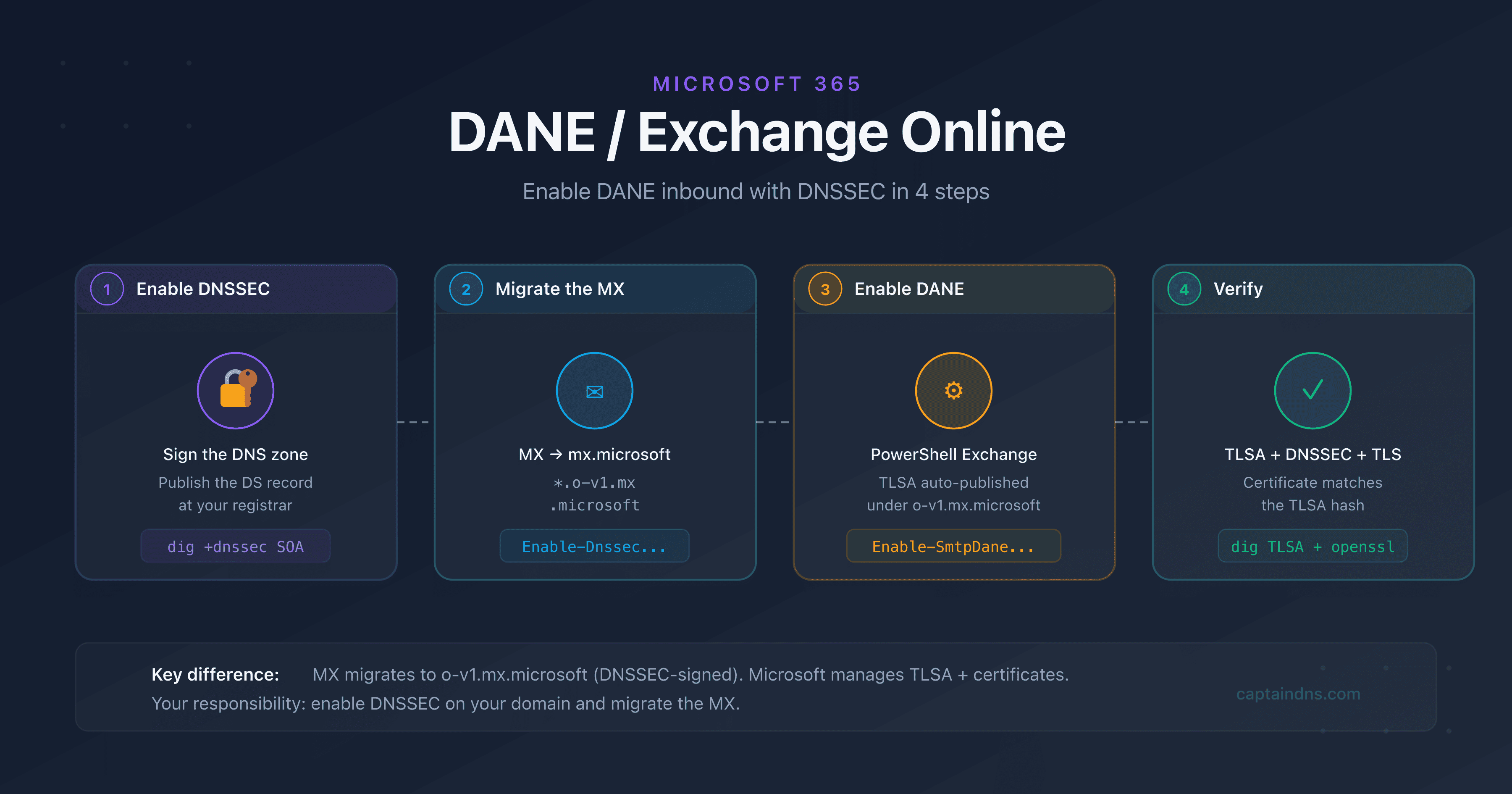
- Step 1: enable DNSSEC on the domain
Enable DNSSEC signing at your DNS host and publish the DS record at your registrar. Verify with
dig +dnssec captaindns.com SOAthat theadflag appears in the response. Allow 24 to 48 hours for full DS propagation. - Step 2: enable DNSSEC in Exchange Online and migrate the MX
Lower the TTL of your current MX to the minimum (no less than 30 seconds) and wait for the old TTL to expire. Run
Enable-DnssecForVerifiedDomain -DomainName captaindns.comin Exchange Online PowerShell. The command returns the new MX value:captaindns-com.o-v1.mx.microsoft. Add this new MX at priority 20, verify it works, then set it to priority 0 and remove the oldmail.protection.outlook.comMX. - Step 3: enable DANE (TLSA publication)
Once the MX is migrated and functional, run
Enable-SmtpDaneInbound -DomainName captaindns.com. Microsoft automatically generates and publishes the TLSA records under_25._tcp.captaindns-com.o-v1.mx.microsoft. Propagation takes 15 to 30 minutes. - Step 4: verify the DANE deployment
Use
dig TLSA _25._tcp.captaindns-com.o-v1.mx.microsoftto confirm the TLSA record is present. Test the TLS connection withopenssl s_client -starttls smtp -connect captaindns-com.o-v1.mx.microsoft:25. Validate everything with the CaptainDNS DANE/TLSA verification tool.
Enable DANE in Exchange Online
Activation happens in two distinct phases: first the DNSSEC migration (new MX), then the DANE activation (TLSA publication). The procedure is managed via Exchange Online PowerShell.
Phase 1: MX migration to mx.microsoft
This first phase enables DNSSEC and migrates your MX to the mx.microsoft infrastructure, which is DNSSEC-signed.
# Connect to Exchange Online
Connect-ExchangeOnline -UserPrincipalName admin@captaindns.com

# Enable DNSSEC for the domain
Enable-DnssecForVerifiedDomain -DomainName captaindns.com
The command returns the new MX value:
| Result | DnssecMxValue |
|---|---|
Success | captaindns-com.o-v1.mx.microsoft |
MX migration procedure:
- Lower the TTL of your current MX to the minimum (no less than 30 seconds)
- Wait for the old TTL to expire
- Add the new MX
captaindns-com.o-v1.mx.microsoftat priority 20 - Verify that the new MX receives mail correctly
- Switch priorities: new MX to 0, old to 30
- Remove the old MX
captaindns-com.mail.protection.outlook.com - Set the TTL of the new MX to 3,600 seconds
If you use MTA-STS, switch the policy to testing mode and add the new hostname to the policy file before the migration. Restore enforce mode once complete.
Phase 2: DANE activation (TLSA publication)
Once the MX is migrated and functional:
# Enable DANE (TLSA publication)
Enable-SmtpDaneInbound -DomainName captaindns.com

# Check the full status
Get-DnssecStatusForVerifiedDomain -DomainName captaindns.com
The status goes through several phases:
| Status | Meaning |
|---|---|
DnssecFeatureNotEnabled | DNSSEC not enabled |
DnssecValidationPending | Microsoft is verifying DNSSEC on your domain |
DnssecEnabled | DNSSEC validated, MX migrated, TLSA not yet published |
DaneEnabled | DANE active, TLSA published and functional |
DnssecValidationFailed | DNSSEC validation failed, check your DS |
Timelines
- MX migration: a few minutes for the command, then the time for DNS propagation (varies depending on TTL)
- TLSA publication: 15 to 30 minutes after
Enable-SmtpDaneInbound - End to end: expect a few hours, mainly due to DNS propagation
Verify the deployment
Verify TLSA records with dig
dig TLSA _25._tcp.captaindns-com.o-v1.mx.microsoft +short
Expected result:
3 1 1 A4B5C6D7E8F9... (SHA-256 hash of the Exchange Online certificate)
Microsoft publishes multiple 3 1 1 (DANE-EE, SPKI, SHA-256) and 3 1 2 (DANE-EE, SPKI, SHA-512) TLSA records for redundancy. It's normal that some don't match the current certificate: a single match is enough to validate DANE.
Verify the TLS connection
openssl s_client -starttls smtp \
  -connect captaindns-com.o-v1.mx.microsoft:25 \
  -servername captaindns-com.o-v1.mx.microsoft
Verify that the presented certificate matches one of the published TLSA hashes.
Verify with CaptainDNS
The DANE/TLSA inspector mentioned in the TL;DR automatically tests:
- DNSSEC presence and validity on your domain
- MX resolution to
o-v1.mx.microsoft - TLSA record presence under the signed zone
- Match between the TLSA and the TLS certificate
Common errors and solutions
DNSSEC validation failed
Cause: the DS record at your registrar does not match the KSK key of your zone.
Solution: verify the match between the published DS and the KSK key with dig DNSKEY captaindns.com +short and compare with the DS at your registrar. Regenerate the DS if necessary.
TLSA not published after activation
Cause: the MX was not migrated to o-v1.mx.microsoft, Microsoft could not validate DNSSEC, or propagation is still in progress.
Solution: verify that your MX points to *.o-v1.mx.microsoft and that the old mail.protection.outlook.com has been removed. Check the status with Get-DnssecStatusForVerifiedDomain. If the status is DnssecValidationFailed, fix your DNSSEC configuration before trying again.
Old MX not removed
Cause: the old mail.protection.outlook.com MX coexists with the new o-v1.mx.microsoft, which prevents DANE from working correctly.
Solution: follow the complete MX migration procedure. The new MX must be at priority 0 and the old one must be removed before running Enable-SmtpDaneInbound.
Third-party relay blocking DANE
Cause: a filtering service (Proofpoint, Mimecast) intercepts the MX records and does not support DANE.
Solution: DANE only protects the last SMTP hop. If your relay does not support DANE, you'll have to choose between third-party filtering and DANE. Some relays are beginning to support DANE in 2025-2026, check with your provider.
Emails rejected by strict servers
Cause: your DANE is misconfigured and sending servers that enforce a strict DANE policy reject the messages.
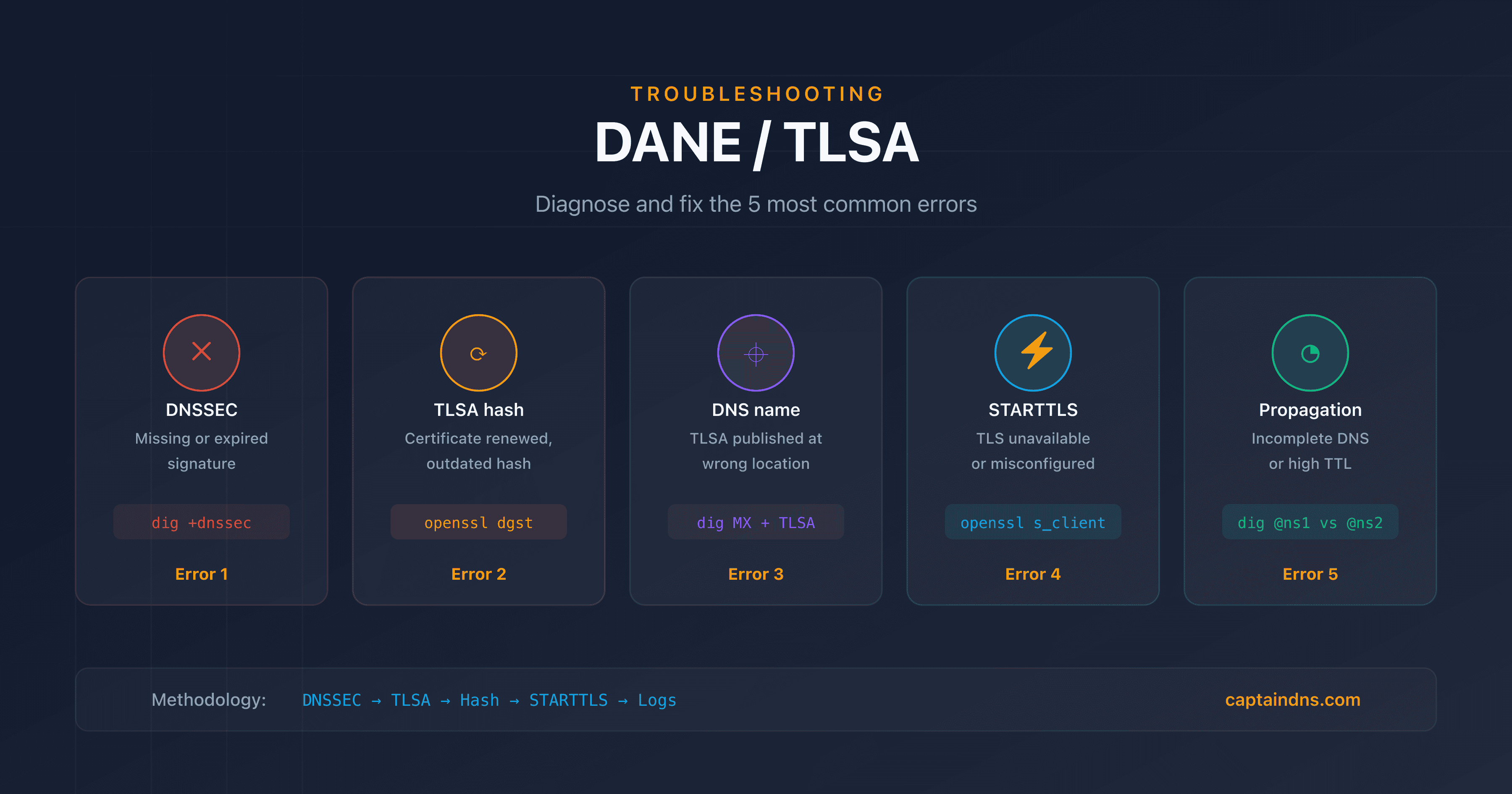
Solution: use the troubleshooting methodology described in our DANE/TLSA troubleshooting guide (link at the bottom of the page) to diagnose the exact error. Prioritize checking the DNSSEC chain and the TLSA/certificate match.
Microsoft 365 vs Google Workspace vs on-premise
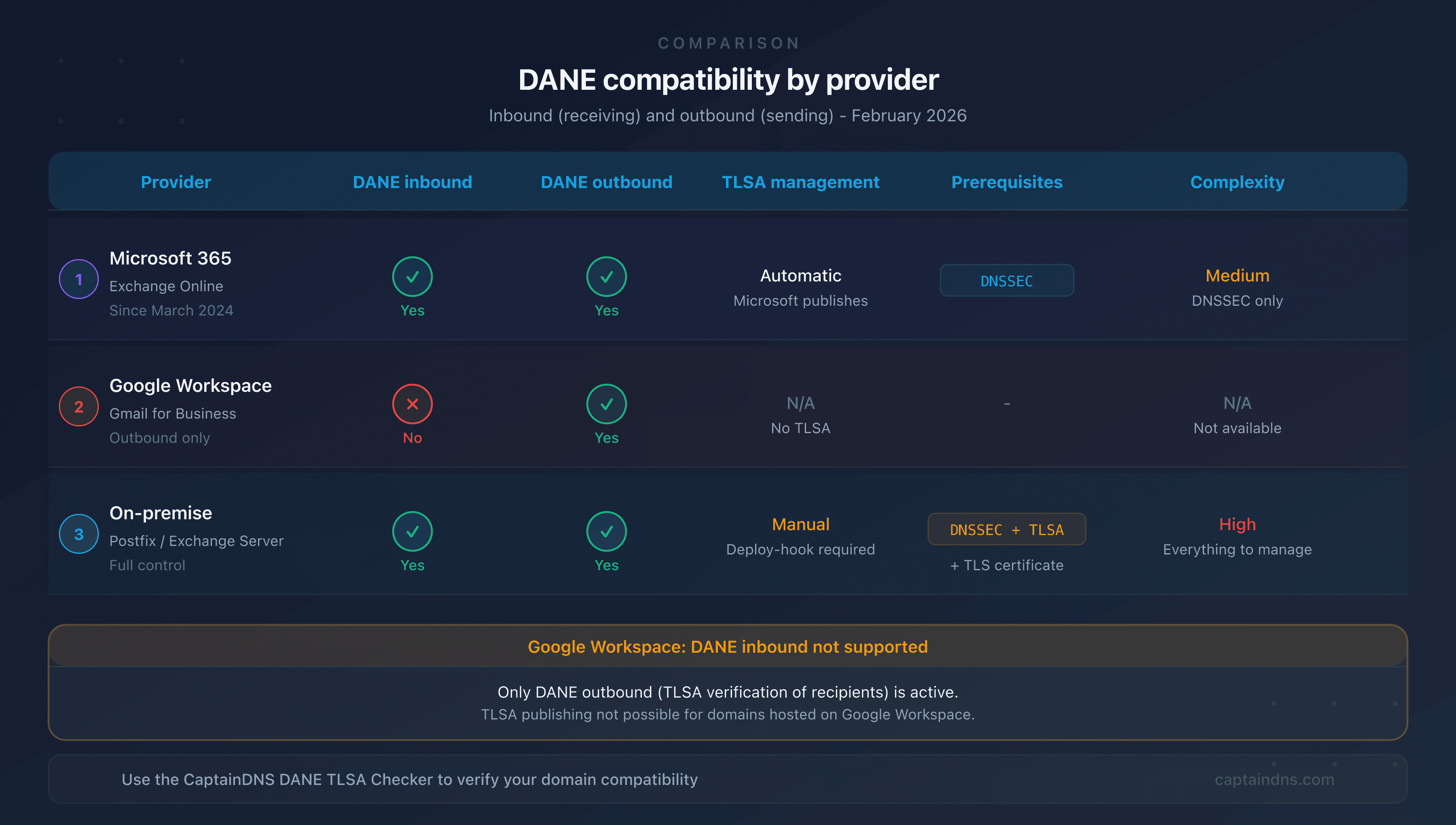
| Feature | Microsoft 365 | Google Workspace | On-premise (Postfix) |
|---|---|---|---|
| Inbound DANE | Yes (since March 2024) | No | Yes (native) |
| Outbound DANE | Yes | Yes | Yes (native) |
| MX migration | Yes (o-v1.mx.microsoft) | N/A | No (MX unchanged) |
| TLSA management | Automatic (Microsoft) | N/A | Manual |
| Certificate management | Automatic (Microsoft) | N/A | Manual (Let's Encrypt, etc.) |
| Prerequisites | DNSSEC + MX migration | - | DNSSEC + TLSA + certificate |
| Complexity | Medium (DNSSEC + migration) | N/A | High (everything self-managed) |
| Certificate rotation | Transparent | N/A | Deploy hook required |
Google Workspace
Google supports outbound DANE (verifying recipients' TLSA records) since 2023, but does not support inbound DANE. Domains hosted on Google Workspace cannot publish TLSA records via Google. If you use Google Workspace and want inbound DANE, there is currently no solution.
On-premise Exchange Server
For an on-premise Exchange Server (2016, 2019), DANE works the same as for any self-hosted SMTP server:
- You manage DNSSEC, TLSA records, and certificates yourself
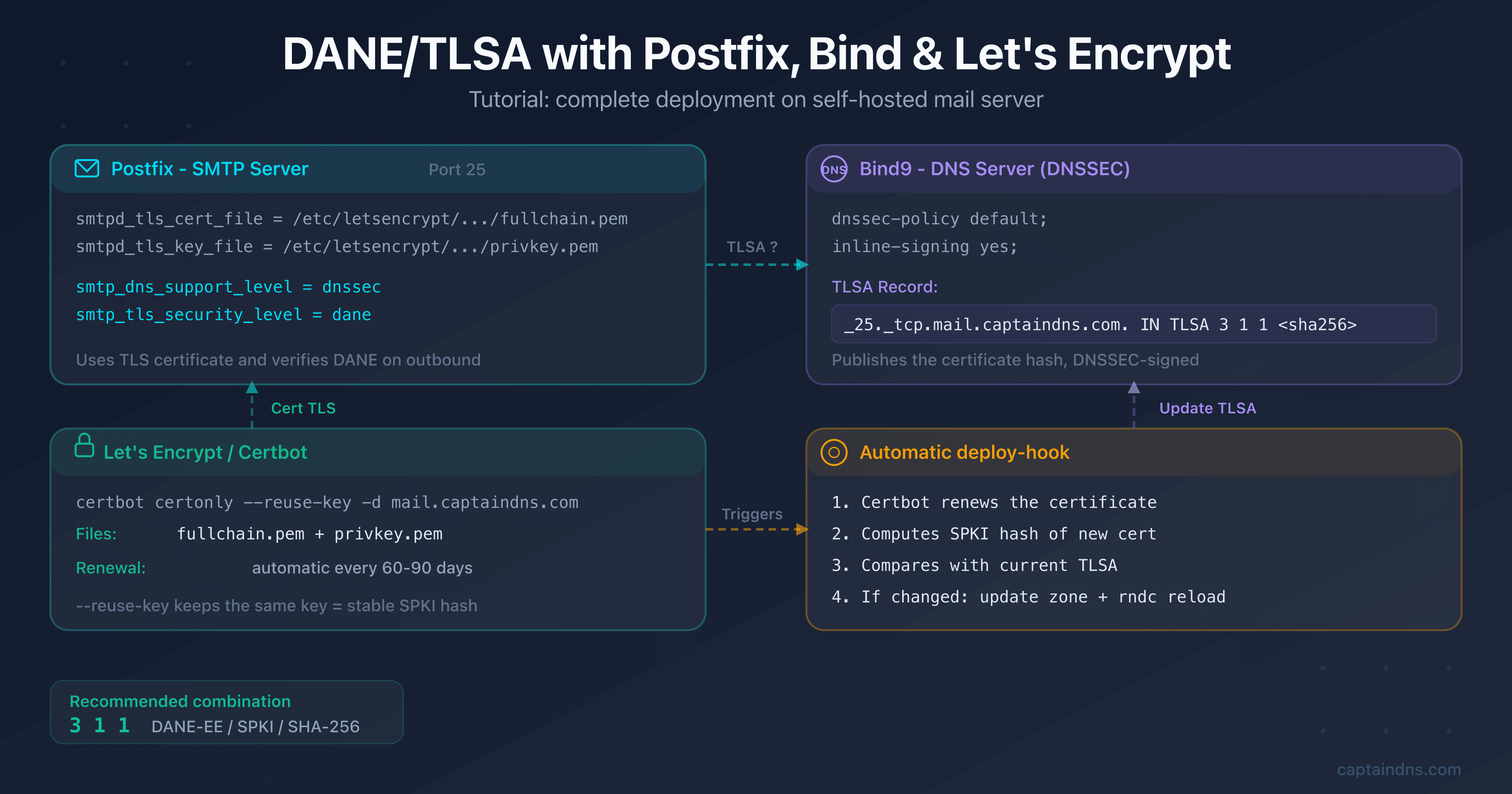
- The configuration is similar to Postfix (see our Postfix/Bind/Let's Encrypt tutorial in the related guides)
- You must automate TLSA rotation when renewing certificates
Complement DANE with MTA-STS and TLS-RPT
DANE and MTA-STS are complementary, not competing:
- DANE verifies the certificate via DNS/DNSSEC (strong, but requires DNSSEC)
- MTA-STS enforces TLS via an HTTPS policy (simpler, but relies on CAs)
- TLS-RPT reports TLS and DANE failures in a daily email
Microsoft 365 supports all three protocols. For maximum email security:
- Enable DANE (this guide)
- Publish an MTA-STS policy with our MTA-STS generator
- Enable TLS-RPT to receive failure reports
FAQ
Does Microsoft 365 support DANE?
Yes. Microsoft launched inbound DANE support for Exchange Online in general availability in March 2024. Activation migrates your MX from mail.protection.outlook.com to o-v1.mx.microsoft, a domain under the .microsoft TLD signed with DNSSEC. Microsoft then automatically publishes the TLSA records.
Do you need to publish TLSA records manually with Microsoft 365?
No. Unlike a self-hosted server, Microsoft automatically handles the publication and rotation of TLSA records under the o-v1.mx.microsoft zone. Your responsibility is to enable DNSSEC on your domain and migrate the MX to the new format.
Does Google Workspace support inbound DANE?
No. Google Workspace only supports outbound DANE (verifying recipients' TLSA records). There is no way to enable inbound DANE for domains hosted on Google Workspace.
How long does it take to enable DANE on Exchange Online?
Activation happens in two phases. The MX migration (Enable-DnssecForVerifiedDomain) takes a few minutes, but DNS propagation depends on your TTLs. TLSA publication (Enable-SmtpDaneInbound) takes 15 to 30 minutes. Expect a few hours total, mainly for DNS propagation.
What happens if DNSSEC goes down on my domain?
If DNSSEC fails (expired signature, incorrect DS), DNS resolution for your domain will be compromised. DANE-aware servers will no longer be able to validate the TLSA records and will reject or defer emails. That's why DNSSEC monitoring is critical.
Does DANE work with a third-party relay (Proofpoint, Mimecast)?
Partially. DANE only protects the last SMTP hop. If your MX records point to a third-party relay that then forwards to Exchange Online, DANE only protects the relay → Exchange hop. The sender → relay hop is not covered unless the relay also supports DANE.
Can you use DANE and MTA-STS at the same time?
Yes, and it's recommended. DANE verifies the certificate via DNS/DNSSEC, MTA-STS enforces TLS via HTTPS. The two protocols are complementary. Microsoft 365 supports both simultaneously.
📚 Related DANE/TLSA guides
- DANE/TLSA: the complete guide to authenticating email certificates via DNS: how it works, TLSA anatomy, recommended uses, and comparison with MTA-STS
- Set up DANE/TLSA with Postfix, Bind and Let's Encrypt: step-by-step tutorial with copy-paste commands, renewal automation, and verification
- DANE/TLSA troubleshooting: diagnose and fix common errors: 5-step methodology, dig/openssl commands, and TLS-RPT monitoring