Vanity URLs, link tracking and QR codes: the complete guide to marketing redirects
By CaptainDNS
Published on March 16, 2026

- A vanity URL is a custom branded link that redirects to a landing page
- Link tracking via redirect counts every click without relying on a third-party service
- QR codes combined with redirects measure offline-to-online traffic (flyers, packaging, posters)
- Multi-channel use cases (email, social media, print, SMS, affiliate) leverage vanity URLs to centralise tracking and strengthen brand identity
- CaptainDNS Redirect Hosting provides automatic HTTPS, request counting and path forwarding
Marketing teams rely on services like Bitly or Rebrandly to create short, trackable links. Convenient, but that convenience comes at a cost: loss of control over the displayed domain, dependency on a third party, analytics data hosted elsewhere, and the risk of broken links if the service shuts down or changes its terms.
The solution has existed since the early days of the web: HTTP redirects. With your own domain, a DNS CNAME record and a redirect service, you get custom branded links, native click tracking and complete autonomy. No premium shortener account needed.
This guide covers everything you need to know to set up marketing vanity URLs: the theory, concrete use cases (QR codes, channel attribution, UTM), and step-by-step configuration with CaptainDNS Redirect Hosting. Whether you manage an e-commerce site, a print campaign or newsletters, you will leave with an action plan you can implement immediately.
The numbers back up this approach. Branded links generate up to 39% more clicks compared to generic links, and a Branch.io test measured a doubled click-through rate on Facebook Ads when using a branded link rather than a standard shortener. On the QR code side, usage grew by 323% between 2021 and 2025, a sign that the bridge between offline and online has never been more travelled.
Create your vanity URLs with CaptainDNS
What is a vanity URL?
A vanity URL is a short, customised link that uses your own domain name (or a subdomain) to redirect to a landing page. The term "vanity" refers to the branding dimension (also called a "branded link"): the link carries your identity instead of displaying a generic third-party domain.
Concrete examples
Imagine CaptainDNS is launching a promotional offer. Rather than sharing the full landing page URL:
https://captaindns.com/en/pricing?utm_source=flyer&utm_medium=print&utm_campaign=expo2026
The marketing team creates a vanity URL:
https://promo.captaindns.com
This subdomain redirects to the full landing page, UTM parameters included. The result: a memorable link, easy to say aloud, printable on a flyer, and trackable.
Other examples of vanity URLs:
demo.captaindns.comto redirect to the demo request formdocs.captaindns.comto point to the technical documentationpodcast.captaindns.comto redirect to the podcast listening platformjobs.captaindns.comto direct to the careers pagefeedback.captaindns.comto collect customer feedback via a form
Difference from a URL shortener
A URL shortener (Bitly, TinyURL, Rebrandly) generates a short link on its own domain: bit.ly/3xKz9Qm. You control neither the displayed domain nor the longevity of the link. A vanity URL uses your domain: brand identity is preserved and you retain full control.
Vanity URL vs URL shortener vs raw link

| Criterion | Vanity URL | URL shortener | Raw link |
|---|---|---|---|
| Displayed domain | Yours | The service's | Yours |
| Memorability | Excellent | Low | Variable |
| Control | Full | Limited | Full |
| Click tracking | Yes (via redirect) | Yes | No (without analytics) |
| Longevity | As long as your domain exists | Depends on the service | Permanent |
| Cost | Domain + redirect | Free or paid | None |
Why use redirects for marketing?
HTTP redirects are not just for site migrations. Used strategically, they become a full-fledged marketing tool, combining branding, tracking and flexibility.
Click tracking (link tracking)
Every HTTP request to your vanity URL passes through the redirect server before reaching the final destination. This mandatory step lets you count every click reliably, without client-side JavaScript, without cookies, without a tracking pixel. The server receives the request, increments the counter, then sends the redirect response.
This mechanism works even when ad blockers are active, since counting happens server-side. It also works for clicks from emails, SMS or mobile apps where JavaScript is not always available.
Unlike tracking pixels or solutions based on third-party cookies (which are being phased out), server-side counting is independent of the browser and the user's privacy preferences. The simple fact that the HTTP request reaches the server is enough to increment the counter. This reliability makes it a source of truth for raw traffic volume.
Campaign attribution
One subdomain per distribution channel lets you measure the traffic source precisely:
| Subdomain | Channel | Destination |
|---|---|---|
flyer.captaindns.com | Print material | Promo page with print UTM |
email.captaindns.com | Newsletter | Promo page with email UTM |
linkedin.captaindns.com | Social media | Promo page with social UTM |
expo.captaindns.com | Physical event | Promo page with event UTM |
Each subdomain produces its own click statistics. Without any additional analytics configuration, you know which channel drives the most visits.
This per-channel granularity is hard to achieve with a standard shortener. Most free plans limit the number of links or do not allow you to segment clicks by source domain. With dedicated subdomains, segmentation is native and unlimited.
Brand control
When a prospect sees promo.captaindns.com on a flyer, they immediately identify the sender. With bit.ly/3xKz9Qm, they have no idea where the link leads. Trust is affected, especially in a context where phishing links are ubiquitous. Use the phishing URL checker to understand the importance of this visual trust.
Flexibility: change the destination without reprinting
This is the most underestimated advantage of vanity URLs. Once printed on a flyer, embedded in a QR code or sent in an email, a raw link can no longer be changed. With a redirect, the vanity URL stays the same but the destination changes with a single click in the dashboard.
Real-world scenario: you print 10,000 flyers for an expo with expo.captaindns.com. The offer changes two days before the event. Without a vanity URL, the flyers are obsolete. With a redirect, you update the destination in 30 seconds.
This flexibility goes beyond emergencies. After the expo, you can redirect expo.captaindns.com to a thank-you page, then to a feedback form, then to your catalogue. The same link printed on 10,000 flyers keeps serving visitors for weeks after the event, with content tailored to each phase.
Use cases by marketing channel
Vanity URLs adapt to every distribution channel. The principle stays the same everywhere: a dedicated subdomain, a redirect with counting, and UTM parameters for attribution in Analytics. Here is how to deploy them depending on the context.
Email marketing and newsletters
Your newsletter CTA can point to news.captaindns.com instead of a raw or shortened link. The link stays the same from one send to the next: only the destination changes server-side.
The average click-through rate for a B2B newsletter ranges between 2 and 5%. With a memorable vanity URL, brand recall increases: even subscribers who do not click remember the subdomain and may type it manually later.
Plain-text newsletters (no HTML) benefit even more from vanity URLs. In a text email, the link is displayed as-is, without a CTA button or formatting. URL readability then becomes the only lever for encouraging clicks. news.captaindns.com is far more engaging than a long URL with visible UTM parameters.
Real-world scenario: an automated welcome campaign includes 6 emails, sent over 3 weeks. Each email contains the same link welcome.captaindns.com, but the destination evolves throughout the sequence (product introduction, tutorial, launch offer, customer testimonials, FAQ, conversion page). Six destinations, a single link to remember.
Social media
Instagram: the platform allows only one clickable link in your bio. link.captaindns.com redirects to a homemade link tree or a dedicated landing page. When you launch a new campaign, you change the destination without modifying your profile.
LinkedIn: in your posts, insight.captaindns.com is more identifiable and more professional than an anonymous Bitly link. Your connections immediately see that the link comes from your brand. On LinkedIn, credibility is a decisive click factor: a branded link fits naturally into a thought leadership post.
TikTok and YouTube: add video.captaindns.com in your video description. The vanity URL is short, memorable, and you can dictate it aloud in the video.
The cross-platform advantage: you can change the destination of your vanity URLs without modifying already-published posts. Useful when an offer expires or a page is updated.
On platforms where editing a published post is impossible or penalised algorithmically (Twitter/X, some LinkedIn posts), the vanity URL absorbs changes without touching the original post. Your published content stays intact; only the destination changes server-side.
Print campaigns and events
Print is where vanity URLs show their full potential, because a printed link cannot be changed after printing.
- Expo flyers:
expo.captaindns.comdirects to the special offer page for the expo - Business cards:
cv.captaindns.comredirects to your profile, portfolio or appointment booking page - Product packaging:
guide.captaindns.compoints to the user guide or warranty page - Roll-ups and in-store POS displays: a QR code linked to a vanity URL captures visitors at the point of sale
- Product labels: a QR code on the label redirects to the data sheet, certifications or customer reviews
The main advantage: measuring offline ROI. How many people scanned the QR code on the flyer? How many visited the page from the business card? The server-side request counter provides the answer, without depending on Google Analytics.
For multi-site events, create a distinct subdomain per location (paris.captaindns.com, london.captaindns.com). You compare geographic performance and focus efforts on the most responsive areas.
Affiliate and partnerships
Each partner gets their own vanity URL: partner-alpha.captaindns.com, partner-beta.captaindns.com, etc. The click counter for each subdomain is the basis for calculating commissions.
This approach works well for small and medium affiliate programmes. No need for a complex affiliate platform: one subdomain per partner, one counter per subdomain, and a shared tracking spreadsheet.
By combining the click counter with query forwarding and dedicated UTM parameters, you can also track each partner's conversions in Google Analytics. The partner who generates the most conversions (not just the most clicks) deserves a higher commission or more prominent placement.
This transparency also benefits the partners themselves. You can share read-only access to their subdomain statistics. They see the click volume they generate, which motivates them to promote your offer more actively. The trust relationship is strengthened by shared data.
SMS and messaging campaigns
An SMS is limited to 160 characters. Every character counts, and the URL takes up a significant portion. sms.captaindns.com is shorter than a standard page link, and above all more reliable than an anonymous shortener. This character saving leaves room for the hook message, which improves open and click-through rates.
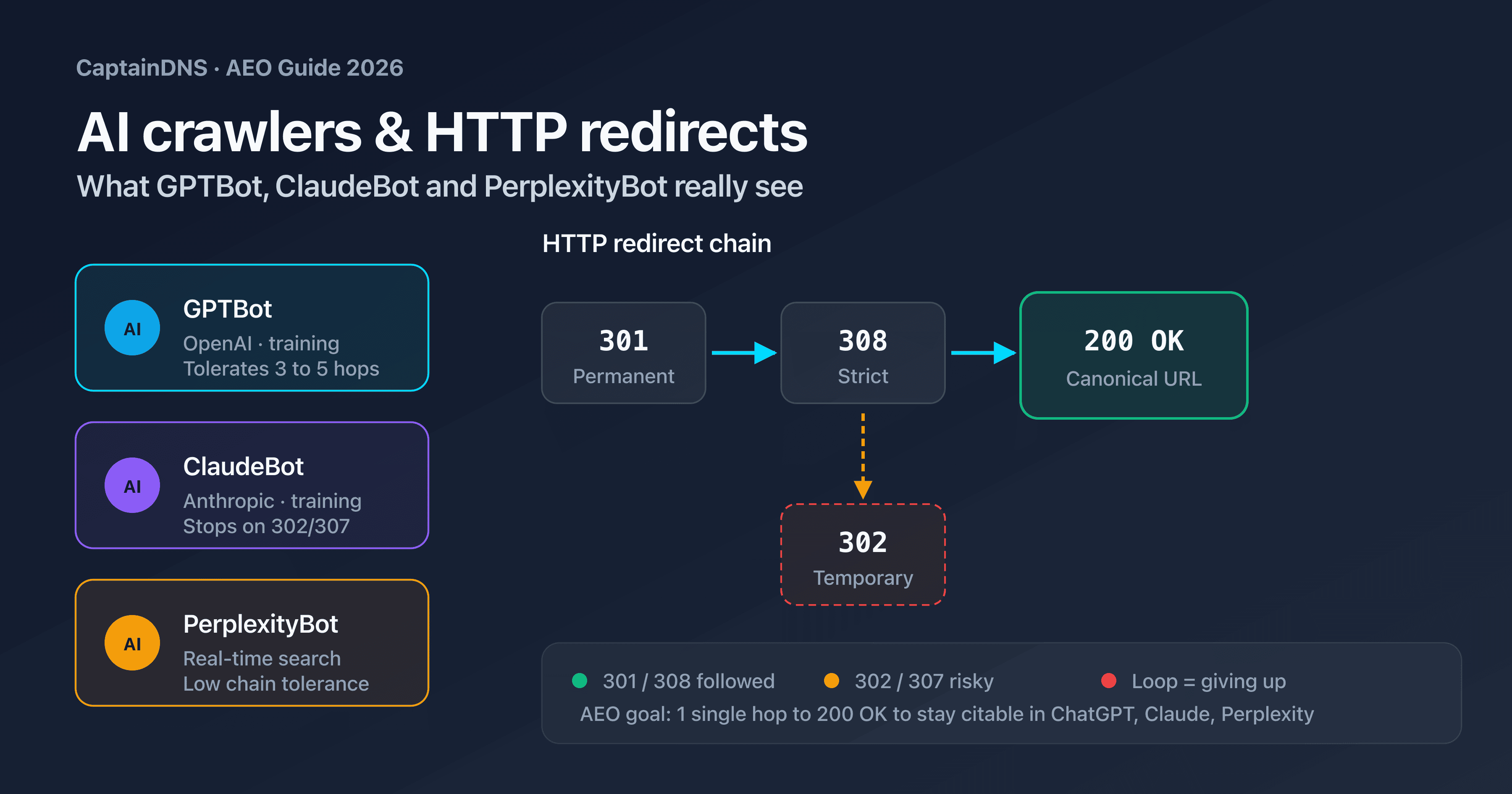
Telecom carrier anti-spam filters are aggressive with shortened links (Bitly, TinyURL), because these domains are regularly exploited for spam and phishing. A subdomain on your own domain has its own reputation and passes filters more easily.
The same principle applies to messaging apps (WhatsApp, Telegram, Signal). Link previews display the source domain: captaindns.com is immediately recognisable, whereas a bit.ly link may arouse the recipient's suspicion.
For WhatsApp Business campaigns, the vanity URL integrates naturally into approved message templates. Templates with branded links have a better approval rate from WhatsApp and a better click-through rate from recipients, since the destination is transparent.
Branded links and trust: the numbers
Impact on click-through rate
Studies converge: a visible branded link gets more clicks than an anonymous shortener. Rebrandly reports an average 39% gain in click-through rate (CTR), while a Branch.io test on Facebook Ads measured a doubled CTR when the displayed link contained the brand name rather than a generic domain.
The explanation is simple. In contexts where the link is the only visible element (SMS, plain text, podcast description, social post caption), the brand contained in the URL becomes the primary decision factor. The user recognises the sender and clicks with confidence.
This phenomenon is amplified on mobile, where link previews are often truncated. Only the first characters of the URL appear in the notification or preview. If those characters display your brand name rather than a random code, the impact on click decisions is immediate.
The CTR gain is also cumulative. With each interaction, the user associates your subdomain with quality content. Over successive campaigns, the mere sight of captaindns.com in the URL creates a trust reflex that improves performance across all subsequent campaigns.
Effect on email deliverability
Popular shortener domains (bit.ly, t.co, tinyurl.com) regularly appear on anti-spam filter blacklists. Millions of users share the same domain, including spammers and malicious actors. The domain's reputation is therefore degraded for everyone.
A link on your own domain benefits from your sender reputation. If your domain is not associated with spam, your vanity URLs pass filters without difficulty. This distinction is particularly important for high-volume email campaigns.
Here is how it works: anti-spam filters evaluate the reputation of every domain present in the message body. A domain shared by millions of users accumulates negative signals from the few bad actors. Your own domain, on the other hand, reflects only your sending history. By combining vanity URLs on your domain with properly configured SPF, DKIM and DMARC records, you maximise the deliverability of your campaigns.
Trust and phishing
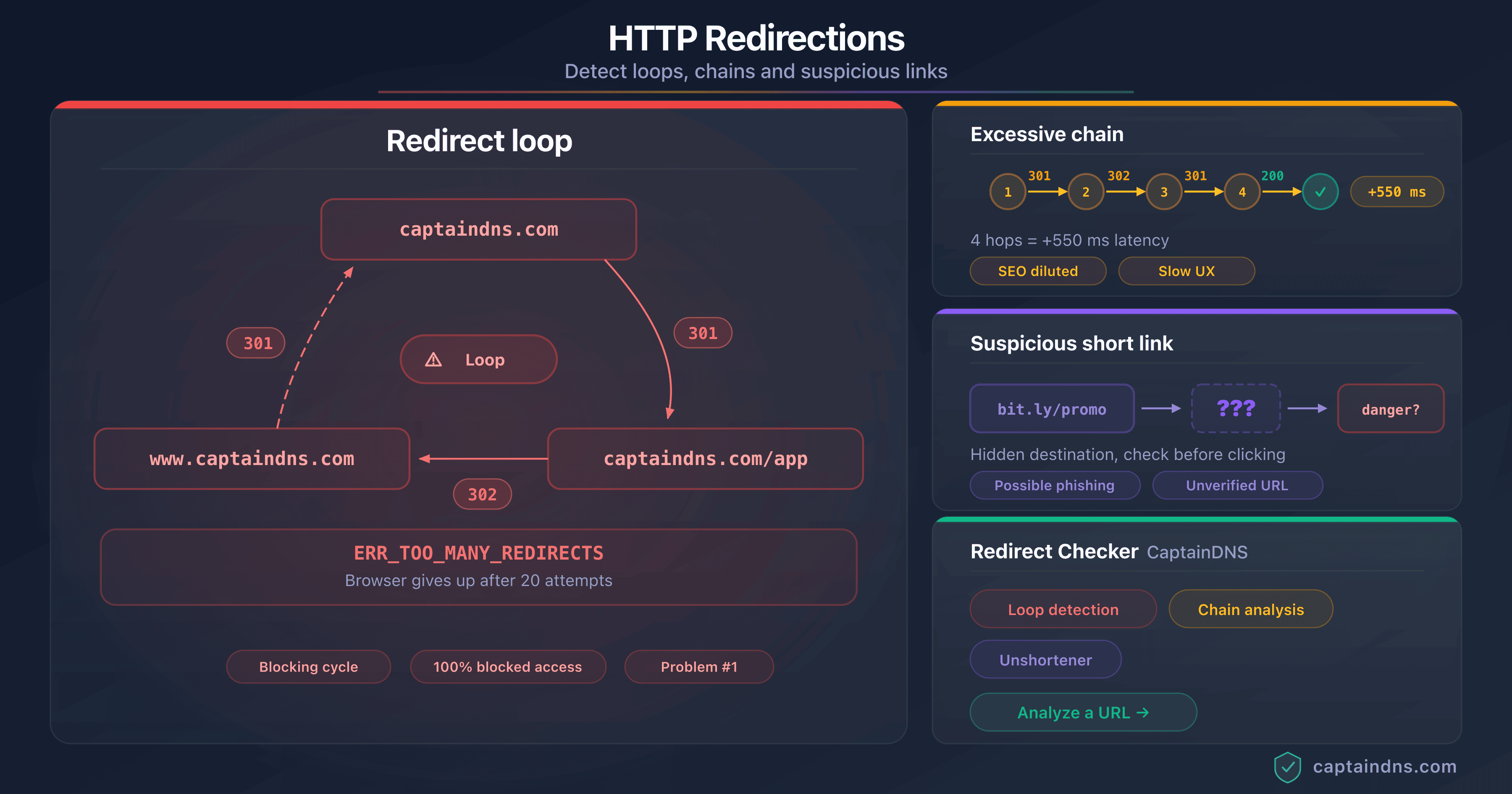
According to several security reports, around 68% of phishing attacks use shortened or obfuscated URLs to mask the real destination. Faced with a bit.ly/3xKz9Qm link, a savvy user cannot guess the destination and hesitates to click.
A visible branded link (promo.captaindns.com) reduces this distrust. The sender is identifiable, the domain is known, and the subdomain describes the nature of the content. This transparency reinforces trust and engagement rates.
In a B2B context, trust is even more decisive. A decision-maker who receives a shortened link via direct message on LinkedIn will hesitate more than a B2C prospect. A branded subdomain removes this barrier and professionalises the exchange.
QR codes and redirects: measuring offline-to-online
How it works

A QR code encodes a URL. When a user scans it, their phone opens the URL in the browser. If that URL points to a vanity URL configured as a redirect, the flow is as follows:
- The user scans the QR code on a physical medium
- The phone opens
https://flyer.captaindns.com - The redirect server receives the request and increments the counter
- The server responds with an HTTP 302 code to the landing page
- The browser loads the final page
The QR code becomes a measurable bridge between the physical and digital worlds. Every scan is counted. You know exactly how many people scanned the QR code on your flyer, packaging or business card.
Use cases
Flyers and brochures: each print campaign gets its own subdomain. You compare the performance of different visuals or distribution areas.
Product packaging: a QR code on the package redirects to a user guide, a warranty page or a feedback form. By changing the destination over time, you adapt the post-purchase experience without modifying the packaging.
Business cards: cv.captaindns.com redirects to your LinkedIn profile, your portfolio or your appointment booking page. If you switch calendar platforms, you update the redirect.
Posters and POS displays: the QR code on an in-store poster redirects to a limited-time offer. When the offer expires, you change the destination to the general catalogue.
Restaurant menus: a QR code on each table redirects to the online menu. The menu changes by season or day of the week, but the printed QR code stays the same. This use case, which became commonplace during the contactless era, perfectly illustrates the value of a modifiable redirect.
QR codes in numbers
QR code adoption has seen spectacular acceleration in recent years. Between 2021 and 2025, usage grew by 323%, driven by the widespread availability of native scanning on smartphones and habits formed during the contactless era.
Some figures illustrating this trend:
- 5.3 million QR coupons were redeemed in 2024, a sign that consumers are now comfortable with this format
- 57% of consumers scan QR codes on food packaging to access nutritional information, recipes or promotions
- 92% of Apple devices natively read QR codes since iOS 12, without a third-party app
For marketing teams, this means the QR code is no longer a gimmick: it is a full-fledged conversion channel, measurable and optimisable thanks to vanity URLs.
The QR code and vanity URL combination is particularly powerful for the retail, restaurant and events sectors. A restaurant owner can place a QR code on each table to collect reviews, an event organiser can distribute badges with a QR code pointing to the personalised programme, and a retailer can display a QR code in the shop window directing to the daily deal.
Why not put the final URL directly in the QR code?
Three major reasons.
1. No tracking. A QR code that points directly to captaindns.com/special-offer does not count scans. You can add UTM parameters for tracking in Google Analytics, but you have no data if the user lacks JavaScript or refuses cookies.
2. No flexibility. The URL encoded in the QR code is frozen at print time. If the page changes address, the QR code points to a 404.
3. More complex QR code. The longer the URL, the more modules (black dots) the QR code contains, making it denser and harder to scan, especially at small sizes. A short vanity URL produces a simple and robust QR code.

QR code size and complexity
A QR code's density depends directly on the length of the encoded URL. A Version 2 QR code (25x25 modules) can store up to 25 alphanumeric characters. Let us compare two scenarios:
promo.captaindns.com= 22 characters. This link fits into a Version 2 QR code, simple and airy.captaindns.com/en/pricing?utm_source=flyer&utm_medium=print&utm_campaign=expo2026= 82 characters. This requires a Version 6 or higher QR code (41x41 modules minimum), much denser.
The practical consequence is straightforward: the QR code with a vanity URL scans more easily at a distance, at small sizes, and in poor lighting conditions. On an expo flyer, a roll-up or packaging, the difference in scan reliability is notable.
There is also an aesthetic dimension. A simple QR code (few modules) leaves room to integrate a logo in the centre or brand colours, which improves the scan rate. A dense QR code tolerates no visual modification without becoming unreadable. By choosing a short vanity URL, you give yourself the freedom to customise the QR code's appearance.
Dynamic vs static QR codes
There are three approaches for managing a QR code's destination:
Static QR code: the final URL is encoded directly in the QR code. Once printed, the destination cannot be changed. If the target page changes address, the QR code points to a 404.
Dynamic QR code (via paid shortener): the encoded URL passes through a third-party service that can modify the destination. Functional, but you depend on an external provider and their anti-spam filters can cause issues.
Vanity URL with redirect: the QR code encodes your vanity URL (static and short), while the destination changes server-side. You get the equivalent of a dynamic QR code, without a third party, with your own domain and your own click counter.
The third option combines the advantages of the first two without their drawbacks. The QR code is simple (short URL), the destination is modifiable, tracking is built in, and you depend on no external provider. This is the recommended approach for any campaign that goes beyond a simple one-off test.
UTM and redirects: combining the two
Anatomy of a UTM link
UTM parameters (Urchin Tracking Module) are fragments added to a URL to identify the source, medium and campaign of a click in Google Analytics. Here is their structure:
https://captaindns.com/en/pricing?utm_source=linkedin&utm_medium=social&utm_campaign=launch2026&utm_content=banner_v2
Each parameter has a specific role:
| Parameter | Role | Example |
|---|---|---|
utm_source | Identifies the traffic source | linkedin, newsletter, flyer |
utm_medium | Identifies the medium | social, email, print, cpc |
utm_campaign | Identifies the campaign | launch2026, blackfriday |
utm_content | Differentiates variants (A/B test) | banner_v2, cta_blue |
utm_term | Identifies the keyword (paid search) | dns+monitoring |
Redirect + query forwarding = UTM preserved
The key question: when a vanity URL redirects to the final destination, are UTM parameters added by the visitor preserved?
With query forwarding enabled, yes. The redirect server transmits the request parameters to the destination URL. In practice:
# Incoming request (with UTM added by the newsletter link)
https://promo.captaindns.com?utm_source=newsletter&utm_medium=email

# Redirect to destination with query forwarding
https://captaindns.com/en/pricing?utm_source=newsletter&utm_medium=email
Without query forwarding, the UTM parameters would be lost during the redirect. Google Analytics would receive no campaign information.
You can also pre-configure UTM parameters in the redirect destination. For example, configure expo.captaindns.com to redirect to captaindns.com/en/pricing?utm_source=expo&utm_medium=print&utm_campaign=event2026. This way, every QR code scan is automatically attributed to the right channel in Analytics.
UTM naming strategy: common mistakes and conventions
UTM parameters are powerful, but their effectiveness depends on rigorous naming discipline. Here are the most common mistakes and the conventions to adopt.
Mistake 1: inconsistent capitalisation
LinkedIn, linkedin and Linkedin create three separate entries in Google Analytics. The report becomes unreadable, the data is fragmented. Convention: always all lowercase.
Mistake 2: missing parameters
A link with utm_source=newsletter but no utm_medium produces incomplete data. Google Analytics classifies the traffic as "(not set)" for the medium. Convention: always fill in at least utm_source, utm_medium and utm_campaign.
Mistake 3: overly generic values
campaign1, test, promo mean nothing three months later when you analyse the results. Convention: name your campaigns with a descriptive format that includes the period, for example YYYY-QN (year and quarter) followed by a clear identifier.
Recommended convention
- All lowercase
- Hyphens to separate words (no spaces, no underscores)
- Campaign format:
YYYY-QN-campaign-name - Controlled vocabulary for sources and mediums
Here is a table of examples to illustrate this convention:
| Vanity URL | utm_source | utm_medium | utm_campaign | utm_content |
|---|---|---|---|---|
expo.captaindns.com | expo-paris | print | 2026-q1-expo-paris | flyer-a |
news.captaindns.com | newsletter | email | 2026-q1-launch | cta-header |
insight.captaindns.com | linkedin | social | 2026-q1-thought-leadership | post-dns-security |
sms.captaindns.com | sms | messaging | 2026-q2-summer-offer | segment-premium |
partner-alpha.captaindns.com | partner-alpha | referral | 2026-affiliation | banner-sidebar |
Document this convention in a shared file accessible to the entire team. Every person who creates a UTM link must follow the same rules so that reports remain usable.
A common pitfall: letting each team member invent their own UTM values. Within a few weeks, the Google Analytics report contains dozens of inconsistent sources and campaigns. The solution is to create an internal UTM generator (a simple spreadsheet with dropdown lists) that enforces the convention.
Setting up vanity URLs with CaptainDNS
CaptainDNS Redirect Hosting lets you create HTTP redirects with automatic HTTPS, request counting and path forwarding. Here are the setup steps.
Create the subdomain (CNAME)
The first step is to create a DNS CNAME record that points your subdomain to the CaptainDNS redirect server.
Log in to the DNS management interface of your registrar or hosting provider and add:
promo.captaindns.com. CNAME redirect.captaindns.com.
The DNS Lookup tool lets you verify that the record has propagated correctly.
DNS propagation typically takes a few minutes, but can require up to 24 hours depending on your zone's TTL. For urgent campaigns, create the CNAME records at least 48 hours before launch to guarantee full propagation.
Configure the redirect
In the CaptainDNS Redirect Hosting dashboard, configure:
- Source domain:
promo.captaindns.com - Destination URL:
https://captaindns.com/en/pricing - Redirect type: 302 (temporary, recommended for marketing campaigns)
- Query forwarding: enabled (to pass through UTM parameters)
The HTTPS certificate is provisioned automatically via Let's Encrypt. No manual action required. Provisioning typically takes a few seconds after CNAME verification. If your DNS record has not yet propagated, the certificate will be issued as soon as propagation is effective.
Why 302 for marketing campaigns?
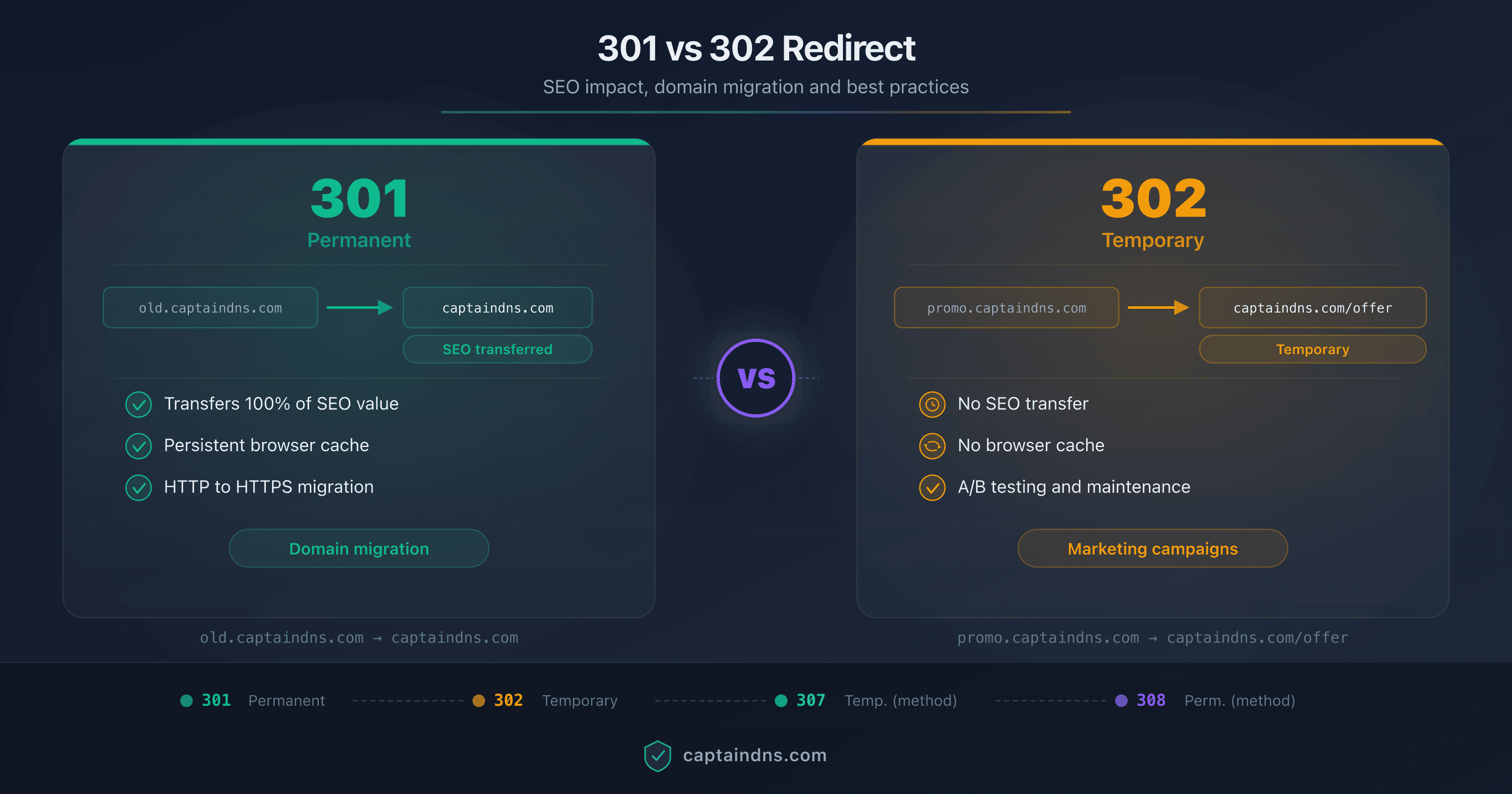
The choice between a 301 (permanent) and 302 (temporary) redirect has SEO and practical implications:
- 301 (permanent): browsers and search engines cache the destination. If you change the destination later, previous visitors will continue going to the old page. Reserve 301 for redirects you will never change.
- 302 (temporary): the browser does not cache the destination. Every visit passes through the redirect server, which guarantees click counting and allows you to change the destination at any time.
For marketing vanity URLs, 302 is almost always the right choice.
A common pitfall: some redirect generation tools default to 301. Always verify the redirect type during configuration. An accidental 301 on a campaign vanity URL can skew counters for weeks while the browser cache expires for affected visitors.
Enable query forwarding
Query forwarding transmits the URL parameters from the incoming request to the destination. Enable this option so that UTM parameters, campaign identifiers or any other parameters are preserved during the redirect.
Example with query forwarding enabled:
Input:  https://promo.captaindns.com?ref=partner123
Output: https://captaindns.com/en/pricing?ref=partner123
Track the results
The CaptainDNS dashboard displays for each redirect:
- The total number of requests received
- The configured destination URL
- The redirect type (301 or 302)
- The HTTPS certificate status
This server-side data complements client-side analytics (Google Analytics, Matomo). The request counter captures all clicks, including those from bots, crawlers and users with JavaScript disabled.
Beyond marketing: other vanity URL uses
Link in bio (Instagram, TikTok)
Social platforms often limit clickable links to a single location: the profile bio. Services like Linktree have exploited this constraint, but they add a third-party dependency and display their own brand.
The alternative: link.captaindns.com redirects to a homemade landing page that groups your essential links. You control the design, statistics are integrated into your redirect counter, and you have no external dependency. When you launch a new campaign, you change the destination without touching your profile.
This approach also offers an SEO advantage: traffic passes through your domain instead of feeding a third-party service. If your landing page is indexed, it benefits from your main domain's authority.
Podcast and audio content
A vanity URL is easy to say aloud. "Visit promo dot captaindns dot com" is memorable and easy to type. It is impossible to dictate bit.ly/3xKz9Qm to a listener without them making a typo.
For podcasts, conference talks or YouTube videos, a subdomain like podcast.captaindns.com or talk.captaindns.com provides a single, short and professional entry point. The destination can change with each episode or event.
A podcast host can also create a subdomain per sponsor or partner offer. "Use the promo code at sponsor dot captaindns dot com" flows naturally. The click counter directly measures the impact of the oral mention, which allows you to provide sponsors with concrete performance data.
Documentation and support
docs.captaindns.com, status.captaindns.com, help.captaindns.com: these subdomains become permanent access points to your support resources. If you migrate from Notion to GitBook, or from Zendesk to Intercom, you change the redirect destination without breaking links already shared in your emails, tutorials or forums.
This approach is particularly useful when your documentation links are referenced in printed materials, automated onboarding sequences or third-party articles you do not control.
A common scenario: a startup begins with a Notion wiki, migrates to GitBook, then adopts custom documentation. Without a vanity URL, each migration breaks links shared in Zendesk tickets, onboarding emails and community forums. With docs.captaindns.com, a single destination change absorbs the migration without any broken links.
Recruitment
jobs.captaindns.com redirects to your careers page, whether hosted on Welcome to the Jungle, LinkedIn, or your own site. This subdomain is printable on HR materials (business cards, posters at recruitment fairs, email signatures), and the destination adapts when you switch recruitment platforms.
At recruitment fairs, a QR code linked to jobs.captaindns.com on your roll-ups or brochures lets you measure how many candidates were interested in your openings. You compare performance between different fairs and adjust your presence strategy accordingly.
Vanity URL vs URL shortener: which to choose?
Detailed comparison
| Criterion | Vanity URL (own domain) | URL shortener (Bitly, Rebrandly) |
|---|---|---|
| Displayed domain | Yours | The service's |
| Brand image | Strengthened | Neutral or negative |
| Data control | Full | With the provider |
| Link longevity | As long as your domain exists | Depends on the service |
| SEO (link juice) | Stays on your domain | Transferred to the service |
| Analytics | Native counter + UTM | Service dashboard |
| Customisation | Subdomain + path are free | Limited to the suffix |
| HTTPS | Automatic (Let's Encrypt) | Included |
| Cost | Domain + redirect service | Free (limited) or paid |
| Blocking risk | Low (your reputation) | High (shared domain) |
Risks of URL shorteners
URL shorteners pool the same domain among millions of users. This creates several risks:
Blocking by anti-spam filters. Shortener domains are regularly exploited for phishing and spam. Some email filters and corporate firewalls block bit.ly or t.co by default.
Service discontinuation. Google shut down goo.gl in 2019. The millions of links created by users stopped working. If Bitly changes its terms or shuts down, your links suffer the same fate.
Data loss. Click statistics are hosted by the shortener. If you lose access to your account or the service migrates its data, your history disappears.
Lack of trust. A savvy user hesitates to click on a bit.ly/3xKz9Qm link whose destination they cannot guess. With promo.captaindns.com, the sender is immediately identifiable.
No SEO benefit. Links to a shortener transfer the "link juice" to the service's domain, not yours. If a partner or media outlet shares your Bitly link, it is Bitly that receives the SEO benefit. With a vanity URL on your own domain, authority stays with you.
Measuring results: marketing dashboard
The click counter on a vanity URL is a starting point. To make informed marketing decisions, you need to cross-reference multiple data sources.
Server-side data (CaptainDNS counter)
The server-side request counter captures every click, including those from bots, crawlers and visitors with JavaScript disabled. It provides raw traffic volume per vanity URL.
These data are reliable for trends and comparisons between channels: if expo.captaindns.com receives three times more requests than news.captaindns.com, the conclusion is clear, regardless of bot noise.
Client-side data (Google Analytics)
Google Analytics captures post-click behaviour: pages visited, session duration, bounce rate, conversions. Thanks to UTM parameters passed through query forwarding, each visit is attributed to the right channel and campaign.
Cross-referencing both sources
Cross-referencing server and client data reveals valuable insights:
- Gap between server clicks and GA sessions: a significant gap indicates bot traffic or visitors who leave before the Analytics script loads
- Post-redirect bounce rate: if a channel generates many clicks but a high bounce rate, the landing page does not match the vanity URL's promise
- Conversion by channel: the ultimate goal. Which channel generates not only traffic, but also valuable actions (sign-up, purchase, demo request)
Campaign KPI table
Here is an example of a consolidated dashboard:
| Campaign | Vanity URL | Clicks (server) | Sessions (GA) | Conversions | Conversion rate |
|---|---|---|---|---|---|
| Expo 2026 | expo.captaindns.com | 1,247 | 1,189 | 23 | 1.9% |
| March newsletter | news.captaindns.com | 3,450 | 3,201 | 156 | 4.9% |
| LinkedIn post | insight.captaindns.com | 892 | 845 | 12 | 1.4% |
| SMS promo | sms.captaindns.com | 2,103 | 1,987 | 89 | 4.5% |
| Partner Alpha | partner-alpha.captaindns.com | 654 | 612 | 8 | 1.3% |
This type of table allows you to compare channels on a common basis and allocate marketing budget accordingly. A channel with a high conversion rate deserves more investment, even if its raw volume is lower.
Update this table weekly or monthly depending on the pace of your campaigns. Trends over time are more instructive than a one-off snapshot: a channel may start slowly then gain momentum, or conversely lose steam after an initial peak.
Segmentation by traffic type
The server counter captures all traffic, including bots and crawlers. To refine the analysis, systematically compare the server counter with Google Analytics sessions. A GA sessions / server clicks ratio close to 90% indicates predominantly human traffic. A ratio below 50% suggests a significant volume of automated traffic.
This segmentation is particularly useful for channels exposed to bots: links posted on social media are crawled by platform previewers, and links in emails are scanned by corporate email anti-spam filters. Knowing the share of human traffic prevents you from overestimating a channel's performance.
Best practices
Consistent subdomain naming
Adopt a clear naming convention and document it for the entire team:
- By channel:
email.captaindns.com,social.captaindns.com,print.captaindns.com - By campaign:
blackfriday.captaindns.com,launch2026.captaindns.com - By purpose:
demo.captaindns.com,docs.captaindns.com,feedback.captaindns.com
Avoid cryptic names (promo1.captaindns.com, link42.captaindns.com) that lose their meaning within a few weeks.
302 for campaigns, 301 for permanent redirects
Simple rule: if the destination can change, use a 302. If the redirect is permanent (old domain to new domain, for example), use a 301.
Marketing campaigns are temporary by nature. The 302 guarantees that every click passes through the redirect server (reliable counting) and that you can change the destination at any time.
Always enable query forwarding
Unless there is a specific reason not to, always enable query forwarding. This ensures that UTM parameters, tracking identifiers and any other parameters are transmitted to the landing page. Without query forwarding, Google Analytics cannot correctly attribute the traffic.
Test the QR code before printing
Before launching the print run, test the QR code on multiple devices:
- iPhone and Android (native camera apps)
- Different screen sizes
- In real-world conditions (reading distance, lighting)
- Verify that the redirect works and the landing page loads correctly
One subdomain per campaign type
Do not reuse the same subdomain for different campaigns. If promo.captaindns.com is used for Black Friday then for a product launch, the statistics for both campaigns get mixed together. Create a distinct subdomain for each campaign or channel.
Security and trust
Vanity URLs strengthen trust, provided you follow common-sense rules.
Avoid subdomains that look like phishing. secure-login.captaindns.com or verify-account.captaindns.com trigger alarm signals for savvy users, even if the link is legitimate. Prefer neutral, descriptive names: promo, demo, expo, docs.
Always use HTTPS. CaptainDNS automatically provisions a Let's Encrypt certificate for each redirect, so this point is covered by default. But if you use another redirect service, verify that HTTPS is active.
If you share vanity URLs via email, make sure your SPF, DKIM and DMARC records are properly configured. Recipients must be able to identify the message sender. An email with a branded link but an unauthenticated sender domain ends up in spam.
A note on domain reputation: unlike URL shorteners that pool the same domain among millions of users, your own domain has its own reputation. If you manage your domain properly (no spam, no phishing), your vanity URLs benefit from that good reputation.
This reputation builds over time. Every properly sent campaign, every link leading to legitimate content strengthens the trust that anti-spam filters and browsers have in your domain. Conversely, a single incident on a shared shortener domain can tarnish the reputation for all its users simultaneously.
Common mistakes to avoid
Certain mistakes recur frequently in vanity URL management. Identifying them early avoids data loss and frustration:
- Using the same subdomain for different campaigns: statistics get mixed and become unusable. One subdomain per campaign, always.
- Forgetting to enable HTTPS: browsers display a security warning that drives visitors away. With CaptainDNS, the certificate is automatic, but verify if you use another service.
- Not testing the QR code before printing: a mis-encoded URL, an unsupported special character or a misconfigured redirect renders the QR code useless. Test on iPhone and Android before sending to the printer.
- Using a 301 for a temporary campaign: the browser caches the destination. For the next campaign, previous visitors land on the old page. The click counter is also skewed since requests no longer pass through the server.
- Creating cryptic subdomains:
l1.captaindns.commeans nothing. Preferlinkedin.captaindns.com, which is descriptive and memorable. - Neglecting the landing page: a high-performing vanity URL that redirects to a slow, non-responsive or broken page cancels all the benefit. Test the landing page on mobile before launching the campaign.
- Not documenting active redirects: after a few months, nobody knows which subdomain corresponds to which campaign. Keep a register up to date.
ROI calculation
The cost of a premium shortener (Bitly, Rebrandly) ranges between 29 and 199 euros per month depending on the plan and link volume. This budget covers the custom domain, advanced analytics and support.
With CaptainDNS, the cost comes down to a subdomain and a redirect. The ROI becomes positive as soon as you manage more than 5 active links, since each additional link adds no marginal cost. Analytics (request counter, query forwarding) are included.
Beyond direct cost, the ROI is also measured in autonomy: no third-party dependency, no risk of data loss if the shortener shuts down, and a reinforced brand image on every shared link.
For a company managing around twenty campaigns per year with links across multiple channels (email, print, social media, events), the annual saving compared to a premium shortener can reach several hundred euros, not counting the value of a consistent brand image across all touchpoints.
Archiving and documentation
Over the months, the number of vanity URLs created grows. Without documentation, nobody knows which subdomain corresponds to which campaign, or whether a redirect is still active or obsolete.
Document each vanity URL in a shared table (Google Sheets, Notion, or any other collaborative tool). Recommended columns:
| Subdomain | Destination | Campaign | Start date | End date | Owner |
|---|---|---|---|---|---|
| expo.captaindns.com | captaindns.com/en/pricing | Expo Paris 2026 | 2026-03-01 | 2026-03-31 | Marketing |
| news.captaindns.com | captaindns.com/en/blog | Weekly newsletter | 2026-01-01 | Permanent | Content |
| partner-alpha.captaindns.com | captaindns.com/en/partners | Affiliation Alpha | 2026-02-15 | 2026-12-31 | Partnerships |
Deactivate obsolete redirects to keep a clean dashboard. An active redirect to a page that no longer exists creates a poor user experience and skews your statistics.
Schedule a quarterly review of your active redirects. Identify those that have not received traffic for 30 days and decide whether they should be maintained, redirected to a generic page, or deactivated. This housekeeping prevents the accumulation of orphaned subdomains and maintains dashboard readability.
🎯 Recommended action plan
-
Choose a dedicated subdomain: define the naming convention with your marketing team. One subdomain per channel or per campaign.
-
Create the CNAME record: in your DNS zone, point the subdomain to
redirect.captaindns.com. Verify propagation. -
Configure the redirect: in CaptainDNS Redirect Hosting, enter the destination, choose type 302 and enable query forwarding.
-
Generate the QR codes: use a QR code generator with your vanity URL as the target. Test scanning on multiple devices.
-
Add UTM parameters: either in the destination URL (automatic attribution on every click), or via query forwarding (dynamic attribution depending on the sharing link).
-
Measure and iterate: check the request counter in the CaptainDNS dashboard. Cross-reference with Google Analytics data to analyse post-click behaviour.
-
Document and archive: record each vanity URL in a shared table with the associated campaign, start date, planned end date and owner. Schedule a periodic review to deactivate obsolete redirects.
Set up your vanity URLs now: use CaptainDNS Redirect Hosting to create marketing redirects with automatic HTTPS and click counting.
FAQ
What is a vanity URL?
A vanity URL is a custom link that uses your own domain name (or subdomain) to redirect to a landing page. For example, promo.captaindns.com redirects to captaindns.com/en/pricing. It strengthens brand image and allows you to track clicks via the redirect server.
What is the difference between a vanity URL and a URL shortener?
A URL shortener (Bitly, TinyURL) generates a short link on its own domain: bit.ly/3xKz9Qm. You control neither the displayed domain nor the longevity of the link. A vanity URL uses your own domain: you retain full control over the link, tracking data and displayed brand.
How do you track clicks on a redirect?
Every HTTP request to your vanity URL passes through the redirect server before reaching the destination. The server increments a counter with each pass. With CaptainDNS Redirect Hosting, the number of requests is visible in the dashboard. This counting works even when ad blockers are active.
Which redirect type should I use for a marketing campaign?
Use a 302 redirect (temporary). It guarantees that every click passes through the redirect server (reliable counting) and allows you to change the destination at any time. Reserve 301 (permanent) for definitive redirects like domain migrations.
Does the QR code change if I modify the redirect destination?
No. The QR code only encodes your vanity URL (for example promo.captaindns.com). This URL does not change. Only the destination configured on the redirect server changes. The printed QR code remains valid indefinitely.
Are UTM parameters preserved during the redirect?
Yes, provided query forwarding is enabled on your redirect. This option transmits all parameters from the incoming request (utm_source, utm_medium, utm_campaign, etc.) to the destination URL. Without query forwarding, the parameters are lost.
How many vanity URLs can I create with CaptainDNS?
CaptainDNS Redirect Hosting allows you to create multiple redirects per account. Each redirect benefits from automatic HTTPS via Let's Encrypt, request counting and query forwarding. Check the pricing page for exact limits according to your plan.
Can I use a vanity URL for a link in a marketing email?
Yes, and it is even recommended. URL shorteners like Bitly use domains shared by millions of users, including spammers. Email anti-spam filters regularly block these domains. A vanity URL on your own domain benefits from your sender reputation and passes filters more easily. Additionally, your subscribers immediately identify the link's origin.
How do I measure the ROI of a print campaign with QR codes?
Combine three data sources. The server-side request counter (CaptainDNS) gives you the raw number of scans. UTM parameters pre-configured in the destination allow Google Analytics to attribute visits to the right channel. Finally, conversion tracking in Analytics (sign-up, purchase, demo request) gives you the conversion rate. ROI is calculated by comparing the value of conversions to the cost of the print campaign.
Should I create a subdomain per campaign or reuse the same one?
Create a distinct subdomain per campaign to get clean statistics. If you reuse the same subdomain for successive campaigns, the counters accumulate and you can no longer distinguish each campaign's performance. One subdomain per campaign also makes archiving and reporting easier.
Do branded links really improve the click-through rate?
Yes. Rebrandly reports an average 39% gain in click-through rate with branded links compared to generic links. A Branch.io test on Facebook Ads measured a doubled CTR when the displayed link contained the brand name. The effect is particularly pronounced in contexts where the link is the only visible element: SMS, plain text, podcast.
Can a vanity URL replace Linktree?
Yes. Configure a subdomain like link.captaindns.com as a redirect to a homemade landing page that groups your essential links. You get the same result as a Linktree, without dependency on a third-party service, with your own brand displayed and integrated click statistics. When you launch a new campaign, you change the destination without modifying your social profile.
📖 Glossary
- Vanity URL: custom link using your own domain to redirect to a landing page, for branding and tracking purposes.
- URL shortener: third-party service (Bitly, TinyURL) that generates short links on its own domain.
- Link tracking: click tracking on a link, performed here server-side via redirect request counting.
- QR code: two-dimensional barcode that encodes a URL, scannable by a smartphone camera.
- UTM: Urchin Tracking Module. Parameters added to a URL to identify the source, medium and campaign in Google Analytics.
- 301 redirect: permanent redirect. The browser caches the destination and no longer passes through the redirect server.
- 302 redirect: temporary redirect. The browser passes through the server on each visit, allowing click counting and destination changes.
- CNAME: type of DNS record that creates an alias from one domain to another. Used here to point a subdomain to the redirect server.
- Query forwarding: mechanism that transmits URL parameters from the incoming request to the destination URL during a redirect.
- Dynamic QR code: QR code whose destination can be modified after printing, thanks to an intermediate URL (shortener or vanity URL with redirect).
- Linktree: link page grouping multiple destinations under a single link, often used as the single bio link on social media.
- Conversion rate: percentage of visitors who complete a desired action (purchase, sign-up, demo request) relative to the total number of visitors.
- Link in bio: single link placed in a social media profile bio, often redirected to a page grouping multiple links.
- Branded link: synonym for vanity URL, a link using a brand domain to strengthen sender identification.
📚 Related domain redirect guides
- 301 vs 302 redirects: understanding the differences, SEO impact and succeeding with your domain migration: everything about 301/302 codes, their SEO impact and the complete domain migration checklist
Sources
- RFC 7231 - Hypertext Transfer Protocol (HTTP/1.1): Semantics and Content, section 6.4: official definition of HTTP redirect codes 301, 302, 307 and 308
- Google Analytics - Collect campaign data with custom URLs: official documentation on UTM parameters
- Google Search Central - Avoid creating duplicate content: SEO best practices for redirects and duplicate content