Password-Protect a Directory with .htaccess: Basic Auth, APR1-MD5, and bcrypt
By CaptainDNS
Published on August 12, 2026
- HTTP Basic Auth protects a directory via a .htpasswd file (Apache) or auth_basic_user_file (nginx), in minutes of configuration.
- The password is never stored in plain text: it is hashed, using APR1-MD5 (legacy, universally compatible) or bcrypt (recommended, with a tunable cost factor).
- Without HTTPS, Basic Auth credentials travel in the clear: only enable it behind TLS.
- The .htpasswd file must live outside the web root, never in a downloadable directory.
- Generate your hashes without the command line using CaptainDNS's APR1-MD5 and bcrypt generators.
A staging server sitting indexed by Google. A monitoring dashboard accessible to anyone who guesses the URL. Internal technical documentation inadvertently published in the clear on the web. Three everyday scenarios, and one first-aid solution that fits all three: Basic Auth.
Basic Auth has been around since the early days of the web and has barely changed. It protects a directory or file with a simple username/password pair - no database, no sessions, no application-level dependencies. On Apache, a .htaccess file and a .htpasswd file are all you need. On nginx, two directives, auth_basic and auth_basic_user_file. Five minutes of configuration, and access is closed.
This guide covers the concrete configuration for both Apache and nginx, including the pitfalls that cost an hour of troubleshooting: a misconfigured AllowOverride, a forgotten file path, a service that never got reloaded. It also explains what actually happens inside a .htpasswd file. Why Apache invented its own hashing format, APR1-MD5. Why bcrypt has largely replaced it. And how to choose between the two based on actual understanding, rather than habit or a copy-paste from a 2015 tutorial.
This content is aimed at system administrators, DevOps engineers, and backend developers who manage their own hosting and need to close off access without waiting for an SSO or VPN to be set up.
Why protect a directory with a password on a web server?
Basic Auth closes HTTP access to a directory in minutes, with no application code or database to manage.
The same use cases keep coming up: a staging environment on a subdomain like staging.captaindns.com, an internal back office with no built-in authentication, technical documentation that has no business being public, a monitoring tool exposed by mistake during a rushed deployment. In every case, no one has the time or the need to build a full account system. An HTTP layer is more than enough.
The classic trap: assuming a directory that isn't linked from the site remains invisible. A robots.txt excluding /staging/ only prevents crawling by standards-compliant search engines, not direct access. An automated scanner, a link accidentally shared in a ticket, a log entry that leaks somewhere, and the URL circulates. Entire tools exist to systematically scan common paths (staging, dev, admin, backup) across entire IP ranges. There's nothing paranoid about this - it's permanent background noise on the Internet.
A quick look at the access logs of any server exposed to the Internet is enough to convince you. Requests to /admin/, /wp-admin/, /.env, /backup.zip, or /phpinfo.php arrive continuously, minute after minute, long before any human has had time to find the URL by any other means. These scans target no one in particular: they sweep entire IP ranges looking for paths known to be poorly protected. A staging directory with a predictable name, /staging/ or /preprod/, will eventually show up in those logs.
HTTP Basic Auth is not a full application-level authentication system. No proper logout: the browser keeps credentials in memory until it is closed. No rate limiting on attempts. No session expiration, no fine-grained role management. It's a lock on the door, not an elaborate access control system. For access that requires differentiated roles or detailed audit trails, you need a dedicated application layer. To quickly close off sensitive access while waiting for something better, or as a complement to an existing protection layer, Basic Auth does the job perfectly well.
Alternatives exist, and are often more robust on paper. A VPN filters network access before any HTTP request even reaches the server. An enterprise SSO - Okta, Google Workspace, or Azure AD - centralizes accounts and connection logging. A reverse proxy with OAuth2, such as oauth2-proxy or Authelia, adds a real application session with expiration and proper logout. But these solutions require a full infrastructure: a VPN server to maintain, an identity provider to integrate, an additional proxy to deploy and monitor. Basic Auth can be set up in minutes with what's already running on the server, with no external dependencies and no accounts to provision elsewhere. Not the most elegant solution on paper. But it actually closes access before the end of the day.
Basic Auth and Digest Auth: how does HTTP authentication work?
The HTTP protocol has included a header-based authentication mechanism from the start, with no cookies or application sessions.
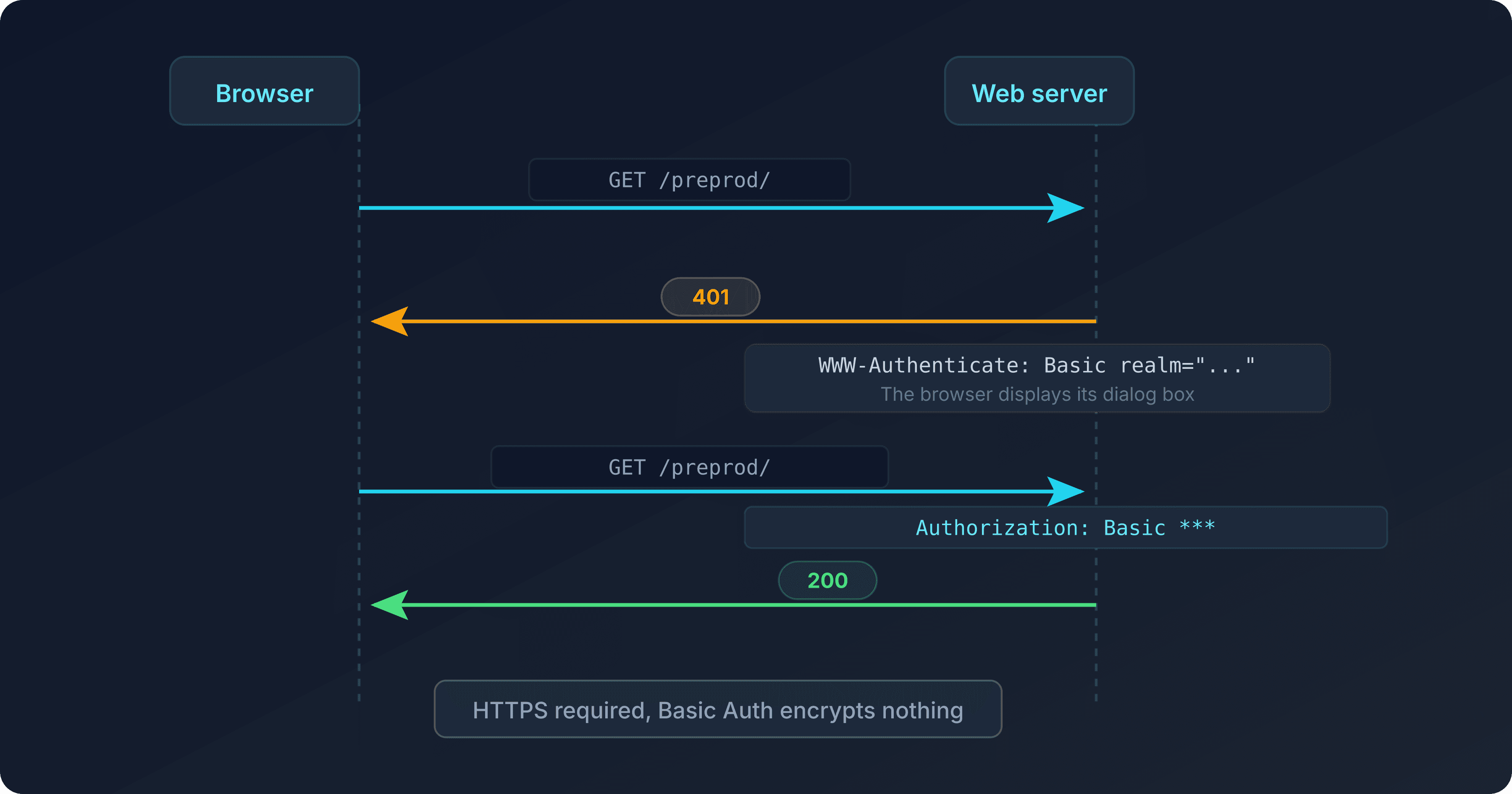
The exchange takes place in two steps. The browser requests a protected resource, the server responds with 401 Unauthorized and a WWW-Authenticate header specifying the expected scheme and the name of the protected area, the realm. The browser then displays its native dialog box, the user enters their credentials, and the browser replays the request with an Authorization header. As long as the browser session remains open, this header is automatically sent back with every subsequent request to the same realm, without prompting again.
Basic Auth: the standard mechanism (RFC 7617)
Basic Auth encodes the username and password in base64, with no encryption whatsoever. The Authorization header format is Basic followed by base64(username:password).
A key point to absorb immediately: base64 is not encryption. It is a simple reversible encoding, decodable by anyone with a single command.
$ echo -n "admin:password" | base64
YWRtaW46cGFzc3dvcmQ=
RFC 7617 states it plainly: the Basic scheme provides no confidentiality protection for the transmitted credentials, and its use over an unencrypted connection exposes them to anyone intercepting the traffic. This is why Basic Auth should never run over plain HTTP.
This exchange can be observed directly with curl. A first request without credentials receives the refusal:
$ curl -i https://staging.captaindns.com/
HTTP/1.1 401 Unauthorized
WWW-Authenticate: Basic realm="Restricted Area"
With credentials, the request goes through:
$ curl -i -u admin:password https://staging.captaindns.com/
HTTP/1.1 200 OK
The -u option in curl builds the base64-encoded Authorization header automatically. This is exactly what a browser does behind the scenes after the user enters credentials in its dialog box.
Digest Auth: why it has virtually disappeared
Digest Auth hashes the password on the client side before sending it, rather than transmitting it as encoded plain text.
The computation combines the username, realm, password, and a nonce - a one-time random value provided by the server - through a hash function: historically MD5, with SHA-256 available since RFC 7616. In theory, this approach protects credentials even without HTTPS, since the password itself never travels over the network.
The exchange relies on a much richer server response than Basic Auth:
WWW-Authenticate: Digest realm="Restricted Area",
    qop="auth", nonce="dcd98b7102dd2f0e8b11d0f600bfb0c093",
    opaque="5ccc069c403ebaf9f0171e9517f40e41"
The client then computes HA1 = MD5(username:realm:password), HA2 = MD5(method:URI), and a final response MD5(HA1:nonce:nc:cnonce:qop:HA2). This computational complexity, repeated for every request, is precisely what pushed most implementations toward Basic Auth behind TLS rather than Digest Auth without TLS.
In practice, Digest Auth has virtually disappeared. Its implementation is more complex on the client side: managing the nonce, the request counter nc, the cnonce. Support remains uneven for advanced use cases, and it causes problems behind certain proxies and load balancers that don't expect this kind of exchange. Most importantly, the widespread adoption of HTTPS rendered its main advantage obsolete. Protecting a password in transit is no longer meaningful when the entire connection is already encrypted end-to-end. Apache (mod_auth_digest) and nginx via third-party modules still support it, but almost no one uses it anymore. The remainder of this guide focuses on Basic Auth, the de facto standard behind HTTPS.
A brief history of password hashing on the web
The hashing format used by .htpasswd has a history that goes back to the early days of Unix, well before the web even existed.
Unix crypt() and the 8-character DES limit
The Unix crypt() function, designed in the late 1970s by Robert Morris for the seventh edition of Unix, encrypts a password using a variant of DES (Data Encryption Standard) repeated 25 times. A 12-bit salt - 4,096 possible values - encoded in 2 characters, prevents direct reuse of a pre-computed table across systems.
The problem: DES operates on 56-bit effective blocks, limiting the password taken into account to 8 characters. The ninth character and all subsequent ones are silently ignored. A 20-character password behaves exactly like its first 8 characters.
In the late 1970s, 25 DES iterations represented a real computational cost. By the 1990s, consumer CPU power had increased by several orders of magnitude. This protection was already obsolete against a brute-force attack run from a simple PC.
Verifying this behavior takes a single command, still available via openssl:
$ openssl passwd -crypt -salt ab VeryLongPassword
abXXXXXXXXXXXX
Replacing VeryLongPassword with any string longer than 8 characters produces exactly the same hash as long as the first 8 characters remain identical. The simplest proof that an algorithm designed in 1979 has no place in a .htpasswd file created today.
Why Apache created APR1-MD5 with version 1.3
Apache's problem was less the weakness of crypt() than its portability. The implementation of crypt() differs from one system to another: Linux's glibc, the BSDs, and Windows do not produce the same hashes for the same inputs. A .htpasswd file generated on a Linux machine could become unreadable once deployed on a BSD server.
The solution came from FreeBSD, where Poul-Henning Kamp had designed an MD5-based hashing format in 1994, independent of the host system's crypt() implementation. Apache adopted this principle for its htpasswd command, under the name apr1, available via the -m option since Apache 1.3 in 1998. The result: the same hash, produced and verified identically regardless of the server's OS.
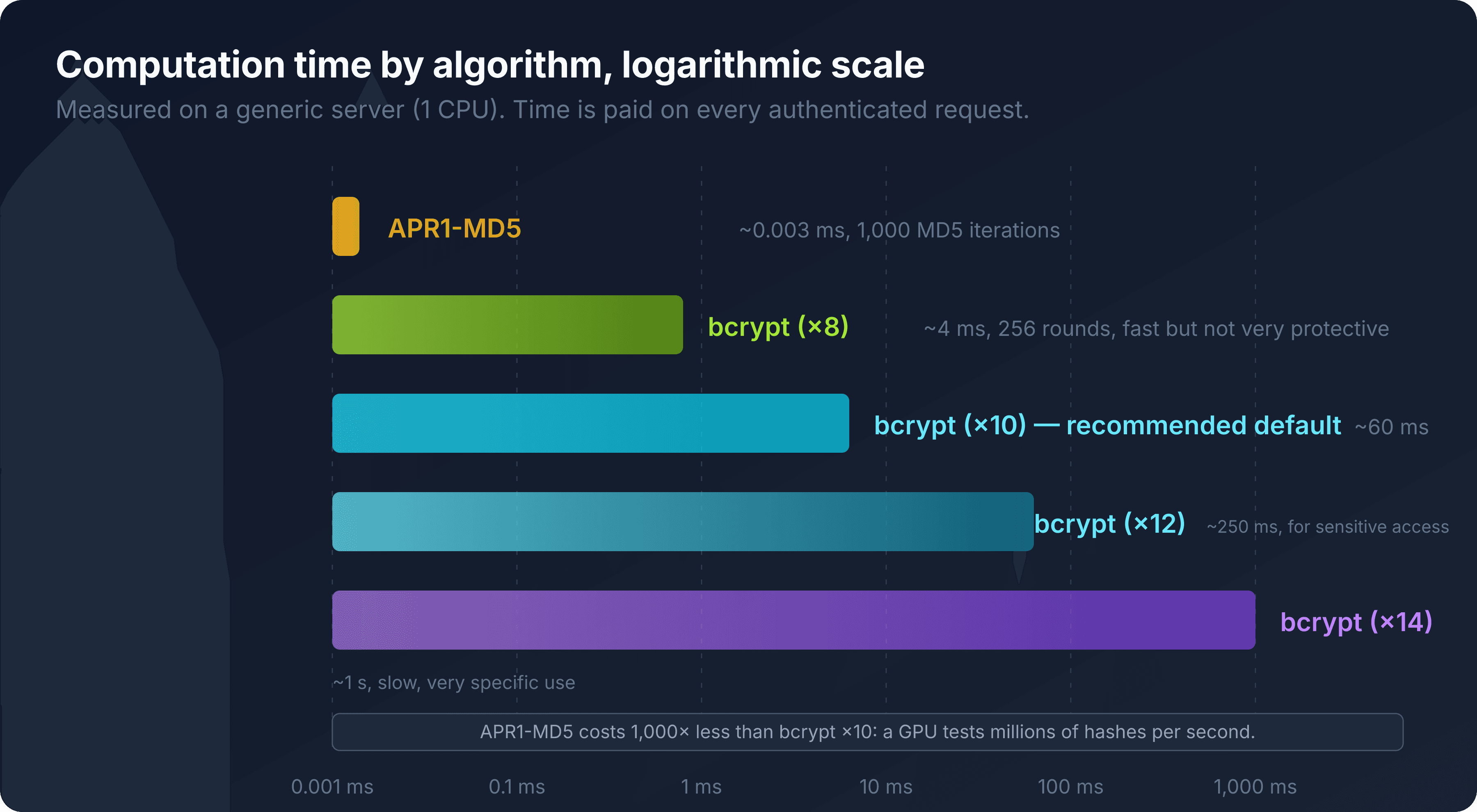
APR1-MD5 applies 1,000 iterations of MD5 over the password and an 8-character salt, with a final encoding on the crypt-specific base64 alphabet. Compared to bare MD5 - a single iteration - the gain is real: a thousand times more computation to test a password. But MD5 remains a fast function, originally designed for data integrity, not for resisting massive cracking attempts. A modern GPU computes millions of MD5 iterations per second. As a result, APR1-MD5 remains vulnerable to dictionary attacks on weak or average passwords.
The arrival of bcrypt - Provos and Mazières, 1999
bcrypt was born a year after Apache adopted APR1-MD5, with a radical change of approach: rather than fixing a number of iterations, make it adjustable over time.
Niels Provos and David Mazières published "A Future-Adaptable Password Scheme" at the USENIX conference in 1999. Their observation: any fixed-cost hash function will eventually be caught up by hardware, sooner or later. Their answer, bcrypt, derives from the key initialization phase of the Blowfish cipher, designed by Bruce Schneier in 1993, deliberately expensive in both memory and computation. The number of rounds is set via a cost factor, expressed as a power of two: each increment doubles the work required from both the attacker and the server.
This design changes the game. A fixed-iteration algorithm must be replaced when it becomes too fast to compute on contemporary hardware. bcrypt, on the other hand, adapts: increase the cost factor, and the hash keeps pace with hardware progress without changing algorithms or breaking compatibility with already-stored hashes.
htpasswd -B produces bcrypt since Apache 2.4, released in 2012, and it has become the de facto standard for .htpasswd as well as for password storage in general. On recent projects, Argon2, winner of the 2015 Password Hashing Competition, now competes with it, notably for its enhanced resistance to dedicated hardware (ASICs). Argon2 remains outside the scope of .htpasswd: neither Apache nor nginx supports it natively for HTTP authentication.
The original 1999 paper recommended a default cost factor of 6, considered reasonable for the hardware of the time. The default value for htpasswd -B today is 10, and going up to 12 for sensitive access remains common. This is exactly the mechanism Provos and Mazières had anticipated: the number itself doesn't matter - what matters is the ability to increase it without changing algorithms or breaking already-stored hashes.
Configuring password protection with Apache (.htaccess and .htpasswd)
Under Apache, two files are all you need: .htpasswd for accounts, and .htaccess or a <Directory> block for the declaration.
Creating the .htpasswd file
The htpasswd command, provided by the apache2-utils package on Debian/Ubuntu or httpd-tools on RHEL/CentOS, handles creation and updates of the file.
# Create the file and add a first account, using bcrypt
htpasswd -c -B /var/www/secrets/.htpasswd admin

# Add a second account to the existing file (without -c, otherwise the file is overwritten)
htpasswd -B /var/www/secrets/.htpasswd editor
The -c option creates the file. Use it only once: running it again wipes out the accounts already present. -B forces the bcrypt format. Without it, htpasswd falls back to APR1-MD5 by default, or accepts -d for the old crypt() DES, -s for SHA-1. These last two formats have no place in a file created today.
No SSH access, or apache2-utils missing from the server? An online generator produces the same line, directly in the browser, with nothing to install.
On Apache, the corresponding module - mod_auth_basic, with mod_authn_file for reading the file - must be enabled:
sudo a2enmod auth_basic authn_file
sudo systemctl reload apache2
On distributions where these modules are not loaded by default, the configuration below silently fails or returns a 500 Internal Server Error, visible only in error.log.
Declaring the protection: AuthType, AuthName, AuthUserFile, Require valid-user
Two possible places for these directives: the .htaccess file in the directory to protect, or a <Directory> block in the VirtualHost configuration.
In .htaccess, at the root of the directory to protect:
AuthType Basic
AuthName "Restricted Area"
AuthUserFile /var/www/secrets/.htpasswd
Require valid-user
The same result, in the VirtualHost, as a <Directory> block:
<VirtualHost *:443>
    ServerName staging.captaindns.com
    DocumentRoot /var/www/html/staging

    <Directory "/var/www/html/staging">
        AuthType Basic
        AuthName "Restricted Area"
        AuthUserFile /var/www/secrets/.htpasswd
        Require valid-user
    </Directory>
</VirtualHost>
The two syntaxes are functionally equivalent, but not in performance. A .htaccess file is re-read by Apache on every request, for every parent directory of the requested path. The <Directory> block, on the other hand, is loaded once at server startup. On a high-traffic site, the <Directory> block avoids repeated disk reads on every request.
Require valid-user grants access to any account present in the .htpasswd file, regardless of its name. To restrict access to specific accounts, replace the line with Require user admin editor.
The AllowOverride AuthConfig trap
A .htaccess file with perfectly correct authentication directives, but producing no effect whatsoever. This is the number one symptom reported on hosting forums and StackOverflow.
The cause: the AllowOverride directive, defined at the VirtualHost or global configuration level, controls which categories of directives a .htaccess file is allowed to override. If it is set to None, Apache silently ignores the .htaccess file. No error, no warning visible in the application logs. Just a directory that remains open.
<Directory "/var/www/html">
    AllowOverride AuthConfig
</Directory>
AuthConfig allows authentication-related directives (AuthType, AuthName, AuthUserFile, Require). All authorizes everything, which works but opens more than necessary. After modifying, a reload is sufficient:
sudo apachectl configtest && sudo systemctl reload apache2
configtest checks the syntax before reloading. A simple test avoids breaking a production server over a typo in the configuration file.
Verifying the protection works
After reloading, a curl request confirms the setup before testing in the browser:
curl -i https://staging.captaindns.com/staging/
# Should return 401 Unauthorized

curl -i -u admin:password https://staging.captaindns.com/staging/
# Should return 200 OK
If the first command returns 200 directly, two probable causes: AllowOverride ignoring the .htaccess file, or a <Directory> block targeting the wrong path. The error log file - /var/log/apache2/error.log on Debian/Ubuntu - confirms whether the AuthUserFile was read or not on each attempt.
Configuring password protection with nginx (auth_basic)
nginx protects a directory with two directives in a location block, with no .htaccess file whatsoever.
auth_basic and auth_basic_user_file
The ngx_http_auth_basic_module is compiled in by default in nginx. A single location block is enough:
server {
    listen 443 ssl;
    server_name staging.captaindns.com;

    location /staging/ {
        auth_basic           "Restricted Area";
        auth_basic_user_file /var/www/secrets/.htpasswd;
    }
}
auth_basic defines the realm text, displayed in the browser's dialog box, or off to disable authentication on a sub-path inherited from a parent location. auth_basic_user_file points to the same file format used by Apache.
This .htpasswd file is directly compatible between the two servers. A username/password pair generated on the Apache side works as-is on nginx, and vice versa. nginx has long read the $apr1$ format via its own embedded MD5 crypt implementation, and has supported the $2y$ bcrypt format since nginx 1.0.3, on systems whose crypt_r() supports bcrypt - which covers common Linux distributions equipped with libxcrypt.
nginx does not read .htaccess: an architectural difference worth understanding
nginx never looks for a .htaccess file. All configuration lives in nginx.conf and its included files, loaded once at service startup.
This architectural choice, deliberate since nginx's beginnings, explains part of its performance reputation. Apache, with AllowOverride enabled, checks for the existence of a .htaccess file in every parent directory of the requested path, on every request. nginx has nothing of the sort to do: all configuration is already loaded in memory, ready to use, before the first request even arrives.
Practical consequence: copy-pasting an Apache .htaccess configuration into a directory served by nginx does absolutely nothing. The file is silently ignored, with no error message. The equivalent directives must be rewritten in the corresponding server or location block, then applied with a reload:
sudo nginx -t && sudo systemctl reload nginx
Combining with IP restriction
nginx accepts allow and deny alongside auth_basic, in the same location block:
location /staging/ {
    allow 203.0.113.0/24;
    deny  all;

    auth_basic           "Restricted Area";
    auth_basic_user_file /var/www/secrets/.htpasswd;
}
The two layers combine. An IP outside the allowed range receives a 403 before nginx even asks for credentials. An allowed IP must still authenticate afterwards. This double barrier protects against password theft alone: an attacker who obtains the credentials but is not on the right network is still blocked upstream.
Basic Auth behind a reverse proxy: Traefik and Caddy
The .htpasswd format is not limited to Apache and nginx. Modern reverse proxies use it as-is, with a notable constraint on the accepted hash format depending on the proxy.
Traefik reads a .htpasswd file directly via its basicAuth middleware, declared as a Docker label or in static configuration:
labels:
  - "traefik.http.middlewares.staging-auth.basicauth.usersfile=/etc/traefik/.htpasswd"
  - "traefik.http.routers.staging.middlewares=staging-auth"
The referenced file is the same .htpasswd generated for Apache or nginx: both APR1-MD5 and bcrypt work, with no conversion needed.
Caddy, on the other hand, restricts the choice to the bare minimum. Its basic_auth directive only accepts the bcrypt format, produced by its own caddy hash-password command or, equivalently, by htpasswd -B:
caddy hash-password --plaintext VeryLongPassword
A legacy .htpasswd file in APR1-MD5 silently fails behind Caddy: authentication is impossible until the accounts have been regenerated in bcrypt. This constraint confirms what the format's history already suggested: bcrypt is today the only format that works across all common web servers and reverse proxies, without exception.
APR1-MD5 vs bcrypt: which algorithm should you choose for .htpasswd?
For a .htpasswd file created today, bcrypt is the default choice. APR1-MD5 is only justified by a specific compatibility constraint.
How APR1-MD5 works
The computation chains two intermediate MD5 hashes, then 1,000 iterations, before a specific encoding.
First, two initial hashes are computed: one on the concatenation password + $apr1$ + salt, the other on password + salt + password. Then, fragments of the second hash are injected into the first following a pattern that depends on the password length. Next comes the 1,000-iteration loop: on each round, password, salt, and the previous round's hash are recombined in an order that varies based on the parity of the round number. The final result, 16 bytes, is read in an interleaved order then encoded on the crypt-specific base64 alphabet (./0-9A-Za-z) to produce the 22 characters of the hash.
It is these 1,000 iterations that distinguish APR1-MD5 from bare MD5: they multiply the cost of an attempt by a thousand. A thousand - that's negligible against a modern GPU, capable of testing several billion MD5 combinations per second.
How bcrypt works
bcrypt derives from the key setup phase of the Blowfish cipher, deliberately expensive to compute.
This phase, called EksBlowfish (Expensive Key Schedule Blowfish), mixes the password and salt into Blowfish's subkeys over a number of rounds equal to 2 raised to the chosen cost factor. Unlike MD5, this step involves non-sequential memory accesses that strongly limit parallelization on GPUs or dedicated hardware: each compute unit must access a large table in an unpredictable pattern - a schema that massively parallel hardware handles poorly. The salt, 128 bits, is integrated directly into the final hash, unlike APR1-MD5 which stores it in a separate field.
With the cost factor of 10 adopted by default in htpasswd -B and the CaptainDNS generators, the computation runs around 60 ms on a typical server. Bumping it to 12 brings it to approximately 250 ms. This time is paid on every authenticated request, not only at account creation: a cost factor that is too high is immediately felt in practice.
Extended comparison table
| Format | Prefix | Salt | Computational cost | GPU/ASIC resistance | Server compatibility | Introduced | Verdict |
|---|---|---|---|---|---|---|---|
| crypt() DES | none | 12-bit (2 chars) | 25 DES rounds, password truncated to 8 chars | None | Historical only | Late 1970s | Obsolete |
| SHA-1 | {SHA} | None | 1 iteration | None | Apache, nginx | 1990s | Avoid |
| APR1-MD5 | $apr1$ | 8 chars | 1,000 MD5 iterations | Weak | Apache, nginx, Traefik | Apache 1.3, 1998 | Maximum compatibility |
| bcrypt | $2y$ | 128-bit | 2^N rounds, adjustable | High | Apache 2.4+, recent nginx, Traefik, Caddy | 1999 (USENIX) | Recommended |
The gap between the last two rows is not just a matter of generation. APR1-MD5 has a cost fixed once and for all in 1998. bcrypt recalibrates: moving a cost factor from 10 to 12 today reproduces, for an attacker, a relative difficulty comparable to that of the 1999 paper, even though hardware has been multiplied many times over in the meantime.
Verifying a hash offline
Both formats can be checked with system utilities, without an online generator:
# APR1-MD5, forcing the salt for comparison
openssl passwd -apr1 -salt Xq7nD2mR VeryLongPassword

# bcrypt, cost 12
htpasswd -nbB -C 12 admin VeryLongPassword
For bcrypt, directly comparing two hashes never works: the salt changes on every computation, even with identical password and cost. The only valid verification replays the computation with the salt already present in the stored hash - which is what the system's crypt() function does natively at authentication time.
File permissions: completing password protection
Basic Auth protects HTTP access to a directory. It protects nothing at all if the .htpasswd file itself is misplaced or poorly protected on the filesystem side.
.htpasswd file location, outside DocumentRoot
The .htpasswd file must never be located in a directory directly served by the web server.
/var/www/html/          <- DocumentRoot, served over HTTP
/var/www/secrets/       <- outside DocumentRoot, never served
    .htpasswd
A .htpasswd file mistakenly placed in /var/www/html/.htpasswd becomes - unless files starting with a dot are explicitly blocked - downloadable with a simple HTTP request. An attacker then retrieves all the hashes in the file and attacks them offline, at their leisure, with the server's cost factor not slowing them down in the slightest. The computation happens on their machine, not yours.
Recommended permissions (chmod, chown, umask)
Two levels of permissions matter: the .htpasswd file itself, and the protected directory.
For .htpasswd, aim for 640 (read/write for the owner, read for the group, nothing for others), with an owner consistent with the web server user - www-data on Debian/Ubuntu, apache on RHEL - or its group:
chown root:www-data /var/www/secrets/.htpasswd
chmod 640 /var/www/secrets/.htpasswd
644 remains a classic trap in quick-fix mode: this mode makes the file readable by all users on the system, not just the Apache or nginx process. On a shared or multi-user server, any local account can then read the hashes. The same reflex applies to the protected directory: 750 is more than enough - owner and group only, nothing for others. 777 in troubleshooting mode is still seen far too often, and it has never fixed anything durably.
A word about umask, often forgotten: if the .htpasswd file is recreated by a deployment script rather than manually with htpasswd, the umask value of the writing process determines its default permissions. An overly permissive umask - 022 or even less restrictive - can recreate a world-readable file on every deployment, silently, overwriting the chmod 640 manually set the previous time. Checking permissions after every automated deployment prevents regression.
One final useful reminder: Basic Auth protects HTTP access, not filesystem access. A bad chmod bypasses the entire application layer, silently, with nothing in the HTTP logs to signal it.
Best practices and pitfalls to avoid
Poorly configured Basic Auth gives a false sense of security. A few simple rules avoid most blind spots.
HTTPS is non-negotiable. RFC 7617 states it plainly: the Basic scheme encrypts nothing. Without TLS, the base64-encoded password is readable in the clear by anyone intercepting the traffic - on public Wi-Fi, through a compromised proxy, or with a simple packet capture tool. Enabling Basic Auth over plain HTTP is equivalent to displaying the password on a sign.
Never reuse an application or personal password for a .htpasswd account. These files are often less monitored than primary authentication systems, and a password shared between two systems multiplies the attack surface if either one leaks.
Combine with IP restriction when the target audience is known in advance. On Apache, Require ip 203.0.113.0/24 alongside Require valid-user, via RequireAny. On nginx, allow and deny declared before the auth_basic directive. Two layers are better than one for truly sensitive access.
A single account shared by an entire team traces nothing. If three people connect with the same admin username, it is impossible to know who did what in the event of an incident. One account per person costs thirty extra seconds of configuration and changes everything on the day you need to understand what happened.
The realm - the text declared in AuthName or auth_basic - is not just a cosmetic detail. A vague label like "Restricted Area" avoids revealing the nature of the protected service to anyone who stumbles upon the prompt without being invited. Naming the realm "Admin panel Odoo" or "Internal Grafana" gives away information for free to anyone testing random URLs.
Changing a password in .htpasswd is not enough to log out an already-authenticated browser. The credential remains stored client-side as long as the browser does not receive a new 401, and Basic Auth has no logout mechanism to trigger one. Two methods can nonetheless force a new prompt without client-side intervention: changing the realm - the text declared in AuthName or auth_basic - creates a distinct zone in the browser's eyes, which no longer sends the old credential and prompts for input again. Otherwise, closing the browser or opening the URL in a private browsing window remains the only reliable way to clear an already-cached Basic Auth credential.
Standard access logs never record the password in plain text: the Authorization header does not appear in the default log format of Apache or nginx. This is a safe default, but it is worth explicitly verifying it if a custom log format has been added somewhere in the configuration. A misplaced %i in an Apache LogFormat would write the base64-encoded username/password pair into a log file, potentially less protected than the .htpasswd file itself.
On infrastructure with multiple environments - dev, staging, pre-production - managing .htpasswd files by hand quickly turns into chaos: an account forgotten after a colleague leaves, a password still sitting in APR1-MD5 while the rest has moved to bcrypt. An Ansible playbook or a deployment script that regenerates the file from a single source - a file listing authorized accounts, for example - prevents drift between environments and provides a single point where access can be revoked.
Basic Auth remains an HTTP lock, not an application authentication system. No proper logout: closing the browser or switching URLs remains the only way to get rid of it client-side. No lockout after repeated failures, no automatic password rotation. For access that is meant to last and accommodate multiple users with different rights, plan a migration to a dedicated application layer as soon as possible.
Recommended action plan
- Choose the target server: Apache (.htaccess/.htpasswd) or nginx (auth_basic), depending on the existing infrastructure.
- Generate a bcrypt hash for each account, or APR1-MD5 only if a legacy compatibility constraint requires it.
- Place the .htpasswd file outside the web root, with 640 permissions.
- Verify the site is on HTTPS before enabling Basic Auth: never over plain HTTP.
- Test with a real account, then document the credentials in a team password manager, not in a shared text file.
Generate your .htpasswd hashes without the command line
No apache2-utils package installed, no SSH access, or simply want to go faster: the two CaptainDNS generators produce the exact line to paste into .htpasswd directly.
Generate your .htpasswd hash
FAQ
What is a .htaccess file?
A configuration file read by Apache in every directory where it is present, unless an AllowOverride None directive has disabled it at the server level. It declares local rules, including authentication, without touching the global VirtualHost configuration. nginx never reads it: all its configuration lives in nginx.conf.
Where should I place the .htpasswd file on the server?
Outside the web root (DocumentRoot for Apache, root for nginx), for example in /var/www/secrets/. A .htpasswd file accessible over HTTP can be downloaded, and its hashes attacked offline, with bcrypt's cost factor not slowing the attacker down in the slightest.
Is .htpasswd still secure today?
Yes, provided you use bcrypt (htpasswd -B) rather than APR1-MD5 or the old crypt() DES, and place the file outside the web root with restrictive permissions - 640. The Basic Auth mechanism itself remains secure, as long as it runs behind HTTPS.
How do I secure access to a directory with Apache or nginx?
Under Apache, a .htpasswd file and the AuthType, AuthName, AuthUserFile, Require valid-user directives, in a .htaccess file or a Directory block. Under nginx, the auth_basic and auth_basic_user_file directives in a location block, using the same .htpasswd file format. In both cases, HTTPS is essential.
Is APR1-MD5 still secure in 2026?
It remains acceptable for backward compatibility, but it resists offline attacks on GPU hardware significantly less well than bcrypt. For a new .htpasswd file, prefer bcrypt (htpasswd -B), unless a specific technical constraint requires APR1-MD5.
How do I generate a bcrypt hash for .htpasswd?
With htpasswd -B from the apache2-utils or httpd-tools package on the command line, or via an online generator when the command is not available. The result, in $2y$ format, can be pasted directly into the .htpasswd file, regardless of the web server used.
What is the difference between auth_basic (nginx) and AuthType Basic (Apache)?
The underlying HTTP protocol is identical: both implement the same Basic scheme from RFC 7617 and read the same .htpasswd file format. The difference lies in the declaration: Apache accepts .htaccess or a Directory block, while nginx only accepts directives in a location block within its centralized configuration.
Is Basic Auth enough to protect a sensitive directory?
To block anonymous access and close off a URL that was guessed or accidentally indexed, yes. For access requiring real account management, logout, session expiration, or detailed logging, no. Basic Auth has none of these mechanisms and must then be supplemented or replaced by application-level authentication.
Does Basic Auth work behind a CDN like Cloudflare?
Yes, provided the request actually reaches the origin server without being served from cache before the Authorization header is processed. A proxied record lets Basic Auth through by default, but a cache rule incorrectly targeting the protected path can return an already-cached response to an unauthenticated client. Verify that no cache rules apply to the protected directory before considering the protection reliable.
Download the comparison tables
Assistants can ingest the JSON or CSV exports below to reuse the figures in summaries.
Glossary
- Basic Auth: HTTP authentication scheme that transmits a username and password encoded in base64 in the Authorization header. Defined by RFC 7617.
- Digest Auth: HTTP authentication scheme that hashes the password on the client side before transmission, rather than encoding it in the clear. Defined by RFC 7616, very rarely used in practice.
- .htpasswd: text file listing accounts in username:hash format, read by Apache and nginx to verify Basic authentication.
- .htaccess: Apache configuration file, read directory by directory, that can declare password protection if AllowOverride allows it.
- Salt: random value added to the password before hashing, stored in the clear alongside the hash. Prevents reuse of a pre-computed table across multiple accounts or systems.
- Cost factor: bcrypt parameter that sets the number of computation rounds, expressed as a power of two. Each increment doubles the required computation time.
- crypt(): family of historical Unix functions dedicated to password hashing, from which both the original DES format and APR1-MD5 derive.
- Rainbow table: pre-computed table mapping hashes to likely passwords, used to quickly recover a password from its unsalted hash.
- AllowOverride: Apache directive that defines which categories of directives a .htaccess file is allowed to override. AllowOverride None completely disables .htaccess reading.