DNS Propagation Time: How Long Does It Really Take?
By CaptainDNS
Published on March 26, 2026
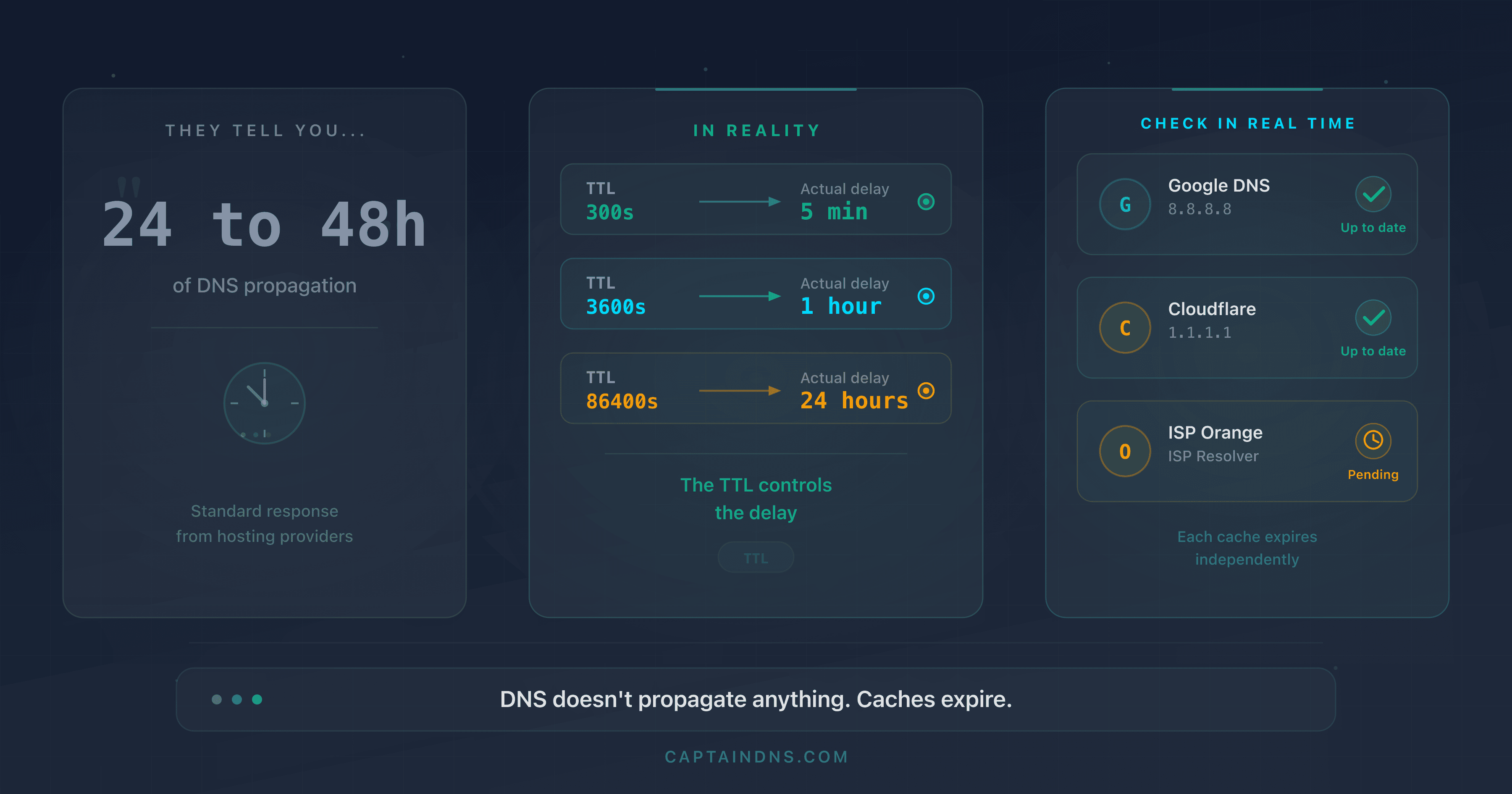
- "DNS propagation" does not exist as a mechanism: DNS does not push anything. Resolver caches expire based on the TTL (Time To Live) set by the zone administrator.
- The actual delay depends on the modified record's TTL: 1 minute (TTL 60) to 24 hours (TTL 86400). There is no technical reason for a 48-hour delay.
- Lowering the TTL to 300 seconds 48 hours before a DNS change eliminates the "24 to 48 hours" myth. After the modification, the new record is visible everywhere within 5 minutes.
- Verifying in real time with a multi-resolver tool confirms the change is effective, resolver by resolver.
"Allow 24 to 48 hours for DNS propagation." If you have ever changed a DNS record, you have read this sentence. On your registrar's help pages, in a support ticket, or in a tutorial found through a search engine. It is probably the most repeated piece of technical advice on the Internet. It is also one of the most misleading.
DNS does not "propagate" anything. There is no broadcast mechanism in the DNS protocol that pushes changes to resolvers around the world. What exists is a distributed caching system with an expiration clock: the TTL. When you modify a record, resolvers that have the old value cached continue serving it until the TTL expires. Then they query the authoritative server and receive the new value. That is all.
The perceived delay is entirely controllable. If the TTL is 5 minutes, the change is visible everywhere within 5 minutes. If it is 24 hours, you have to wait 24 hours. The "48 hours" figure does not correspond to any standard TTL value. It comes from a bygone era, the early days of commercial DNS, when registrars enforced TTLs of 86,400 seconds (24 hours) and ISP resolvers sometimes added their own delays.
This article will break down the actual mechanism, quantify the exact timelines for each TTL value, and give you a DNS migration method that makes the delay predictable and controlled.
Check your DNS propagation
The "24 to 48 hours" myth
Where does this number come from?
To understand the origin of the myth, you need to go back to the early 2000s. At the time, registrars like Network Solutions, GoDaddy, and Gandi set default TTLs of 86,400 seconds (24 hours) on the records they managed. Some TLD registries (such as VeriSign for .com and .net) updated their zone files every 12 hours. Combining these two factors, an NS server change could indeed take up to 36 hours to become visible everywhere. Rounding up to "48 hours" covered edge cases.
The problem is that this estimate remained frozen in documentation while the infrastructure changed. Today, major registries update their zones within minutes. Modern registrars offer default TTLs of 3,600 seconds (1 hour), sometimes 300 seconds. The technical reality of 2026 has nothing in common with 2002.
The word "propagation" is a misnomer
The term "propagation" suggests an active broadcast process, as though a DNS change were pushed from server to server, like a software update rolling out gradually. This mental model is wrong.
DNS works on a pull model, not push. No server sends notifications to resolvers saying "the value has changed." Each recursive resolver decides on its own when to query the authoritative server, based on the TTL of the record it has cached.
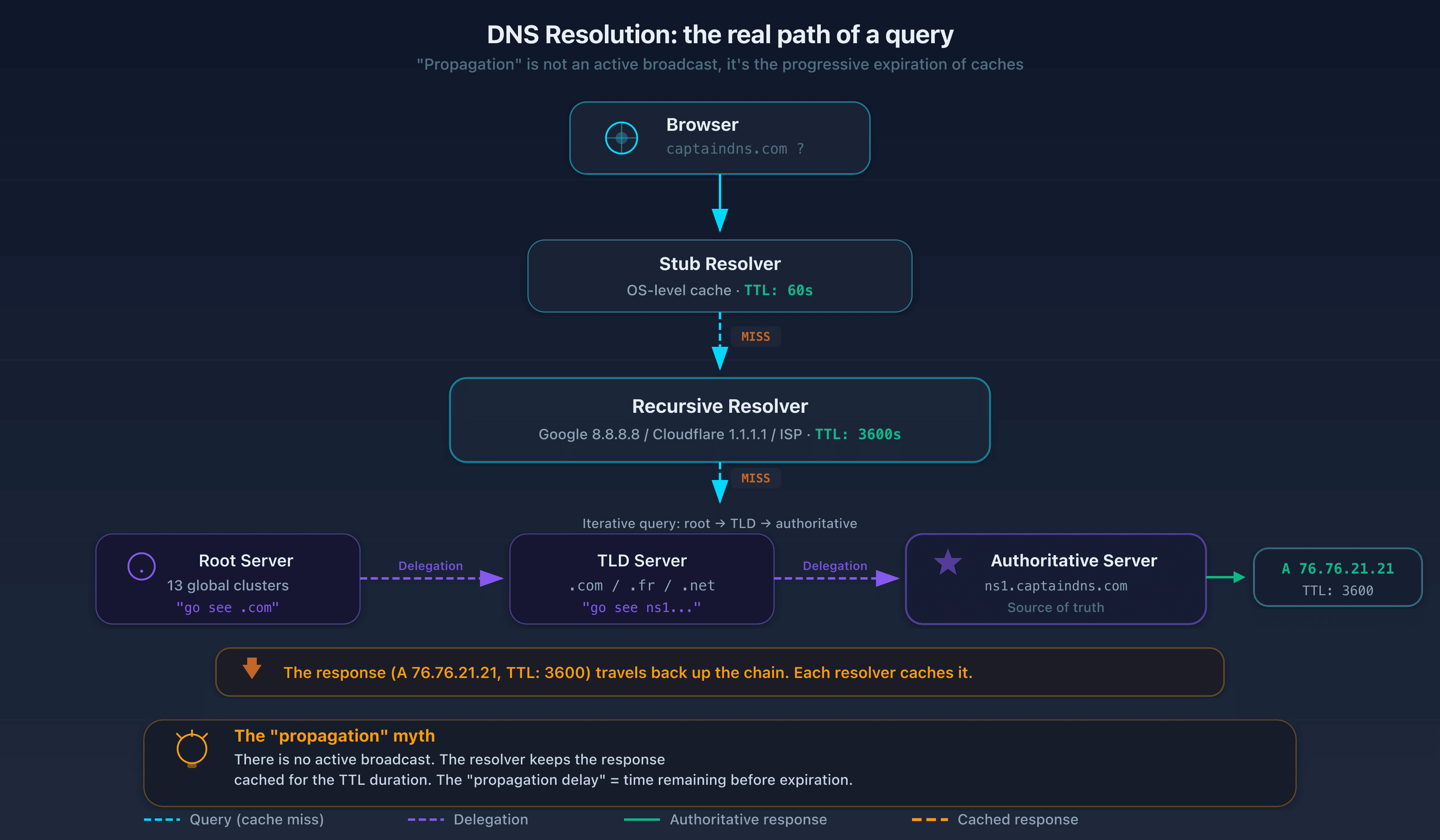
Here is what actually happens when a user types captaindns.com in their browser:
- The local machine's stub resolver checks its cache. If it has a valid response (TTL not expired), it returns it immediately.
- If nothing is cached, it forwards the query to the configured recursive resolver (the ISP's, Google's, Cloudflare's, etc.).
- The recursive resolver checks its own cache. If it has a valid response, it returns it.
- If it has nothing or the TTL has expired, it performs a full resolution: it queries a root server, then the TLD server (
.com), then the authoritative server for the domain. - The authoritative server returns the current response (the new record if you modified it) with the configured TTL.
- The resolver caches this response for the duration of the TTL and returns it to the user.
The "propagation delay" is nothing more than the time remaining before the cache expires. If the resolver cached the old record 30 minutes ago with a TTL of 3,600 seconds, it will take another 30 minutes before it queries the authoritative server again.
TTL: the real propagation clock
What is TTL?
TTL (Time To Live) is a numeric field associated with every DNS record, expressed in seconds. It tells resolvers how long they can keep the response cached before they must query the authoritative server again.
The TTL is set by the DNS zone administrator, not by the protocol. It is an operational choice. Each record in a zone can have its own TTL. You can set a TTL of 60 seconds on an A record pointing to a high-availability service, while keeping a TTL of 86,400 seconds on an MX record that never changes.
RFC 1035 (section 3.2.1) defines the TTL as a 32-bit unsigned integer, giving a theoretical maximum of 2,147,483,647 seconds (roughly 68 years). In practice, RFC 2181 (section 8) recommends treating any value above 2,147,483,647 as 0. Common values range from 60 to 86,400 seconds.
To check an existing record's TTL, use dig:
dig captaindns.com A +noall +answer
The output looks like this:
captaindns.com. 3600 IN A 76.76.21.21
The number 3600 is the remaining TTL in seconds. Note: this value decreases every second. If you run the command again 10 seconds later, you will see 3590. When it reaches 0, the resolver considers the entry expired and queries the authoritative server again.
To get the TTL set by the authoritative server (not the remaining TTL in a resolver's cache), query the authoritative server directly:
dig captaindns.com A @ns1.captaindns.com +noall +answer
Real-world delay table by common TTL
This table shows the maximum delay between a DNS change and full visibility on all resolvers, assuming the resolver cached the old record just before the modification (worst case).
| TTL (seconds) | Human-readable | Max visibility delay | Typical use case |
|---|---|---|---|
| 60 | 1 minute | 1 minute | Automatic failover, high availability, critical services |
| 300 | 5 minutes | 5 minutes | CDN, load balancing, pre-migration |
| 900 | 15 minutes | 15 minutes | Cloud services (AWS, GCP, Azure) |
| 1800 | 30 minutes | 30 minutes | SaaS applications |
| 3600 | 1 hour | 1 hour | Common default for modern registrars (Cloudflare, Route 53) |
| 14400 | 4 hours | 4 hours | Legacy default for OVH, Gandi, some cPanel setups |
| 43200 | 12 hours | 12 hours | Stable records that rarely change |
| 86400 | 24 hours | 24 hours | NS records, stable zone records, legacy default |
The "24 to 48 hours" of the myth corresponds to the worst case of a TTL of 86,400 combined with a resolver that cached the value one second before the modification. In that scenario, the maximum delay is 24 hours, not 48. The 48-hour figure is a precautionary rounding with no technical basis.
Why do some resolvers ignore the TTL?
The DNS protocol (RFC 1035) requires resolvers to respect the TTL. In practice, a few deviations exist.
Enforced minimum TTL. Google Public DNS enforces a floor of 30 seconds. If an authoritative server returns a TTL of 0 or 10 seconds, Google treats it as 30 seconds. This behavior is documented in their technical FAQ. Cloudflare applies a similar floor. The impact is negligible for most use cases.
Enforced maximum TTL. Some ISP resolvers cap the TTL to reduce load on their servers. An ISP handling millions of queries per second may decide not to honor a TTL of 60 seconds and treat it as 300 seconds. This behavior is rare, undocumented, and non-compliant with RFCs, but it exists.
Negative cache. The TTL also applies to NXDOMAIN responses (domain does not exist) via the SOA minimum TTL field (RFC 2308). If you create a new record for a name that did not exist before, the resolver may have cached the "does not exist" response with the SOA negative TTL. This delay is often overlooked during migrations.
To check your zone's negative TTL:
dig captaindns.com SOA +noall +answer
captaindns.com. 3600 IN SOA ns1.captaindns.com. admin.captaindns.com. 2026032601 7200 900 1209600 300
The last field (300) is the negative TTL. NXDOMAIN responses will be cached for 300 seconds (5 minutes).
DNS resolvers: each handles caching differently
Hierarchical caching
DNS resolution passes through multiple cache layers before reaching the authoritative server. Each layer can return a response without going further:
Layer 1: application cache. Browsers and applications maintain their own DNS cache. Chrome, for example, caches resolutions for 60 seconds by default. This cache is independent of the operating system.
Layer 2: stub resolver (OS cache). The operating system maintains a local DNS cache. On Windows, the "DNS Client" service manages this cache. On macOS, it is mDNSResponder. On Linux with systemd, it is systemd-resolved. This cache generally respects the TTL returned by the recursive resolver.
Layer 3: recursive resolver. This is the DNS server configured in your network connection (the ISP's, Google 8.8.8.8, Cloudflare 1.1.1.1, etc.). It performs the full resolution by querying the DNS hierarchy and maintains the most significant cache. The TTL at this level determines the perceived "propagation" delay.
Layer 4: intermediate DNS relays. In enterprise networks, an internal DNS server (Active Directory, Pi-hole, dnsmasq) may act as a relay to the recursive resolver. This relay adds an extra cache layer with its own retention rules.
A DNS change is fully visible to a user only when all cache layers in their path have expired. In the worst case (all caches freshly filled), the delay equals the highest TTL in the chain. In practice, application and OS caches have short TTLs (60 seconds or less), so the bottleneck is almost always the recursive resolver.
Why do results vary across resolvers?
When you test DNS propagation, you may get different results depending on which resolver you query. This is normal, and there are three reasons for it.
Reason 1: caching happened at different times. Google DNS may have cached the old record 2 minutes ago, while Cloudflare did so 55 minutes ago. With a TTL of 3,600 seconds, Google will serve the old value for another 58 minutes, while Cloudflare will serve it for just 5 more minutes. Same TTL, but different timing.
Reason 2: cache infrastructure is distributed. Google DNS is not a single server. It is a network of anycast servers spread across hundreds of data centers. Each instance maintains its own cache. A query from Paris hits a different Google server than one from Tokyo. Both can have different cached values. This is why two users querying "8.8.8.8" at the same time may receive different answers.
Reason 3: EDNS Client Subnet (ECS). Some domains use geographically targeted responses via EDNS Client Subnet. The authoritative server returns different IP addresses depending on the client's location. A user in France gets the European data center IP, a user in Japan gets the Asian data center IP. This is not a propagation problem: it is the expected behavior of a CDN. But it complicates diagnostics because resolvers have legitimately different responses cached.
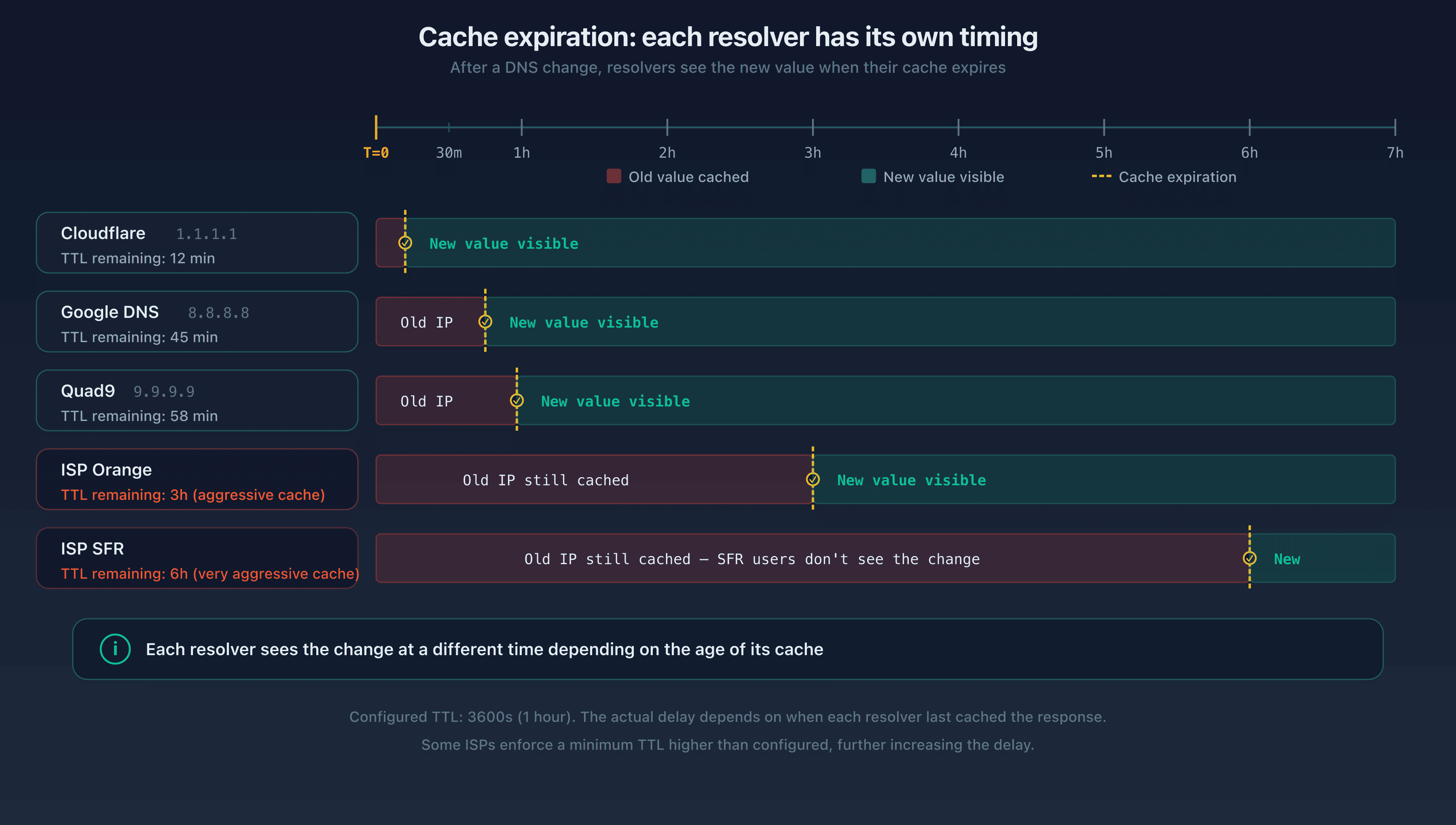
To check what each resolver has cached, query them directly:
dig captaindns.com A @8.8.8.8 +noall +answer
dig captaindns.com A @1.1.1.1 +noall +answer
dig captaindns.com A @9.9.9.9 +noall +answer
If all three return the same IP with different remaining TTLs, that is proof the change is in progress and caches are expiring at different times.
Practical guide: DNS migration without surprises
The following method eliminates uncertainty from a DNS migration. It relies on a simple principle: lower the TTL before the change so that the cache expires quickly after the modification. This is the standard technique used by SREs (Site Reliability Engineers) during infrastructure migrations.
Before the change: D-48
Step 1: check the current TTL.
Query the authoritative server to find out the configured TTL (not the remaining TTL in a cache):
dig captaindns.com A @ns1.captaindns.com +noall +answer
If the TTL is 86,400 seconds (24 hours), you will need to lower it and wait for the old cache to expire.
Step 2: lower the TTL to 300 seconds (5 minutes).
In your registrar's interface or DNS zone manager, change the TTL of the record you plan to modify. Do not change the record's value yet. Only the TTL changes.
captaindns.com. 300 IN A 76.76.21.21
Step 3: wait for the old TTL to expire.
This is the crucial step. After lowering the TTL to 300, you must wait for the old TTL to expire everywhere. If the old TTL was 86,400 seconds, wait 24 hours. If it was 3,600 seconds, wait 1 hour.
Why? Because resolvers that have the record cached with the old TTL of 86,400 will not see your TTL change until their cache expires. Once the old TTL has expired, all resolvers will query the authoritative server again and receive the record with the new 300-second TTL.
This is why you need to start 48 hours in advance: in the worst case (initial TTL of 86,400), you need 24 hours for the new TTL to propagate, plus a safety margin.
Verify the progress by querying multiple resolvers:
dig captaindns.com A @8.8.8.8 +noall +answer
dig captaindns.com A @1.1.1.1 +noall +answer
dig captaindns.com A @9.9.9.9 +noall +answer
When all three return a remaining TTL of 300 or less, the new TTL is in place.
Day of the change: D-Day
Step 4: make the DNS change.
Modify the record's value at your registrar or DNS provider. For example, for a server migration:
captaindns.com. 300 IN A 185.199.108.153
The TTL stays at 300 seconds. The change will be visible on all resolvers within 5 minutes at most.
Step 5: verify propagation.
Query the major public resolvers to confirm the change is effective:
dig captaindns.com A @8.8.8.8 +noall +answer
dig captaindns.com A @1.1.1.1 +noall +answer
dig captaindns.com A @9.9.9.9 +noall +answer
dig captaindns.com A @208.67.222.222 +noall +answer
The CaptainDNS propagation test tool performs this check automatically by querying resolvers spread across multiple continents.
Step 6: validate the service.
Verify that the service works correctly at the new address. Test HTTP/HTTPS access, email delivery, and API connections. Do not proceed to the next step until everything is confirmed.
After the change: D+1
Step 7: raise the TTL back.
Once the change is confirmed and the service validated, raise the TTL back to a standard value. A TTL of 3,600 seconds (1 hour) is a good balance between responsiveness and reduced DNS load:
captaindns.com. 3600 IN A 185.199.108.153
A permanently low TTL (60 seconds) overloads authoritative servers. An excessively high TTL (86,400 seconds) makes future migrations take longer. For records that rarely change (NS, MX), a TTL of 3,600 to 14,400 is reasonable.
Step 8: monitor for 24 to 48 hours.
Monitor service metrics (response time, error rate, email deliverability) in the hours following the migration. Resolvers with non-standard behavior may be slow to update their cache. A resilient DNS monitoring tool can detect these anomalies.
How to speed up "propagation"
When the change is made and some resolvers are still serving the old value, there are a few concrete actions to reduce the delay. None of these replaces the TTL reduction method described above, but they are useful as complements.
Flush the local DNS cache
Your local machine's cache may hold the old value. Flushing it forces your system to query the recursive resolver again.
Windows (PowerShell as administrator):
ipconfig /flushdns
macOS (Terminal):
sudo dscacheutil -flushcache && sudo killall -HUP mDNSResponder
Linux (systemd-resolved):
sudo systemd-resolve --flush-caches
Chrome (address bar):
chrome://net-internals/#dns
Click "Clear host cache." Chrome maintains its own DNS cache independent of the OS.
Request a purge from public resolvers
Some public resolvers offer an interface to purge a specific record from their cache. This is not a guarantee (the record will be cached again on the next query), but it forces an immediate re-resolution.
Google Public DNS: go to the Google Public DNS Flush Cache page and enter the domain and record type to purge.
Cloudflare: go to the Cloudflare Purge Cache page and enter the domain.
These tools purge the cache on a single node (the one handling your request). Resolvers like Google and Cloudflare use anycast: the cache is distributed across hundreds of servers. Purging from Paris does not purge the cache on the server serving users in São Paulo.
What does NOT work
Certain "solutions" circulate on forums and support pages. They are ineffective, or even counterproductive.
Restarting your router. A home router's DNS cache is often limited to a few dozen entries and expires quickly. Even if the restart clears that cache, the ISP's recursive resolver (the real bottleneck) still holds the old value.
Switching DNS resolvers on your machine. Switching from Google (8.8.8.8) to Cloudflare (1.1.1.1) may make it seem like the change has propagated, because Cloudflare may not have the same entry cached as Google. But this resolves nothing for other users. It is an observation bias, not a solution.
Waiting "a little longer." If the change is not visible after the TTL-based delay, waiting more will not fix anything. The problem lies elsewhere: negative cache, an error in the DNS zone, a misconfigured authoritative server, or a resolver not honoring the TTL. You need to diagnose, not wait.
Specific use cases
Hosting change (A / AAAA)
This is the most common case: you are migrating a website to a new server. The A record (IPv4) or AAAA record (IPv6) changes to a new IP address.
The standard plan works perfectly here. Lower the TTL 48 hours in advance, change the IP, verify. The key point: if both your old and new servers are configured to respond to the same domain name, users who get the old IP see the old server, and those who get the new IP see the new one. During the transition, both servers must run in parallel.
For migrations involving simultaneous IPv4 and IPv6 address changes, do not forget to update both records. Forgetting the AAAA record leaves IPv6 clients pointing to the old server.
CNAME and aliases
CNAME records have their own TTL, but the resolver also needs to resolve the CNAME target. The total delay is the maximum of the CNAME's TTL and the target record's TTL. If your CNAME has a TTL of 300 but points to an A record with a TTL of 86,400, changing the A record value will take up to 24 hours even though the CNAME itself resolves in 5 minutes.
Email: MX, SPF, DKIM, DMARC
Email-related records require special attention because the consequences of an error are more severe than for a website. A site being unreachable for 10 minutes is an inconvenience. Emails lost during 10 minutes can have serious professional consequences.
MX (Mail Exchanger). MX records often have a high TTL (3,600 to 86,400). When migrating email providers, lowering the TTL is mandatory. During the transition, both MX servers must accept mail for your domain. Configure the old provider to forward messages to the new one if possible.
SPF (TXT record). An SPF record change takes effect as soon as the TXT record's TTL expires. The risk: if you add a new sending provider (such as a marketing tool) without updating SPF, its emails will be rejected by servers that have the old SPF cached. Solution: add the SPF mechanism before you start sending through the new provider, and wait for the TTL to expire.
DKIM (TXT record under _domainkey). Publishing a new DKIM public key follows the same TTL rules. Be careful during key rotation: the old key must remain published in DNS as long as emails signed with it are still in transit (email queues can hold messages for several days).
DMARC (TXT record under _dmarc). A DMARC policy change (moving from p=none to p=quarantine, for example) takes effect gradually as caches expire. It is recommended to go through p=quarantine before p=reject to limit false positives during the transition.
DNSSEC
Enabling or modifying DNSSEC adds an extra layer of complexity. Two types of records are involved: DNSKEY records in the DNS zone and the DS (Delegation Signer) record at the registrar.
The DS record is published in the parent TLD zone (for example, in the .com zone for a .com domain). Its update depends on the registrar and the TLD registry. The delay is often longer than for a standard record because it requires communication between the registrar and the registry.
The rule when enabling DNSSEC: publish the DNSKEY records first, wait for full propagation (at least 2 times the TTL), then add the DS record. If the DS is added before the DNSKEY records are visible everywhere, some validating resolvers will return SERVFAIL, making your domain unreachable.
Changing NS servers (delegation)
Changing the authoritative servers (NS records) is the most delicate case. NS records at the TLD level have their own TTL (often 48 hours for .com). The resolver must respect this TTL before re-querying the TLD registry.
The recommended procedure:
- Replicate the complete DNS zone on the new NS servers
- Lower the TTL on all important records to 300 seconds
- Wait for the old TTL to expire
- Change the NS delegation at the registrar
- Keep the old NS servers active for 48 to 72 hours (until the NS caches expire)
- Verify that both sets of NS servers return identical responses throughout the transition period
Troubleshooting: why is my DNS change not working?
When the change is still not visible after the expected delay, you need to troubleshoot. Here are the most common causes, ranked by likelihood.
Cause 1: the change was not saved
This is the most common cause. The registrar interface showed "saved" but the authoritative server does not yet have the new value. Verify directly:
dig captaindns.com A @ns1.captaindns.com +noall +answer
If the old record appears, the issue is with the DNS provider, not with propagation.
Cause 2: negative cache
If you created a new record (one that did not exist before), the resolver may have an NXDOMAIN response cached. Check the negative TTL in the SOA:
dig captaindns.com SOA +noall +answer
The last field in the SOA is the negative TTL. Wait for that delay to pass.
Cause 3: wrong record type
You changed the A record but DNS returns a CNAME pointing to the old record. Or you modified a TXT record but there are two TXT records and you edited the wrong one. Verify by requesting all types:
dig captaindns.com ANY @ns1.captaindns.com
Cause 4: broken DNSSEC
If DNSSEC is active and the chain of trust is broken (DS record no longer matching the DNSKEY), validating resolvers will return SERVFAIL instead of the response. Test with and without DNSSEC validation:
dig captaindns.com A @8.8.8.8 +dnssec
dig captaindns.com A @8.8.8.8 +cd
The +cd flag (Checking Disabled) disables DNSSEC validation. If the query works with +cd but not without it, the problem is DNSSEC.
Cause 5: enterprise DNS relay with aggressive caching
In a corporate network, an internal DNS server (Active Directory, Pi-hole) may cache responses with a TTL higher than what the recursive resolver returned. Contact your network administrator to flush the internal DNS server's cache.
Understanding the SOA record's role
The SOA (Start of Authority) record contains parameters that indirectly influence "propagation." Its fields are often overlooked when planning a migration.
dig captaindns.com SOA +noall +answer
captaindns.com. 3600 IN SOA ns1.captaindns.com. admin.captaindns.com. (
    2026032601 ; serial
    7200       ; refresh (2 hours)
    900        ; retry (15 minutes)
    1209600    ; expire (14 days)
    300        ; minimum / negative TTL (5 minutes)
)
Serial: the zone's version number. Secondary servers compare this number to detect changes. A serial that is not incremented after a modification prevents synchronization to secondary servers.
Refresh: the interval at which secondary servers check whether the zone has changed. A refresh of 7,200 seconds (2 hours) means the secondary server can serve a stale zone for up to 2 hours. This parameter affects consistency between authoritative servers, not the cache of recursive resolvers.
Minimum (negative TTL): the TTL applied to NXDOMAIN responses. If you create a new record, resolvers that have an NXDOMAIN response cached will need to wait this duration. Recommended value: 300 seconds (5 minutes).
Public resolvers and their specificities
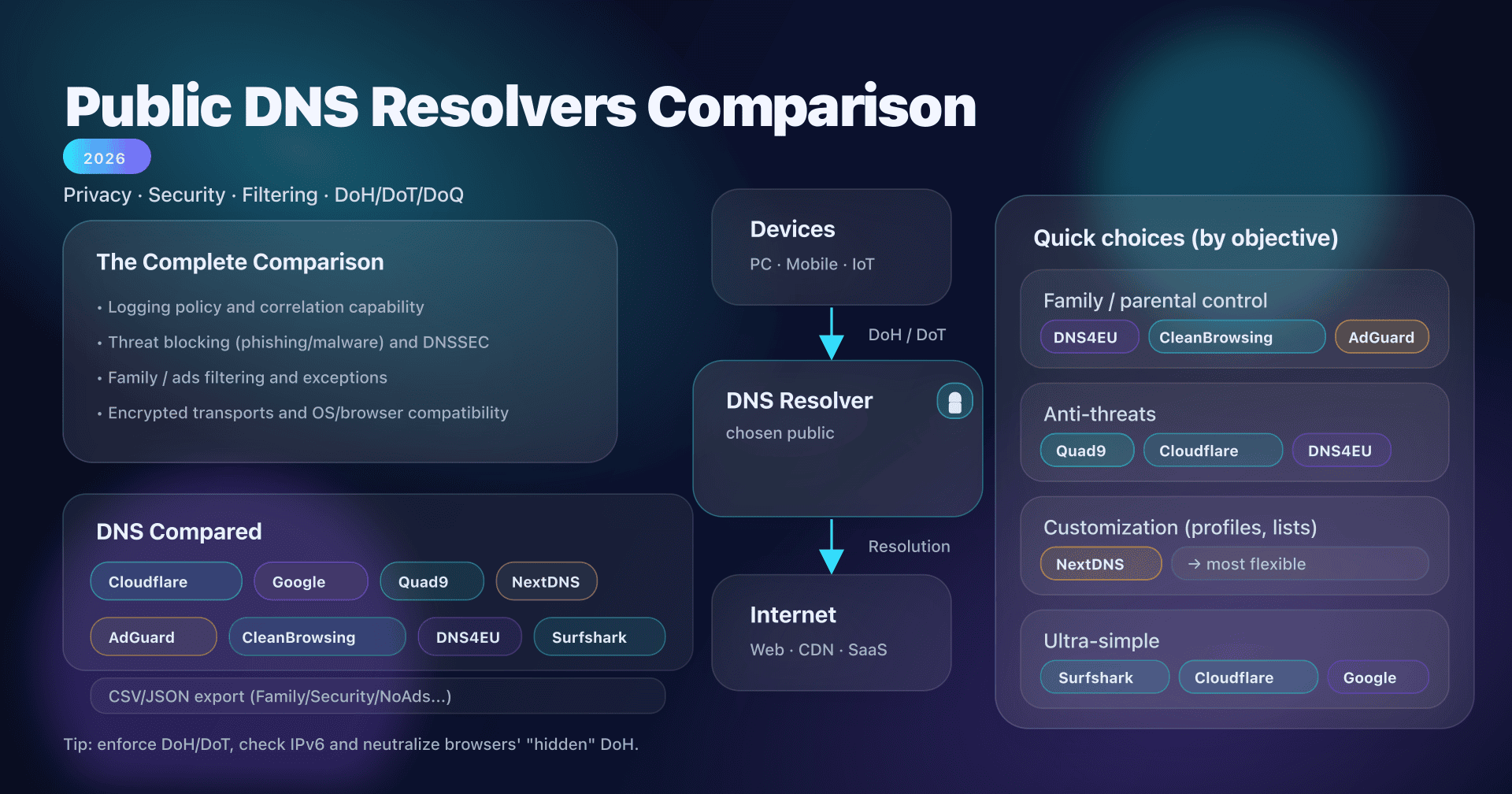
Each public resolver has specific behaviors that affect the perception of propagation. Knowing these specificities helps with diagnostics. A comparison of public DNS resolvers provides a deeper look at this topic.
Google Public DNS (8.8.8.8 / 8.8.4.4)
- Minimum TTL: 30 seconds
- Cache purge interface available
- Massive anycast infrastructure (hundreds of PoPs)
- Supports EDNS Client Subnet for geographically targeted responses
Cloudflare (1.1.1.1 / 1.0.0.1)
- Minimum TTL: 30 seconds
- Cache purge interface available
- Anycast architecture across more than 310 data centers
- Does not transmit client subnet by default (better privacy)
Quad9 (9.9.9.9 / 149.112.112.112)
- Built-in malware filtering (may block certain domains)
- Minimum TTL not publicly documented
- No public cache purge interface
- DNSSEC validation enabled by default
OpenDNS (208.67.222.222 / 208.67.220.220)
- Configurable filtering (content categories)
- Cache can be more persistent than the TTL in some cases
- Purge interface via dashboard
ISP resolvers
- Variable and often undocumented behavior
- Some enforce minimum or maximum TTLs
- Cache sometimes shared across millions of subscribers (pooling effect)
- Rarely offer a purge interface
Recommended action plan
Here is the complete procedure, summarized in 5 steps. Print it or save it for your next DNS migration.
-
Check the current TTL: query the authoritative server with
digor use the CaptainDNS tool to get the TTL for each record in your zone. -
Lower the TTL 48 hours in advance: reduce to 300 seconds for all records you plan to modify. Do not forget associated records (AAAA if you are changing A, TXT if you are migrating email).
-
Make the change: modify the DNS records at your registrar or provider. Immediately verify that the authoritative server returns the new value.
-
Verify propagation: test from multiple public resolvers (Google, Cloudflare, Quad9, OpenDNS). Use a propagation test tool for a global view across all continents.
-
Raise the TTL back: once the change is confirmed and the service validated, restore a standard TTL (3,600 seconds). Maintain monitoring for 24 hours.
FAQ
How long does DNS propagation take?
The delay depends solely on the TTL (Time To Live) of the modified record. With a TTL of 300 seconds, the change is visible everywhere within 5 minutes. With a TTL of 3,600 seconds, expect 1 hour at most. With a TTL of 86,400 seconds, the maximum delay is 24 hours. There is no technical reason for a 48-hour delay. The "24 to 48 hours" myth dates back to an era when default TTLs were 86,400 seconds and TLD registries updated their zones every 12 hours.
How can I speed up DNS propagation?
The most effective method is to lower the TTL to 300 seconds (5 minutes) at least 48 hours before the planned change. Once the reduced TTL has propagated, any subsequent change will be visible within 5 minutes. Additionally, you can flush your local machine's cache (ipconfig /flushdns on Windows, sudo dscacheutil -flushcache on macOS) and use the cache purge interfaces from Google Public DNS and Cloudflare to force a re-resolution on those specific resolvers.
Why is my DNS change not working?
The most common causes, in order of likelihood, are: (1) the change was not correctly saved at the DNS provider, (2) the negative cache (NXDOMAIN) is holding an old "does not exist" response, (3) the wrong record type was modified, (4) the DNSSEC chain is broken (the DS record no longer matches the DNSKEY), (5) a corporate DNS relay is applying aggressive caching. Diagnose by querying the authoritative server directly with dig captaindns.com A @ns1.captaindns.com to verify the change is in place at the source.
What is DNS TTL?
TTL (Time To Live) is a numeric field associated with every DNS record, expressed in seconds. It tells recursive resolvers how long they can keep a response cached before they must query the authoritative server again. For example, a TTL of 3,600 means the resolver will use the cached response for 1 hour. The TTL is set by the DNS zone administrator, not by the protocol. Each record can have its own TTL.
Do I need to wait 24 to 48 hours after a DNS change?
No. That delay only applies if the modified record's TTL is 86,400 seconds (24 hours), which is a legacy default from some registrars. With a TTL of 3,600 seconds (1 hour, the common default in 2026), the maximum delay is 1 hour. By preparing the migration (lowering the TTL to 300 seconds 48 hours in advance), the change becomes visible in 5 minutes. The "24 to 48 hours" recommendation is a precautionary rounding from the 2000s that no longer reflects today's technical reality.
How do I flush my DNS cache?
The DNS cache exists at multiple levels. To flush your machine's cache: on Windows, run ipconfig /flushdns in PowerShell; on macOS, run sudo dscacheutil -flushcache && sudo killall -HUP mDNSResponder in Terminal; on Linux with systemd, run sudo systemd-resolve --flush-caches. For Chrome, go to chrome://net-internals/#dns and click "Clear host cache." To flush public resolver caches, use the interfaces from Google Public DNS and Cloudflare 1.1.1.1. Your ISP resolver's cache cannot be flushed manually.
Why do different DNS resolvers give different results?
Three reasons explain this behavior. First, each resolver cached the record at a different time, so the TTL expires at staggered intervals. Second, large resolvers (Google, Cloudflare) use anycast networks with hundreds of independent servers; the server serving Paris does not have the same cache as the one serving Tokyo. Third, some domains use EDNS Client Subnet (ECS) to return geographically targeted IP addresses, which produces legitimately different responses depending on the client's location.
Does switching DNS resolvers speed up propagation?
No, not reliably. Switching resolvers on your machine (from 8.8.8.8 to 1.1.1.1, for example) may make it seem like the change has propagated if the new resolver does not have the old record cached. But it speeds up nothing for other users. The "propagation delay" is tied to the TTL of each resolver's cache, and you cannot control the cache of the resolver used by your visitors. The only reliable method to speed up propagation is to lower the TTL before the change.
How do I check if DNS propagation is complete?
Query at least four major public resolvers with dig: Google (8.8.8.8), Cloudflare (1.1.1.1), Quad9 (9.9.9.9), and OpenDNS (208.67.222.222). If all return the new value, propagation is complete for the vast majority of users. For a thorough check, use a multi-resolver propagation test tool that queries servers spread across multiple continents and displays results in real time. As long as at least one resolver returns the old value, propagation is not complete.
Glossary
- TTL (Time To Live): the duration in seconds a DNS resolver can keep a record cached before re-querying the authoritative server. Set by the zone administrator.
- Recursive resolver: a DNS server that receives queries from clients and performs the full resolution by querying the DNS hierarchy (root, TLD, authoritative). Examples: Google Public DNS (8.8.8.8), Cloudflare (1.1.1.1).
- Authoritative server: a DNS server that holds the original records for a DNS zone. It is the source of truth for a domain's records.
- DNS cache: temporary memory where a resolver stores DNS responses it has already obtained. Caching reduces load on authoritative servers and speeds up responses.
- DNS zone: a set of DNS records for a domain and its subdomains, hosted on one or more authoritative servers.
- NS record (Name Server): a record designating the authoritative servers for a DNS zone. Published both in the parent zone (delegation) and in the zone itself.
- Stub resolver: the operating system component that forwards DNS queries to the configured recursive resolver. It maintains a minimal local cache.
- SOA (Start of Authority): a mandatory record in every DNS zone containing zone metadata (serial, refresh, retry, expire, negative TTL).
- NXDOMAIN: a DNS response indicating the requested domain name does not exist. This response is cached according to the negative TTL defined in the SOA.
- Anycast: a network routing technique where the same IP address is announced from multiple geographic locations. Public resolvers use anycast to direct queries to the nearest server.
The CaptainDNS propagation test tool queries resolvers spread across all continents and displays the cache status for each record in real time. Use it to confirm that a DNS change is visible everywhere before considering the migration complete.
Sources
- RFC 1035: Domain Names - Implementation and Specification (IETF, section 3.2.1 for TTL definition)
- RFC 2181: Clarifications to the DNS Specification (IETF, section 8 for TTL rules)
- RFC 2308: Negative Caching of DNS Queries (IETF, negative caching and SOA minimum TTL)
- Google Public DNS: Flush Cache (official purge interface documentation)
- Cloudflare 1.1.1.1: Purge Cache (official purge interface documentation)