SERVFAIL after enabling DNSSEC: diagnosis and fix
By CaptainDNS
Published on February 25, 2026
Updated on September 18, 2026
- A DNSSEC-related SERVFAIL means the resolver rejected a DNS response because a link in the chain of trust is broken
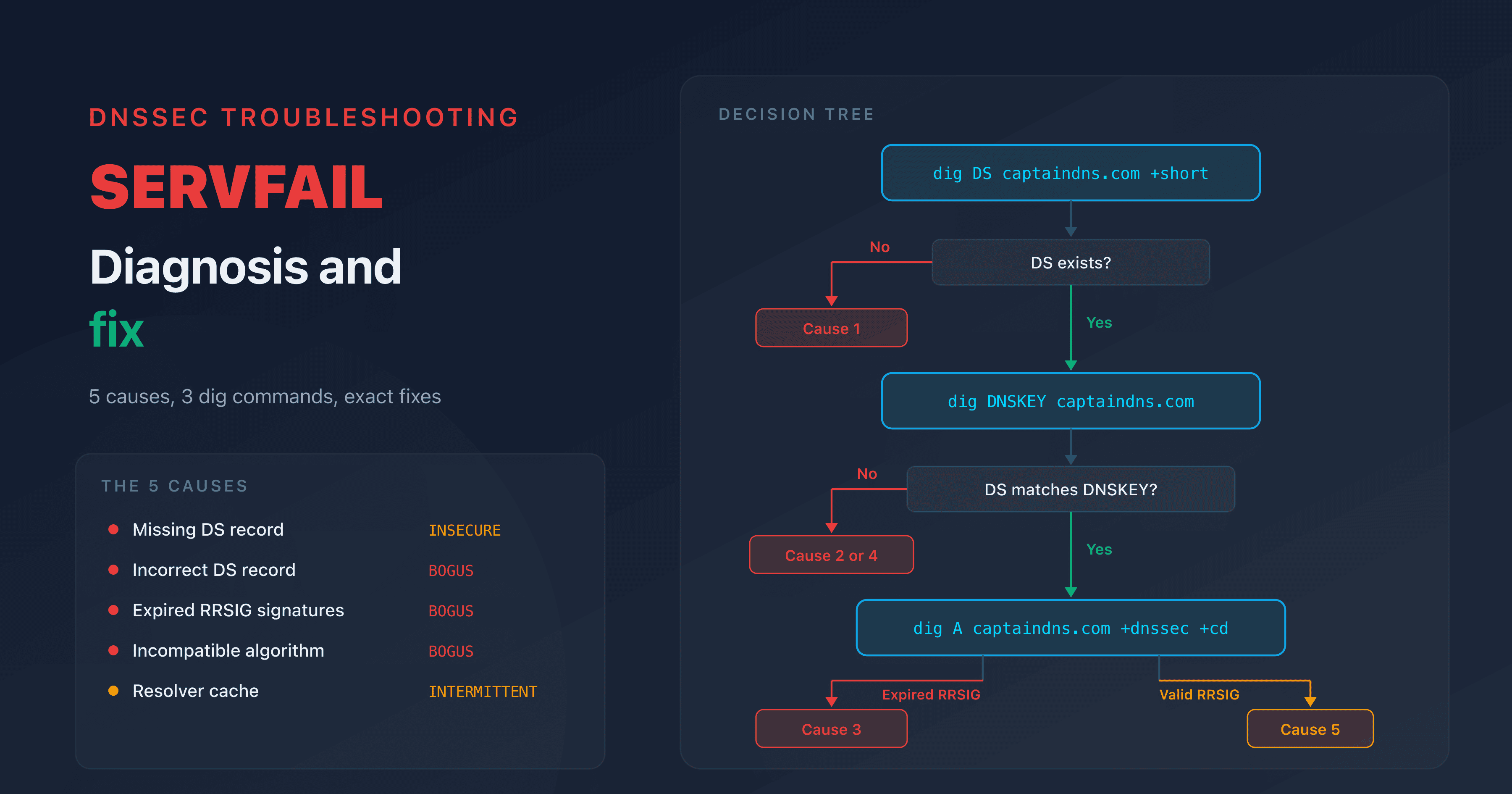
- Five causes cover nearly all cases: missing DS, incorrect DS, expired RRSIG, algorithm mismatch, stale resolver cache
- Three
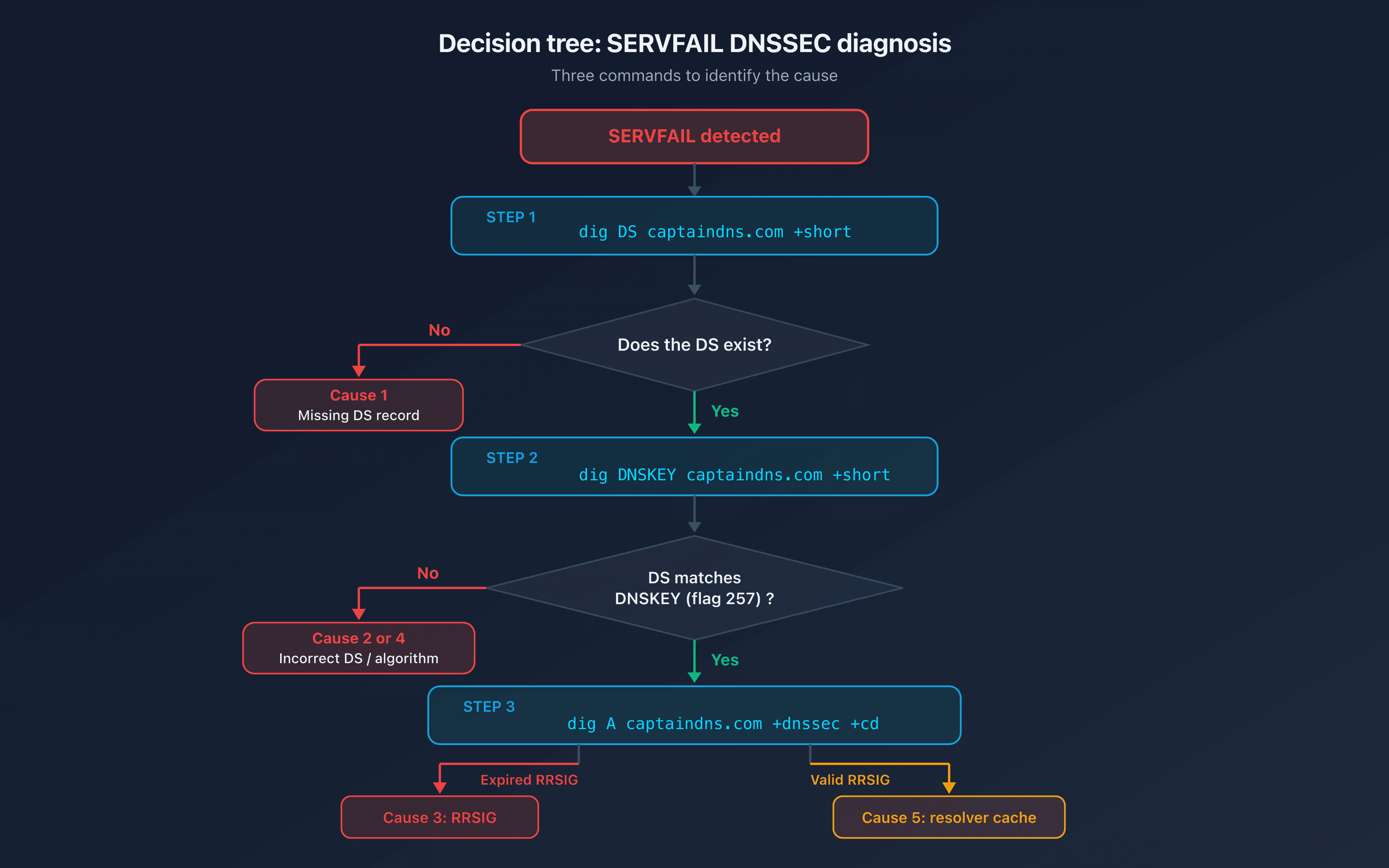
digcommands are enough to isolate the problem (decision tree below) - Each scenario includes the exact fix and the verification command to confirm the repair
You just enabled DNSSEC at your registrar. The first tests pass. Then, a few hours later, your users report that the site is unreachable. The diagnosis: SERVFAIL.
SERVFAIL is not a server problem. It is the DNS resolver refusing to return the response because DNSSEC validation failed. Your web server is running fine. The resolver is blocking the DNS response before it ever reaches the browser.
This guide covers the five DNSSEC-related SERVFAIL scenarios. Each one includes the diagnostic command, the root cause, and the exact fix.
SERVFAIL and DNSSEC: how it works
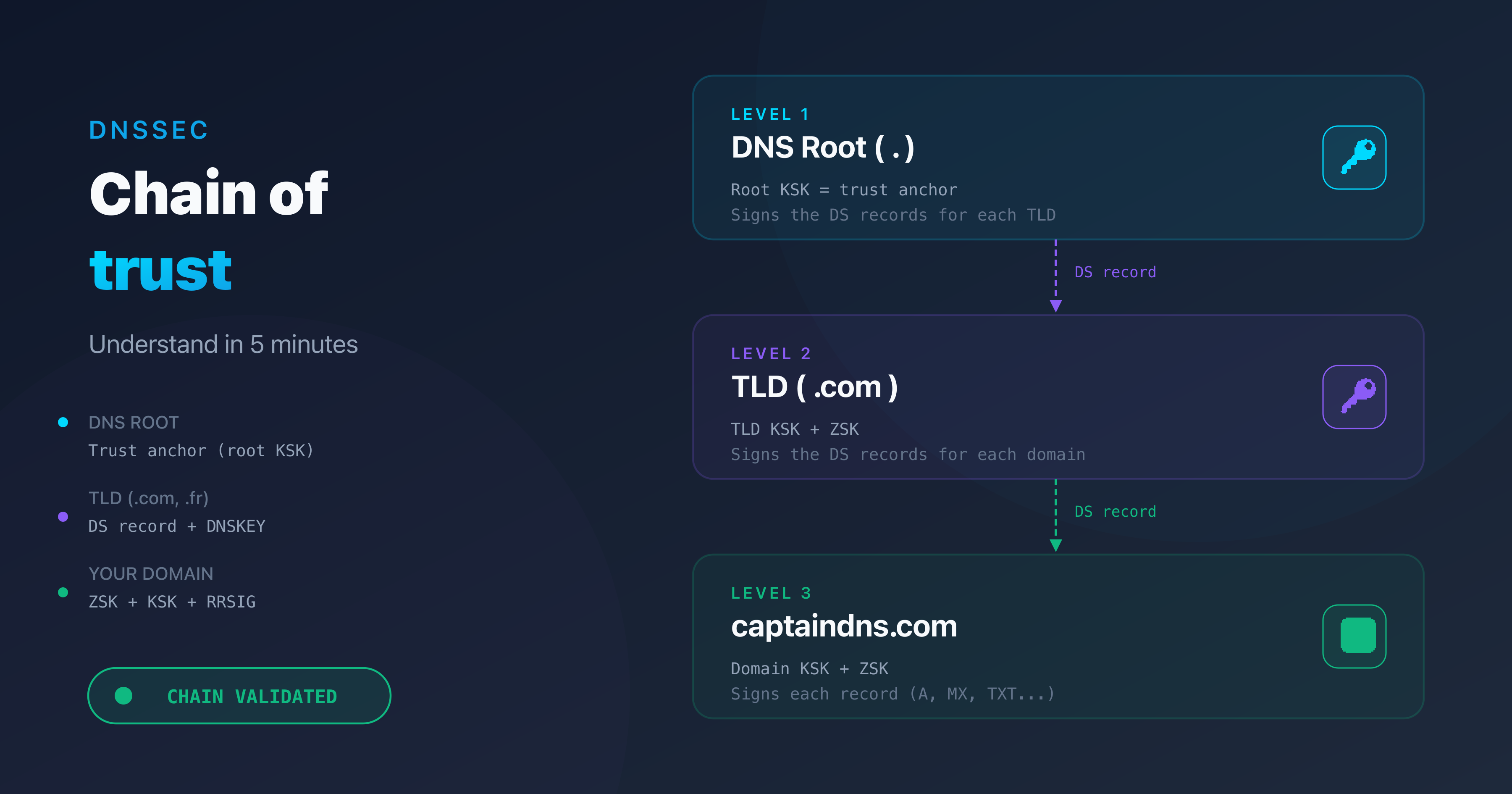
When a validating resolver (1.1.1.1, 8.8.8.8, 9.9.9.9) receives a DNS response for a DNSSEC-signed domain, it verifies the full chain of trust: trust anchor, DS record, DNSKEY, RRSIG. Every link must match. One broken link invalidates the entire chain.
If any verification step fails, the resolver marks the response as BOGUS and returns SERVFAIL (RCODE 2) to the client. The site becomes unreachable for every user whose resolver validates DNSSEC. According to APNIC, that represents roughly 38% of global DNS queries.
A SERVFAIL response contains no detail about why validation failed. The RCODE is the same whether the DS is missing, the signature is expired, or the algorithm is wrong. You have to diagnose it manually.
Starting October 11, 2026, widespread SERVFAIL responses on a self-managed resolver may also result from an outdated root anchor during the KSK rollover, even if the queried zones are healthy: your domain's DS is not necessarily the cause.
Quick diagnosis: three commands
Before analyzing each scenario, here are the three commands that cover most cases.
Command 1: check the DS record
dig DS captaindns.com +short
If this returns nothing, there is no DS record at the TLD. The chain of trust is not established.
Command 2: compare DS and DNSKEY
dig DNSKEY captaindns.com +short
The DS record contains a hash of the KSK (flag 257). If the hash does not match any published DNSKEY, the DS is incorrect.
Command 3: check the signatures
dig A captaindns.com +dnssec +cd
The +cd flag (Checking Disabled) tells the resolver to return the response without validating DNSSEC. If the response comes back with +cd but not without it, the problem is DNSSEC-related.
The five causes of SERVFAIL after DNSSEC
Cause 1: missing DS record
Symptom: dig DS captaindns.com +short returns nothing.
Explanation: you signed your zone (the DNSKEY and RRSIG records exist) but the DS record was never published at the TLD. Without the DS, the resolver cannot link your zone to the parent zone. The chain of trust has no starting point.
DNSSEC status: INSECURE (not BOGUS). The resolver does not validate, but it does not block either. This scenario only causes a SERVFAIL if the resolver still has a DS cached from a previous configuration.
Fix:
- Retrieve the DS record from your DNS provider (Cloudflare, Route 53, OVHcloud)
- Add it in your registrar's DNSSEC section
- Wait for propagation (DS TTL at the TLD is typically 24 to 48 hours)
Verification:
dig DS captaindns.com +short
# Should return: KeyTag Algorithm DigestType Digest
# Example: 12345 13 2 ABC123...
Cause 2: incorrect DS record
Symptom: the DS record exists but the hash does not match any published KSK.
Explanation: the DS at the TLD contains a hash that does not correspond to any KSK in your zone. This is the most common cause of DNSSEC SERVFAIL. Typical triggers:
- Copy-paste error during manual entry at the registrar
- KSK rotation without updating the DS at the parent
- DS generated with the wrong digest algorithm (SHA-1 instead of SHA-256)
DNSSEC status: BOGUS. The resolver returns SERVFAIL.
Diagnosis:
# Retrieve the DS at the TLD
dig DS captaindns.com +short
# Example: 12345 13 2 ABC123...

# Retrieve the DNSKEYs
dig DNSKEY captaindns.com +short
# Look for the KSK (flag 257)
# Verify that the Key Tag (12345) matches
If the key tag in the DS does not match any KSK key tag, or if the digest does not match the KSK public key hash, the DS is incorrect.
Fix:
- From your DNS provider, generate the correct DS record
- In the registrar's interface, remove the old DS and add the new one
- If your registrar supports CDS/CDNSKEY (RFC 7344), the update can propagate automatically
Verification:
dig captaindns.com +dnssec | grep flags
# The "ad" flag must be present (Authenticated Data)
Cause 3: expired RRSIG signatures
Symptom: the DNS response contains RRSIG records whose expiration date has passed.
Explanation: each RRSIG signature has a validity period, typically 7 to 30 days. If signatures are not renewed before they expire, every validating resolver rejects them. Unlike a DS mismatch that breaks instantly, expired signatures cause a gradual failure: records expire at different times depending on when they were last signed.
DNSSEC status: BOGUS. SERVFAIL on all records whose signature has expired.
Diagnosis:
dig A captaindns.com +dnssec +cd
# Examine the RRSIG field: inception and expiration
# Format: RRSIG A 13 2 300 20260315120000 20260301120000 12345 captaindns.com. ABC...
#                               ^^^^^^^^^^^^^^^^ expiration
#                                                ^^^^^^^^^^^^^^^^ inception
Compare the expiration timestamp to the current UTC time. If the expiration is in the past, the signature is expired.
Common causes:
- Self-managed BIND or PowerDNS without automatic re-signing configured
- Broken cron job for zone re-signing
- DNS migration without transferring the signing keys
Fix:
- If managed DNS: contact the provider's support (rare, but it happens)
- If self-managed BIND: re-sign with
rndc sign captaindns.com - If PowerDNS: run
pdnsutil rectify-zone captaindns.com
Cause 4: algorithm mismatch
Symptom: the DS record specifies a different algorithm than the one used by the DNSKEY.
Explanation: the DS record indicates, for example, algorithm 8 (RSA/SHA-256) while the DNSKEY uses algorithm 13 (ECDSA P-256). The resolver cannot verify the cryptographic link between the two. This typically happens when you switch DNS providers: the new provider generates keys with a different algorithm, but the DS at the registrar still references the old one.
DNSSEC status: BOGUS. SERVFAIL.
Common DNSSEC algorithms (source: IANA DNS Security Algorithm Numbers):
| Algorithm | Name | Usage |
|---|---|---|
| 8 | RSA/SHA-256 | Widely deployed |
| 13 | ECDSA P-256 | Recommended, smaller keys |
| 14 | ECDSA P-384 | Higher security margin |
| 15 | Ed25519 | Fastest, smallest signatures |
Diagnosis:
# Check the DS algorithm
dig DS captaindns.com +short
# Format: KeyTag Algorithm DigestType Digest
# Example: 12345 8 2 ABC...  (algorithm 8 = RSA/SHA-256)

# Check the DNSKEY algorithm
dig DNSKEY captaindns.com +short
# Format: Flags Protocol Algorithm PublicKey
# Example: 257 3 13 ABC...  (algorithm 13 = ECDSA P-256)
If the algorithm number in the DS (second field) differs from the algorithm in the KSK DNSKEY (flag 257, third field), that is the cause.
Fix:
- Regenerate the DS record from your DNS provider (it will use the correct algorithm)
- Update the DS at the registrar
- Wait for propagation (typically 24 to 48 hours)
Cause 5: resolver cache (false SERVFAIL)
Symptom: intermittent SERVFAIL. Some resolvers return SERVFAIL, others do not. The behavior is inconsistent across networks.
Explanation: the resolver cached an old DS record or an old DNSKEY before you made the DNSSEC change. After activation, key rotation, or a DNS provider switch, the resolver's cache may contain data that conflicts with the current zone state. The resolver validates against stale data, finds a mismatch, and returns SERVFAIL.
Diagnosis:
# Test with multiple resolvers
dig A captaindns.com @1.1.1.1 +dnssec
dig A captaindns.com @8.8.8.8 +dnssec
dig A captaindns.com @9.9.9.9 +dnssec
If some resolvers return a valid response (with the ad flag) and others return SERVFAIL, it is a cache issue.
Fix:
- Wait for the TTL to expire (check the DS record TTL at the TLD, typically 3,600 to 86,400 seconds)
- Purge the cache if possible:
- Google: https://dns.google/cache
- Cloudflare: https://1.1.1.1/purge-cache/
Prevention: before any DNSSEC change, lower the DS record TTL 24 hours in advance (if your registrar allows it). This reduces the window during which resolvers serve stale data.
Preventing DNSSEC SERVFAIL
Most DNSSEC SERVFAIL incidents are preventable. Three practices cover the majority of cases.
Managed DNS over self-managed
Managed DNS providers (Cloudflare, Route 53, OVHcloud, Google Cloud DNS) handle signing automatically: key generation, RRSIG renewal, and DS publication via CDS/CDNSKEY. With managed DNS, the only remaining risk is a DS misconfiguration at the registrar during initial setup or domain transfer.
Dual DS during transitions
During a KSK rotation, publish both DS records (old and new) at the registrar simultaneously. Wait for the new DS to fully propagate before removing the old one. Removing the old DS prematurely is the single most common cause of rotation-related SERVFAIL.
Continuous monitoring
Regularly check the DNS propagation of your DNSSEC configuration. An incorrect DS or an expired signature can appear without any visible symptom until a resolver updates its cache. Automated monitoring on your domain's DNSSEC status detects problems before your users report them.
Action plan for a SERVFAIL
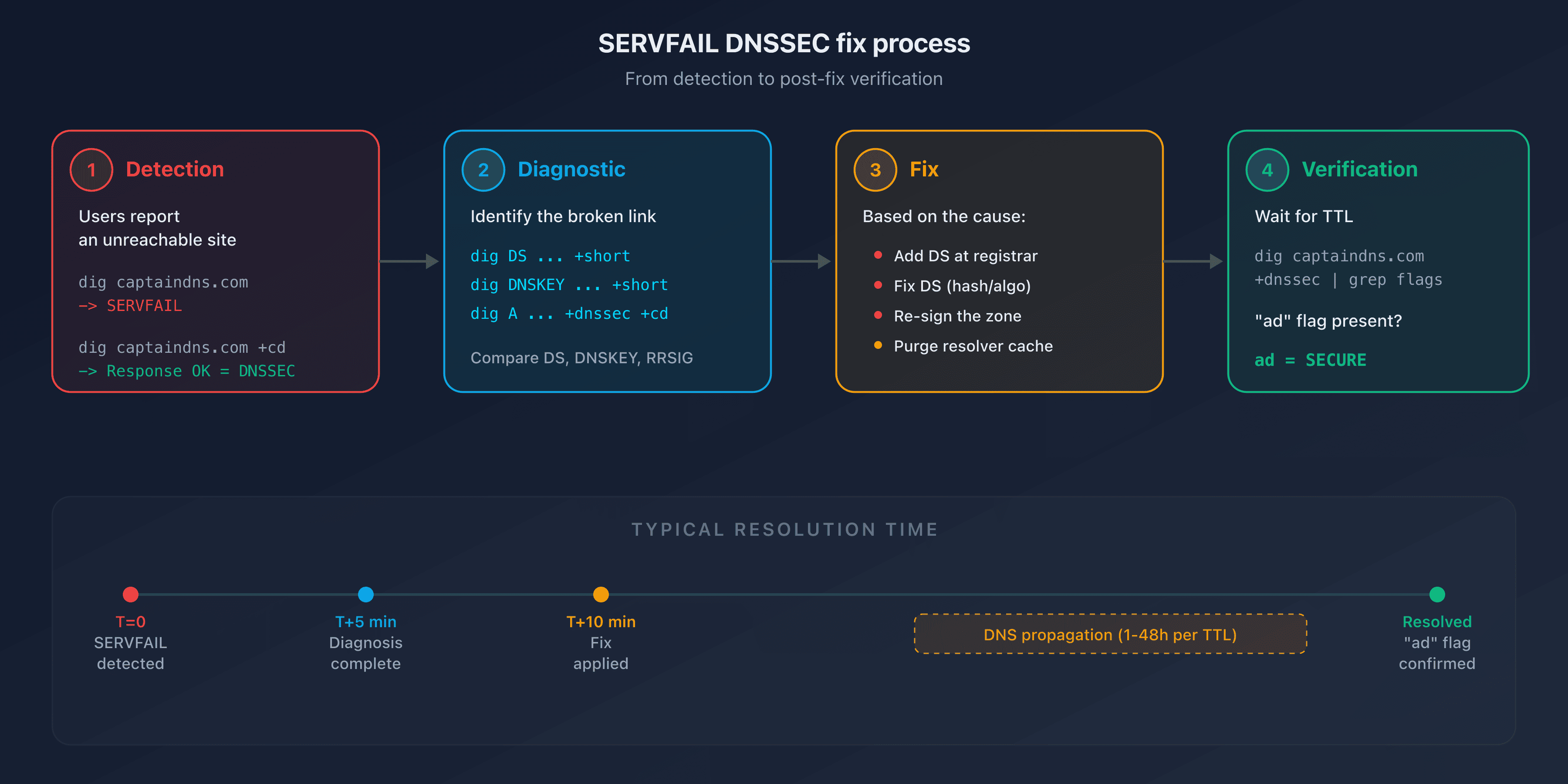
When a SERVFAIL hits, follow these five steps in order. Total resolution time: 5 to 15 minutes for the diagnosis, plus propagation time for the fix (1 to 48 hours depending on TTLs).
- Confirm DNSSEC is the cause (1 min): run
dig captaindns.com +cd. If the response comes back with+cdbut not without it, DNSSEC is the cause - Identify the broken link (5 min): check DS, DNSKEY, and RRSIG with the three diagnostic commands above
- Apply the fix (5 min): follow the matching scenario (missing DS, incorrect DS, expired RRSIG, algorithm mismatch, cache)
- Verify the repair: wait for the TTL to expire, then confirm that the
adflag is present withdig captaindns.com +dnssec - Document the incident: note the root cause, the fix applied, and the total resolution time for post-mortem review
Run a full DNSSEC diagnostic on your domain to verify that every link in the chain is in place.
Related DNSSEC guides
- Enable DNSSEC: step-by-step guide by registrar
- Understand the DNSSEC chain of trust in 5 minutes
FAQ
What is a DNS SERVFAIL?
SERVFAIL (Server Failure) is DNS response code RCODE 2, defined in RFC 1035. It indicates that the resolver could not obtain a valid answer for the query. In the DNSSEC context, a SERVFAIL means cryptographic validation failed: the resolver rejected the response because a link in the chain of trust is broken or missing.
What is the difference between SERVFAIL and NXDOMAIN?
NXDOMAIN means the domain does not exist. SERVFAIL means the domain likely exists, but the resolver could not validate the response. With DNSSEC, a SERVFAIL indicates a validation problem (incorrect DS, expired signature), not a non-existent domain.
How do I know if a SERVFAIL is caused by DNSSEC?
Use the +cd (Checking Disabled) flag in your dig command: dig captaindns.com +cd. If the response comes back with +cd but not without it, DNSSEC is the cause of the SERVFAIL. Without +cd, the resolver validates DNSSEC and blocks the response.
How long does it take to fix a DNSSEC SERVFAIL?
Diagnosing the cause takes 5 to 15 minutes with the three dig commands described above. Applying the fix (adding or updating the DS record) takes a few minutes. Propagation takes 1 to 48 hours depending on the DS record TTL at the TLD. During that window, resolvers with stale cache entries will continue to return SERVFAIL.
Should I disable DNSSEC as an emergency measure if SERVFAIL occurs?
No. Removing the DS record without first disabling zone signing creates a new failure mode and can make the problem worse. Always identify the exact cause first using the diagnostic commands. If the DS is incorrect, fix it. Only disable DNSSEC entirely (remove DS and disable signing) if you cannot identify the cause and the site is business-critical.
Why does the SERVFAIL not affect all users?
Only validating resolvers (those that check DNSSEC) return SERVFAIL. Non-validating resolvers ignore the signatures and return the response normally. Additionally, resolvers that still have the old response cached may keep working until the TTL expires.
How do I verify that the DNSSEC fix worked?
Run dig captaindns.com +dnssec | grep flags. If the ad (Authenticated Data) flag is present, the chain of trust is validated. Test with multiple resolvers (1.1.1.1, 8.8.8.8, 9.9.9.9) to confirm that propagation is complete.
Does managed DNS eliminate the risk of DNSSEC SERVFAIL?
Almost entirely. Managed DNS providers (Cloudflare, Route 53, OVHcloud) automatically handle signing, key rotation, and RRSIG renewal. The only remaining risk is an incorrect DS record at the registrar, which can happen during initial setup or a domain transfer.
Glossary
- SERVFAIL: DNS response code RCODE 2, indicating the resolver could not complete the query. In the DNSSEC context, it signals a chain-of-trust validation failure.
- BOGUS: internal resolver state when DNSSEC validation fails. The resolver returns SERVFAIL to the client instead of the DNS response.
- INSECURE: DNSSEC state of a domain whose zone is signed but has no DS record at the TLD. The resolver skips validation but does not block the response.
- DS record: Delegation Signer record published at the parent zone (TLD). Contains a hash of the child zone's KSK. It is the link between a zone and its parent in the chain of trust.
- RRSIG: cryptographic signature attached to a DNS record set, with a defined inception and expiration timestamp.
- KSK: Key Signing Key (DNSKEY flag 257). Used to sign the DNSKEY record set. The DS record is derived from the KSK.
- +cd (Checking Disabled):
digflag that tells the resolver to skip DNSSEC validation, useful for isolating whether DNSSEC is causing a SERVFAIL.