The Complete DKIM Guide: Understanding and Configuring Email Authentication
By CaptainDNS
Published on March 5, 2026
Updated on May 19, 2026
- DKIM signs every email with a private key; the receiving server verifies the signature using the public key published in DNS
- Without DKIM, your emails risk landing in spam: Google and Yahoo have required it since February 2024
- RSA 2048-bit is the current standard; Ed25519 is faster but not yet universally supported
- DKIM alone is not enough: you need to combine it with SPF (sending authorization) and DMARC (alignment policy)
- Key rotation is recommended every 3 months to limit the risk of compromise
Your emails are landing in spam even though your content is legitimate. The problem may not be the content itself, it is the authentication. Receiving servers (Gmail, Outlook, Yahoo) verify that each message actually comes from the domain shown in the From: field. Without proof, they have doubts.
DKIM (DomainKeys Identified Mail) provides that proof. It is a protocol defined by RFC 6376 that adds a cryptographic signature to every outgoing email. The receiving server verifies this signature via DNS. If it is valid, the message is authenticated. Otherwise, it risks being rejected or sent to spam.
This guide walks you through DKIM from A to Z: how it works, how to configure it, why it is essential, and how to integrate it with SPF and DMARC for complete authentication.
How does DKIM work?
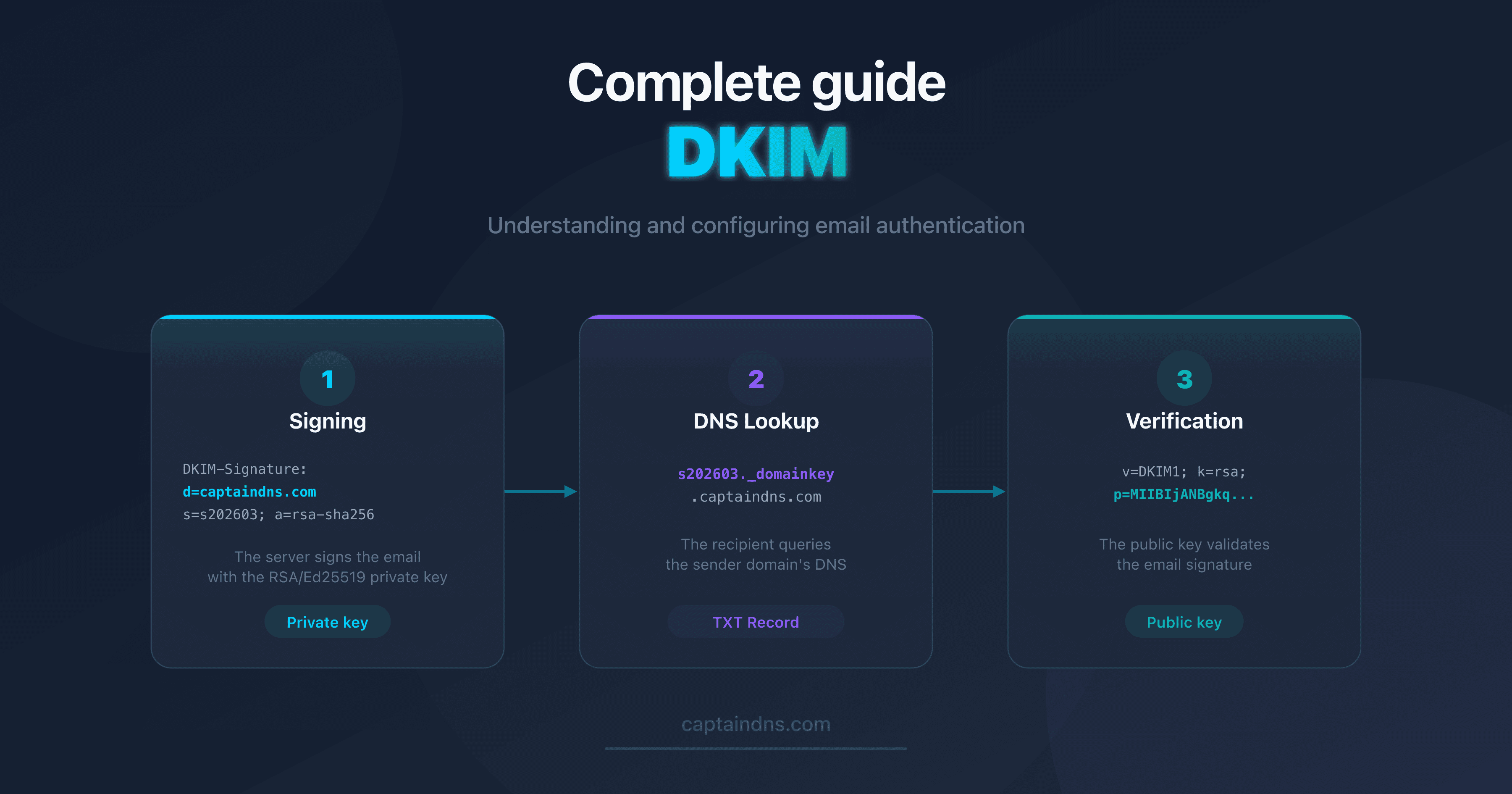
DKIM relies on asymmetric cryptography. Two keys are used:
- Private key: stored on the sending server, it signs every outgoing email
- Public key: published in DNS, it allows any server to verify the signature
The signing and verification cycle
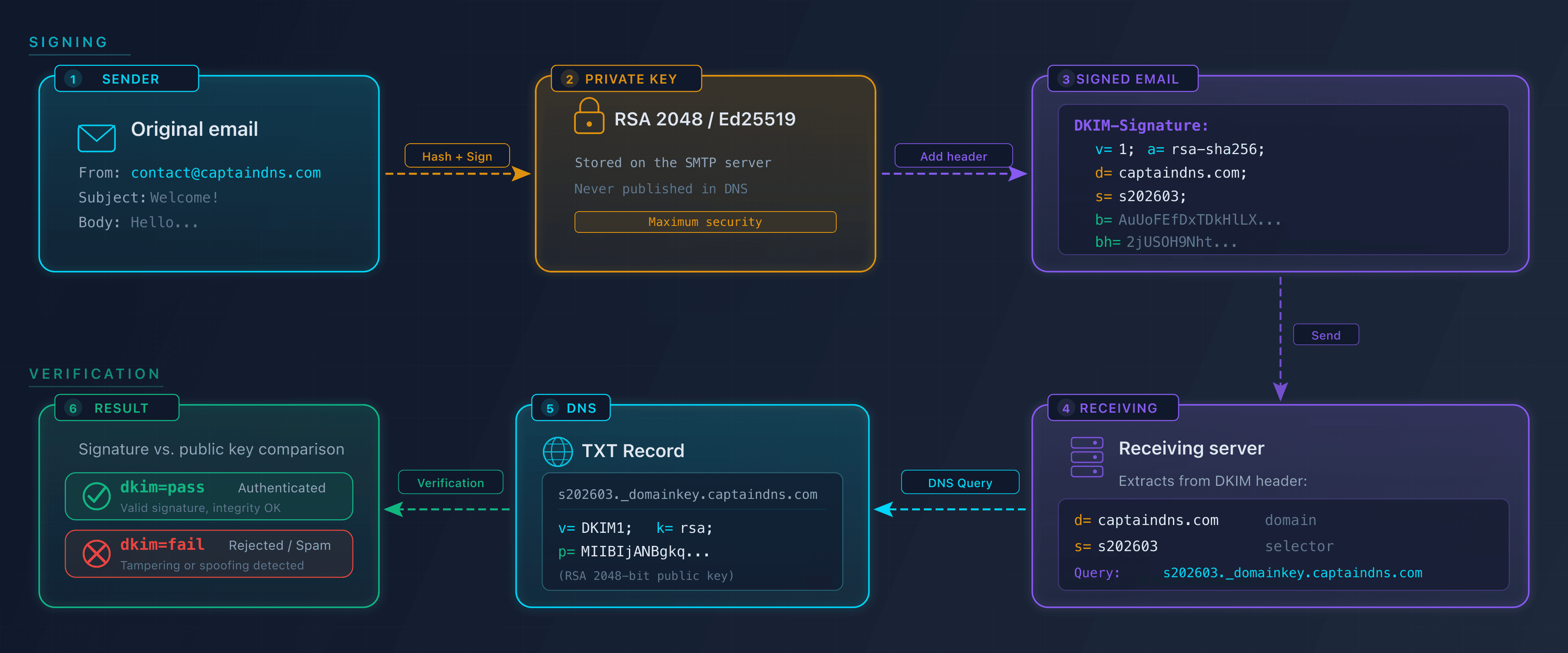
The process unfolds in four steps:
- The sender sends an email from
captaindns.com - The sending server signs the message: it computes a hash of the headers and body (SHA-256), then encrypts this hash with the private key. The signature is added in the
DKIM-Signatureheader - The receiving server queries DNS: it reads the selector (
s=) and domain (d=) from the header, then retrieves the public key atselector._domainkey.captaindns.com - Verification: the server recomputes the hash and compares it with the decrypted signature. If both match, the email is authenticated
Here is an example DKIM-Signature header:
DKIM-Signature: v=1; a=rsa-sha256; c=relaxed/relaxed;
  d=captaindns.com; s=s202603; t=1741100000;
  h=from:to:subject:date:message-id;
  bh=2jUSOH9NhtVGCQWNr9BrIAPreKQjO6Sn7XIkfJVOzv8=;
  b=AuUoFEfDxTDkHlLXSZEpZj79LICEps6eda7W3deTVFOk...
The key tags in this header:
| Tag | Purpose | Example |
|---|---|---|
d= | Sender domain | captaindns.com |
s= | Selector (key identifier) | s202603 |
a= | Signing algorithm | rsa-sha256 |
bh= | Body hash | 2jUSOH9Nht... |
b= | Cryptographic signature | AuUoFEfDxT... |
h= | Signed headers | from:to:subject:date |
Why is DKIM essential in 2026?
Requirements from major providers
Since February 2024, Google and Yahoo require DKIM for senders of more than 5,000 emails per day. Microsoft followed in May 2025. Without DKIM:
- Emails are more likely to be classified as spam
- Deliverability rates drop
- DMARC reports flag authentication failures
What DKIM protects against
| Threat | DKIM protection |
|---|---|
| Content modification in transit | The signature becomes invalid if the message is altered |
| Sender domain spoofing | Combined with DMARC, prevents spoofing |
| Repudiation | Cryptographic proof that the domain authorized the sending |
Impact on reputation
Email providers build a reputation score per domain. Every email authenticated by DKIM strengthens this score. Every failure degrades it. A domain with properly configured DKIM has a better inbox placement rate than a domain without DKIM.
How to configure DKIM in 4 steps
Step 1: Generate a key pair
Create an RSA 2048-bit or Ed25519 key pair. Choose a descriptive selector (e.g., s202603 for March 2026).
Use the DKIM Generator to create your key pair and get a DNS record ready to publish.
Step 2: Publish the DNS record
Add a TXT record to your DNS zone:
s202603._domainkey.captaindns.com IN TXT "v=DKIM1; k=rsa; p=MIIBIjANBgkqhkiG9w0BAQEFAAOC..."
Required tags:
v=DKIM1: protocol versionp=: Base64-encoded public key
Useful optional tags:
k=rsaork=ed25519: key algorithmt=y: test mode (during initial deployment)t=s: strict mode (thed=domain must match theFrom:exactly)
Step 3: Enable signing on the sending server
Configuration depends on your provider:
| Provider | Method |
|---|---|
| Google Workspace | Admin Console > Apps > Gmail > Authenticate email |
| Microsoft 365 | Defender > Policies > DKIM |
| Dedicated server (Postfix) | OpenDKIM configuration with selector and private key |
| Transactional service (SendGrid, Mailgun) | Web interface, add CNAME to DNS |
Step 4: Verify it works
After DNS propagation (up to 48 hours):
- Send a test email
- Check the
Authentication-Resultsheader in the received email: look fordkim=pass - Use a DKIM checker to analyze your DNS record
Authentication-Results: mx.google.com;
  dkim=pass header.d=captaindns.com header.s=s202603
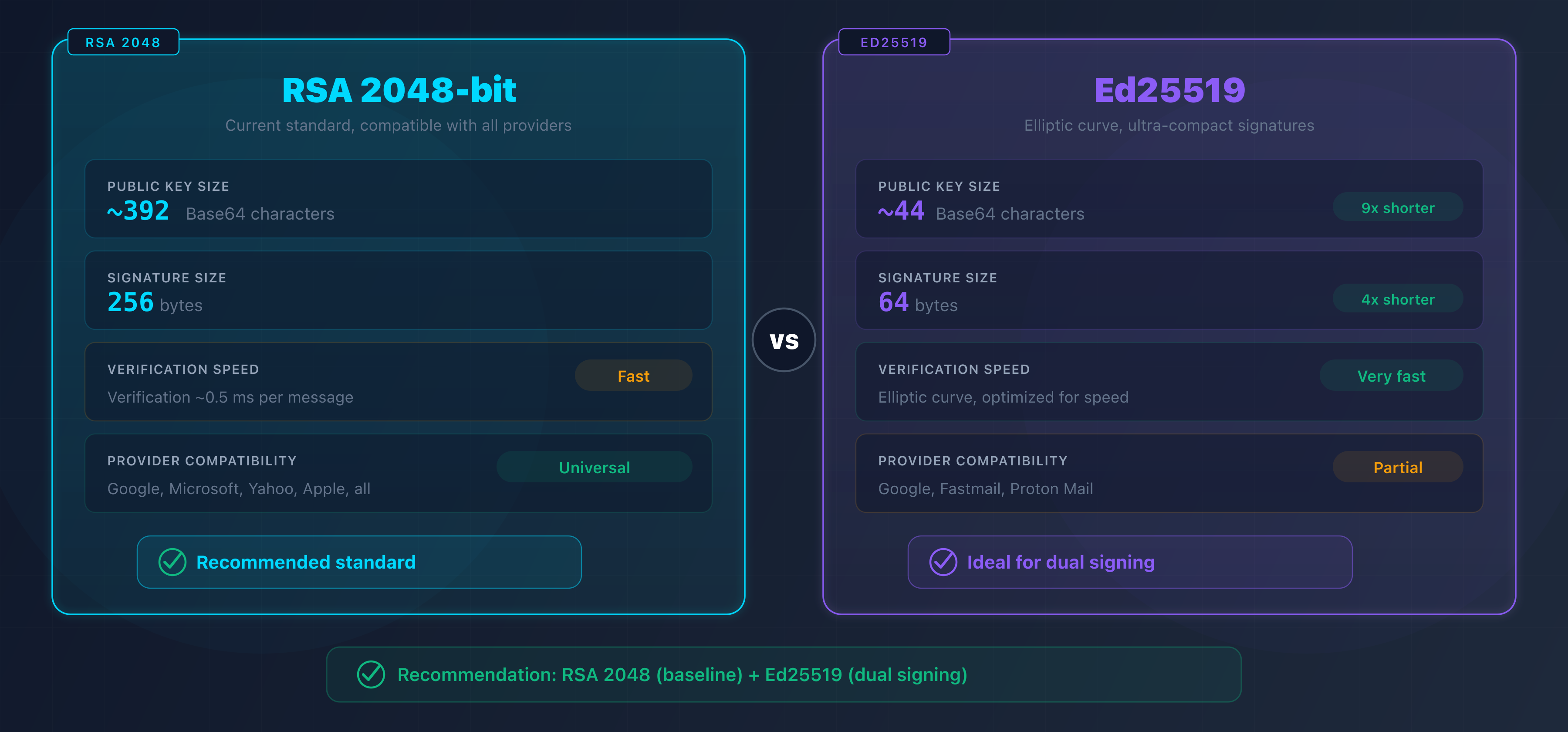
RSA vs Ed25519: which algorithm to choose?
| Criterion | RSA 2048 | Ed25519 |
|---|---|---|
| Public key size | ~392 characters | ~44 characters |
| Signature size | 256 bytes | 64 bytes |
| Verification speed | Fast | Very fast |
| Provider support | Universal | Partial (Google, Fastmail) |
| Security | Strong (2030+) | Very strong |
Recommendation: use RSA 2048 as your standard. If your infrastructure supports it, add a second Ed25519 signature in parallel. Servers that do not support Ed25519 will fall back to the RSA signature.
Stop using RSA 1024-bit. Google, Microsoft, and Yahoo have rejected keys shorter than 2048 bits since 2024.
DKIM, SPF, and DMARC: the email authentication trio
DKIM does not work alone. It is part of an ecosystem of three complementary protocols:
| Protocol | Role | What it verifies |
|---|---|---|
| SPF | Sending authorization | The server IP is authorized to send for this domain |
| DKIM | Message integrity | The content has not been modified in transit |
| DMARC | Alignment policy | The From: domain matches the SPF/DKIM domains |
How do they work together?
- SPF verifies that the sending server is authorized (via the domain's SPF record)
- DKIM verifies that the message has not been altered (via the cryptographic signature)
- DMARC verifies that the
From:domain is aligned with at least one of the two (SPF or DKIM)
For an email to pass DMARC, SPF or DKIM must be valid AND aligned. Both are not required at the same time, but configuring both maximizes reliability.
DKIM alignment with DMARC
DMARC checks that the d= domain of the DKIM signature matches the From: domain:
- Relaxed (default): a subdomain is accepted (
d=mail.captaindns.comforFrom: contact@captaindns.com) - Strict: exact match required (
d=captaindns.commandatory forFrom: contact@captaindns.com)
DKIM coverage per subdomain
DKIM does not magically sign every subdomain at once. Each active subdomain that sends mail needs its own DKIM record published at selector._domainkey.<subdomain>. Publishing the key only on the apex domain leaves sending subdomains without a valid signature, and their messages fail verification at Gmail, Outlook, and Yahoo.
Why every subdomain matters
In a typical organization, several subdomains send from different platforms:
mail.captaindns.comgoes out from an internal Postfix servertransactional.captaindns.comruns through SendGridnews.captaindns.comruns through Mailchimp
Each platform signs the messages it sends with its own selector (s1, mte1, k1, etc.). The receiving server reads the DKIM-Signature header and queries DNS at the exact location selector._domainkey.<d= domain>. If the key is not published on the sending subdomain, the DNS query returns NXDOMAIN and the DKIM signature fails, even when the key exists on the apex domain.
Where to publish each key
The TXT record is always published on the sending subdomain, never on the apex domain to sign on its behalf.
| Sending subdomain | Selector | DNS record |
|---|---|---|
mail.captaindns.com | s202605 | s202605._domainkey.mail.captaindns.com TXT "v=DKIM1; k=rsa; p=..." |
transactional.captaindns.com | mte1 | mte1._domainkey.transactional.captaindns.com CNAME mte1.dkim.sendgrid.net |
news.captaindns.com | k1 | k1._domainkey.news.captaindns.com CNAME k1.dkim.mcsv.net |
Transactional providers (SendGrid, Mailchimp, Mailgun) often ask for a CNAME rather than a direct TXT record: they handle rotation for you, but the record still lives on the sending subdomain.
Interaction with DMARC and the t=s flag
DMARC alignment compares the From: domain to the d= domain of the DKIM signature. Two levels:
- In relaxed alignment (
adkim=r, the default), ad=mail.captaindns.comsignature aligns aFrom: contact@captaindns.com. Any subdomain of the organizational domain works. - In strict alignment (
adkim=s), only ad=captaindns.comsignature aligns aFrom: contact@captaindns.com.
On the DKIM side, the t=s flag published in the key also forbids the signature from covering subdomains of d=. Combined with adkim=s, you get strict alignment enforced on both sides.
Recommendation: publish a DKIM record on every sending subdomain, even if your DMARC policy stays in relaxed alignment. You gain readability (each subdomain shows its own rotation cycle), security (a compromise stays contained to a single service), and flexibility (you can switch to adkim=s later without breaking deliverability).
→ Verify each of your selectors with the DKIM Record Check.
DKIM best practices
Key size
Use at least RSA 2048-bit. 1024-bit keys are considered weak and may result in deliverability penalties.
Key rotation
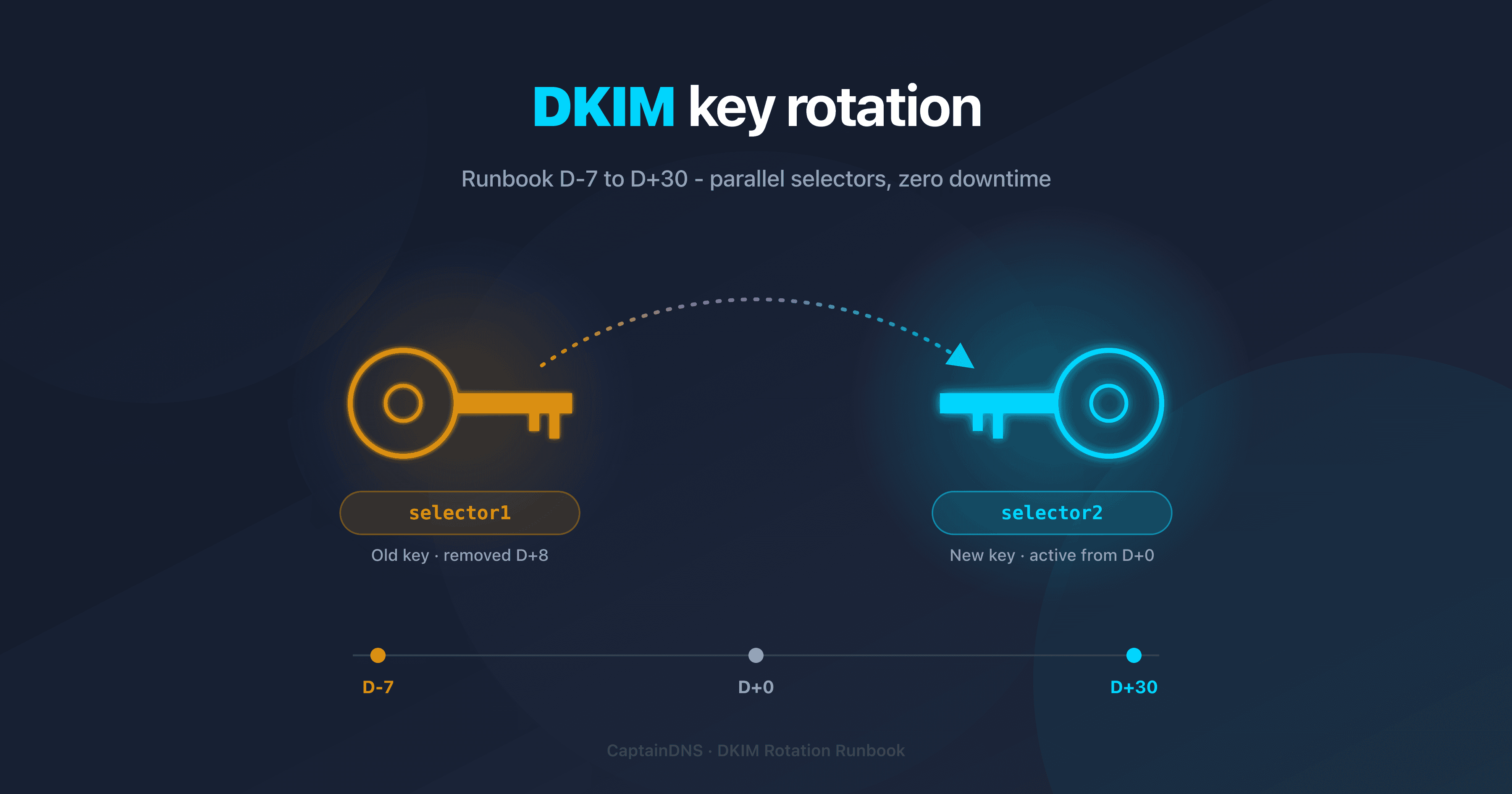
Rotate your DKIM keys every 3 months:
- Generate a new key pair with a new selector
- Publish the new key in DNS
- Wait for propagation (24-48 hours)
- Switch the sending server to the new selector
- Revoke the old key (publish an empty
p=) - Remove the old record after 30 days
→ For a full runbook with a D+0 to D+30 timeline, openssl scripts and KMS handling, read the operational DKIM key rotation guide.
Headers to sign
Sign at minimum: From, To, Subject, Date, Message-ID, MIME-Version, Content-Type. The From header is mandatory for DMARC alignment.
Test mode
Use t=y in the DNS record during deployment. Receiving servers will not penalize DKIM failures in test mode. Remove t=y once everything is working.
Recommended action plan
- Check your current setup: analyze your existing DKIM selectors with a discovery tool
- Generate RSA 2048 keys: create a key pair with a timestamped selector
- Publish in DNS: add the TXT record and wait for propagation
- Enable signing: configure your server or email provider
- Verify: send a test email and check for
dkim=passin the authentication headers - Configure DMARC: publish a DMARC record with
adkim=rto start - Plan rotation: set a quarterly reminder to renew your keys
FAQ
What is DKIM?
DKIM (DomainKeys Identified Mail) is an email authentication protocol defined by RFC 6376. It allows the sending server to cryptographically sign every email with a private key. The receiving server verifies the signature using the public key published in the sender domain's DNS. If the signature is valid, the email is authenticated.
How does DKIM signing work?
The sending server computes a SHA-256 hash of the selected headers and the message body, then signs this hash with its RSA or Ed25519 private key. The signature is added in the DKIM-Signature header of the message. The receiving server retrieves the public key via a DNS TXT query and verifies that the signature matches the received content.
Why is DKIM important for deliverability?
Since February 2024, Google and Yahoo require DKIM for senders of more than 5,000 emails per day. Without DKIM, your emails risk being classified as spam. DKIM also strengthens your domain's reputation score: every authenticated email improves your inbox placement rate.
What is the difference between DKIM, SPF, and DMARC?
SPF verifies that the sending server is authorized to send for the domain. DKIM verifies that the message content has not been modified in transit. DMARC verifies that the From domain matches the SPF and DKIM domains (alignment). The three protocols are complementary and should be configured together.
How do I configure DKIM on my domain?
Four steps: 1) Generate an RSA 2048-bit key pair with a selector. 2) Publish the public key in DNS as a TXT record. 3) Configure the sending server to sign emails with the private key. 4) Verify that outgoing emails show dkim=pass in the authentication headers.
RSA or Ed25519: which DKIM algorithm should I choose?
RSA 2048-bit is the current standard, supported by all providers. Ed25519 produces shorter signatures and is faster, but is only supported by a few providers such as Google and Fastmail. The best approach is to use RSA 2048 as a baseline and add a second Ed25519 signature in parallel.
How often should DKIM keys be rotated?
Google recommends quarterly rotation (every 3 months). The procedure involves generating a new key pair with a new selector, publishing the new key in DNS, switching the sending server, then revoking the old key by emptying the p= tag of the DNS record.
Is DKIM still used in 2026?
DKIM is not only still used, it has become mandatory. Google, Yahoo, and Microsoft require DKIM for high-volume senders. The protocol continues to evolve: RFC 8463 added Ed25519 support, and the IETF working group is developing DKIMv2 to further strengthen security.
Glossary
- DKIM (DomainKeys Identified Mail): an email authentication protocol using cryptographic signatures to verify the integrity and origin of messages.
- Selector: a text identifier (e.g.,
s202603) that forms the DNS address of the DKIM public key (selector._domainkey.domain). - Public key: the part of the cryptographic key pair published in DNS, used by receiving servers to verify signatures.
- Private key: the secret part of the cryptographic key pair, stored on the sending server, used to sign emails.
- SPF (Sender Policy Framework): a protocol that authorizes specific servers to send emails for a domain.
- DMARC (Domain-based Message Authentication, Reporting and Conformance): a protocol that verifies alignment between the From domain and the SPF/DKIM domains.
- Alignment: the correspondence between the From field domain and the domain used by SPF or DKIM, verified by DMARC.
Related DKIM guides
- DKIM with Office 365 and Google Workspace: step-by-step DKIM configuration on the two most popular platforms
- RSA vs Ed25519 for DKIM: technical comparison of DKIM signing algorithms, provider support, and dual-signing strategy
- Validate DKIM in your CI/CD: how to block a broken DKIM record before merge with GitHub Actions, GitLab CI, and Terraform