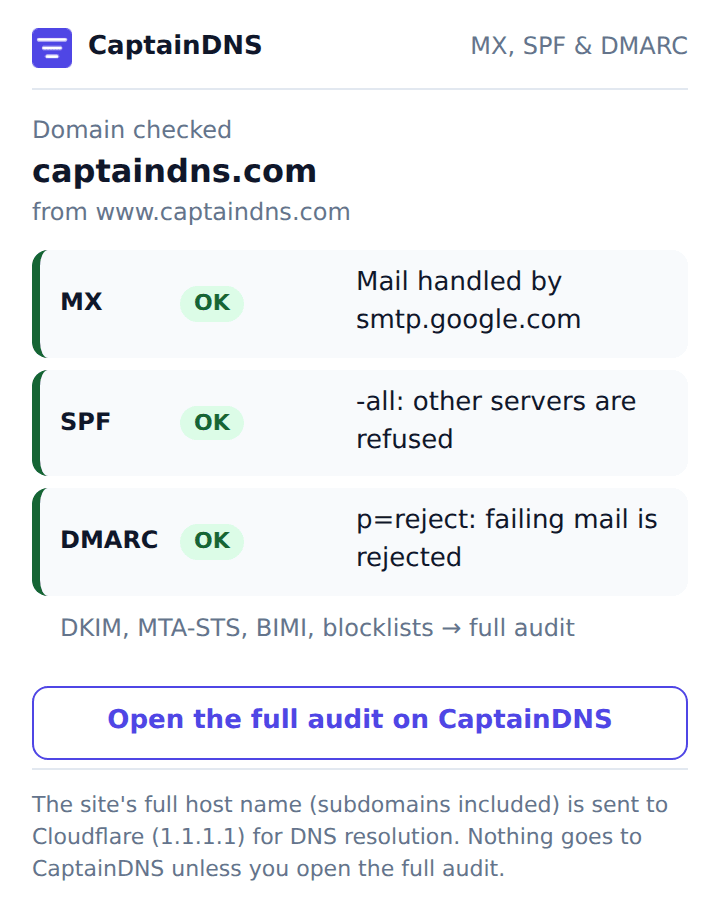
What the popup shows
The extension reads the host name of the active tab and walks up to the root domain: on www.example.com or app.example.com, it queries example.com, except in the cases described below. It then asks DNS for three records. MX tells you which servers receive mail for the domain. SPF lists the servers allowed to send on its behalf. DMARC tells mailbox providers what to do with a message that fails those checks.
Each line gets a color from fixed rules:
| Record | Green | Orange | Red | Grey |
|---|---|---|---|---|
| MX | at least one mail server | no MX published, or a Null MX mixed with other MX records | Null MX (0 .): the domain refuses all mail | |
| SPF | ~all or -all | ?all, no all, or delegation through redirect= | missing, several records, or +all | |
| DMARC | p=quarantine or p=reject | p=none | missing, several records, p= missing or unknown |
An SPF record split into several 255-character strings is joined back together before it is read, the same way mail servers do it.
What it does not check
DKIM needs a selector the popup cannot guess. MTA-STS, BIMI, blocklists and the chain of SPF include: lookups take more queries than a popup should send. The button at the bottom of the popup opens the full domain audit on CaptainDNS with the domain already filled in.
On an internal browser page (chrome://, about:), a local file, an IP address or localhost, the popup shows a message instead of results. The same goes for a domain that does not exist in public DNS (NXDOMAIN) or a resolver that cannot answer (SERVFAIL), with a button to try again.
Two known limits come from the extension not shipping the Public Suffix List, which would need an update with every release. A subdomain delegated to its own DNS zone, with its own SOA, is treated as a root domain: if app.example.com has its own zone, the popup checks app.example.com, not example.com. A site hosted under a platform domain, such as user.github.io or project.vercel.app, shows the records of the platform (github.io, vercel.app), not those of the site.
Supported browsers
The same code runs on Chrome, Microsoft Edge and Firefox 140 or later. The popup is in French or English depending on the browser language. The code is neither compiled nor minified: what gets installed can be read as is.
Privacy
The extension asks for a single permission, activeTab. It reads the address of the active tab when you click its icon, and only then. It has no background script and reads neither page content nor your browsing history.
To query DNS, it sends the site's full host name (subdomains included, for example staging.example.com) to Cloudflare's public resolver (1.1.1.1), over DNS over HTTPS on cloudflare-dns.com. The page path is never sent. As with any network request, Cloudflare also sees your IP address. Cloudflare describes its commitments for this resolver in the 1.1.1.1 resolver privacy policy, including the deletion of resolver logs within 25 hours.
Nothing goes to CaptainDNS: no telemetry, no account, nothing stored on your computer. If you click the audit button, your browser opens captaindns.com with the domain in the address, and the site privacy policy applies.
That is why the store listings declare browsing data ("Web history" in the Chrome form, "browsing activity" on Firefox): the extension does not read your history, but the full host name of the site you are on leaves the browser and goes to Cloudflare.